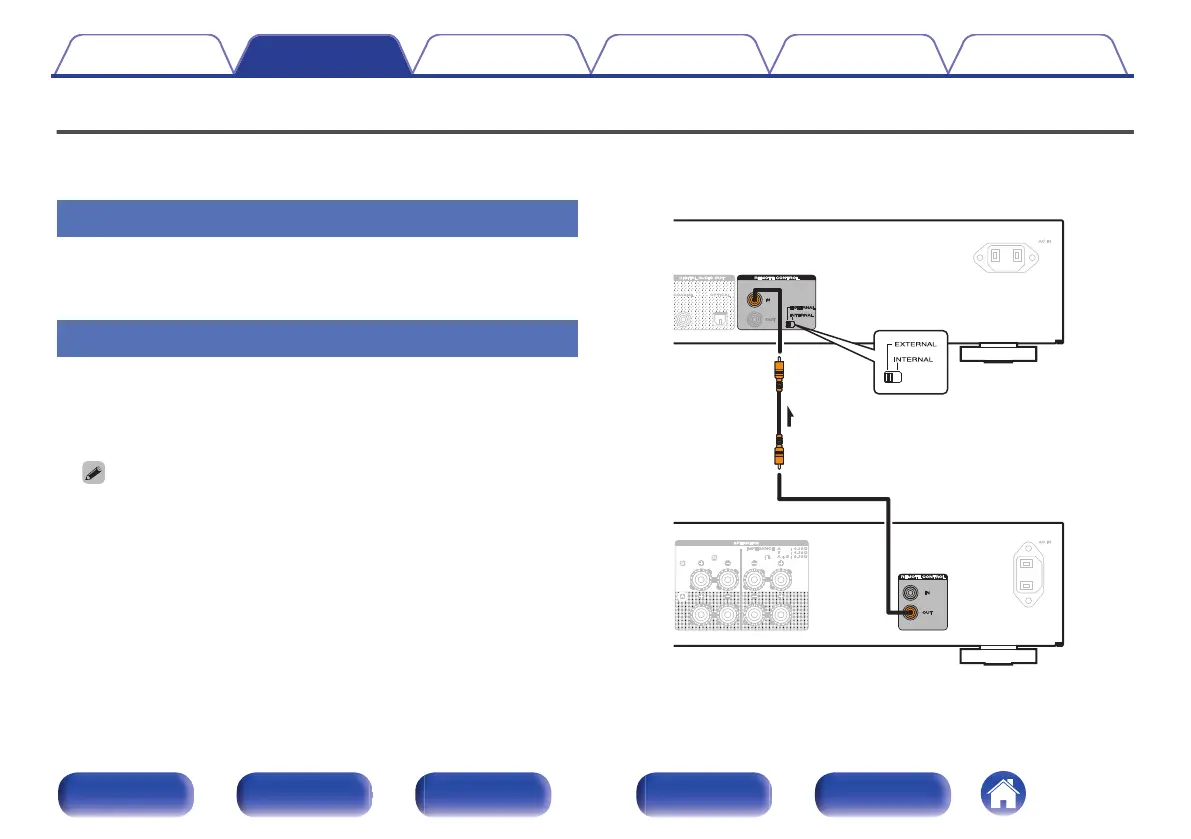
Connecting devices with remote control connectors
When you use this unit connected to a Marantz amplifier, this unit receives operation signals sent from the amplifier and operates accordingly.
Next, configure the “Connection” and “Setting”.
Connection
Use the supplied remote connector cable to connect the REMOTE
CONTROL IN connector of this unit to REMOTE CONTROL OUT
connector of the amplifier.
Setting
Turn the EXTERNAL/INTERNAL switch on the unit to “EXTERNAL”.
0
This setting will disable remote sensor reception of this unit.
0
To operate the unit, point the remote control at the remote sensor of
the amplifier.
0
To use this unit by itself without connecting an amplifier, turn the switch to
“INTERNAL”.
.
This unit
Remote
connector
cable
(supplied)
Signal flow
Amplifier
Set to
“EXTERNAL”.
Contents Connections Playback Settings Tips Appendix
22
Front panel Display Rear panel Remote Index



 To Next Page