'-../
1-3
'
11
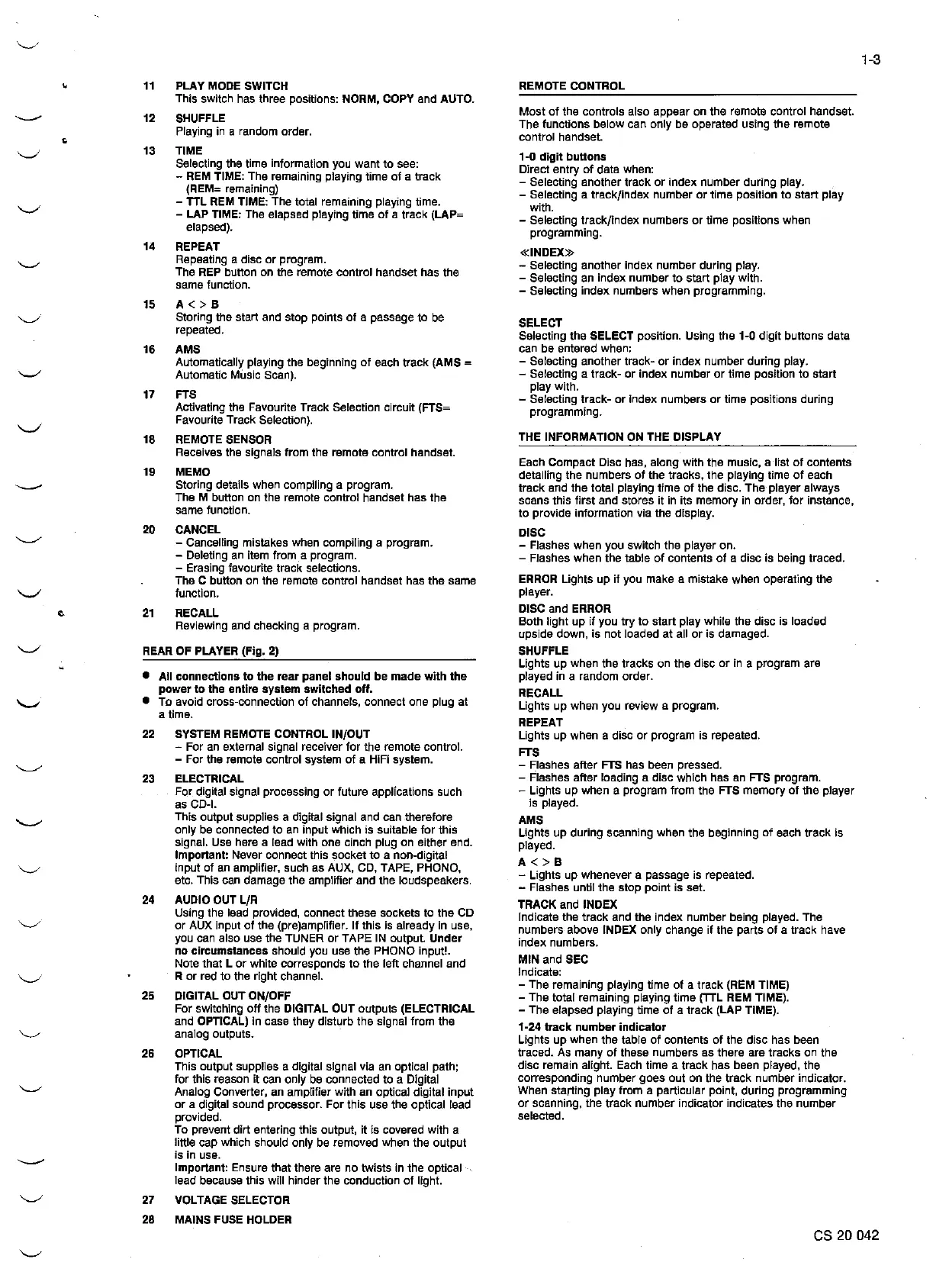
PLAY MODE SWITCH
REMOTE CONTROL
This switch
has
three positions: NORM, COPY and AUTO.
----
12
SHUFFLE
Most
of
the
controls
also
appear
on
the
remote control handset.
Playing in a random order.
The functions
below
can only
be
operated using
the
remote
•
control
handset
.
'-./
13
TIME
1-0
digit
buttons
Selecting the time information you
want
to
see:
Direct
entry
of
data when:
- REM TIME: The remaining playing time
of
a
track
- Selecting
another
track
or
index
number
during play.
(REM=
remaining)
- Selecting a
track/index
number
or
time
position to
start
play
- TTL
REM
TIME: The total remaining playing time.
with.
- LAP TIME: The elapsed playing time
of
a
track
(LAP=
- Selecting
track/index
numbers
or
time
positions
when
elapsed).
programming.
14
REPEAT
«INDEX»
Repeating a
disc
or
program.
- Selecting another index
number
during play.
The REP button on the remote
control
handset has
the
- Selecting an
index
number
to
start
play
with.
same function.
- Selecting
index
numbers
when
programming.
15
A<>B
Storing the start and
stop
points
of
a passage
to
be
SELECT
repeated.
Selecting
the
SELECT position. Using
the
1-0
digit
buttons
data
16
AMS
can
be
entered when:
Automatically playing
the
beginning
of
each
track
(AMS =
- Selecting another
track-
or
index
number
during play.
Automatic
Mllsic
Scan).
- Selecting a
track-
or
index
number
or
time position
to
start
17
FTS
play
with.
- Selecting
track-
or
Index
numbers
or
time
positions
during
Activating the Favourite Track Selection circuit (FTS=
programming.
Favourite Track Selection).
18 REMOTE SENSOR
THE INFORMATION ON THE DISPLAY
Receives the signals
from
the
remote
control
handset.
Each
Compact
Disc
has,
along
with
the
music, a list
of
contents
19 MEMO
detailing
the
numbers
of
the
tracks,
the
playing time
of
each
Storing details when compiling a program.
track
and
the
total playlng
time
of
the disc.
The
player
always
The M button on
the
remote control handset
has
the
scans thls
first
and
stores
it
In
its
memory
in order,
for
instance,
same function.
to
provide
information via
the
display.
20
CANCEL
DISC
- Cancelling mistakes when compiling a program.
- Flashes
when
you switch
the
player on.
- Deleting an item from_a program.
- Flashes
when
the
tabla
of
contents
of
a
disc
is being traced.
- Erasing favourite
track
selections.
The C button on
the
remote
control
handset has
the
same
ERROR Lights
up
if
you
make
a mistake
when
operating the
'-./
function.
player.
e
21
RECALL
DISC
and
ERROR
Reviewing and checking a program.
Both
light
up
if
you
try
to
start
play
while
the
disc
is loaded
upside down, is
not
Joaded
at
all
or
is damaged.
'-./
REAR OF PLA VER (Fig. 2)
SHUFFLE
Lights
up
when
the
tracks
on
the
disc
or
in a
program
are
•
All
connectlons
to
the
rear
panel
should
be
made
wlth
the
played in a random order.
power
to
the
entire
system
switched
off.
RECALL
'-'
•
To
avoid cross-connection
of
channels,
connect
one
plug
at
Lights
up
when you review a
program.
a time.
REPEAT
22
SYSTEM REMOTE CONTROL IN/OUT
Lights
up
when
a
disc
or
program
is repeated.
- For an external slgnal receiver
tor
the
remote control.
FTS
- For the remote control system
of
a HIFI system.
- f:lashes
after
FTS has been pressed.
23
ELECTRICAL
- Flashes
after
loading a
disc
which
has
an FTS
program.
For
digital signal processing
or
future
applfcations such
- Lights
up
when a
program
from
the
FTS
memory
of
the
player
as CD-I.
is played.
This
output
supplies a digital signal and can therefore
AMS
only be connected
to
an input which is sultable
for
this
Lights
up
during scanning when
the
beginning
of
each
track
is
signal. Use here a lead wlth
one
cinch plug on either end.
played.
Important: Never
connect
thls
socket
to
a non-digital
A<>B
input
of
an amplifier. such as AUX, CD, TAPE, PHONO,
- Lights
up
whenever
a
passage
is
repeated.
etc. This can damage
the
amplifier
and
the
loudspeakers.
- Flashes until
the
stop
point
is set.
24
AUDIO OUT
L/R
TRACK and INDEX
Using
the
lead provided, connect these sockets
to
the
CD
lndicate
the
track
and the index
number
being played. The
or
AUX input
of
the
(pre)amplifier.
lf
this is already in use,
numbers
above INDEX only change
if
the
parts
of
a
track
have
you can also use
the
TUNER
or
TAPE IN output.
Under
index
numbers.
no
circumstances
should you use
the
PHONO input!.
MIN
and SEC
Note that L
or
white
corresponds
to
the
left channel
and
R
or
red
to
the right channel.
lndicate:
- The remaining playing time
of
a
track
(REM TIME)
25
DIGITAL OUT ON/OFF
- The total remaining playing
time
(TIL
REM TIME).
For swltchlng
off
the
DIGITAL OUT
outputs
(ELECTRICAL
- The elapsed playing time
of
a
track
(LAP TIME).
and OPTICAL) in case they
disturb
the
signal
trom
the
1-24
track
number
indicator
analog outputs.
Lights
up
when
the
table
of
contents
of
the
disc
has been
26
OPTICAL
traced.
As
many
of
these
numbers
as there
are
tracks
on
the
This
output
supplies a digital signal via an optica] path;
disc
remain alight. Each time a
track
has
been played,
the
tor
this reason
it
can only be connected to a Oigital
corresponding
number
goes
out
on the
track
number
indicator.
Analog Converter, an amplifier with an optica! digital
input
When starting
play
trom
a particular point, during
programming
or
a digital sound processor.
For
this use
the
optical lead
or
scanning,
the
track
number
indicator indicates
the
number
provided.
selected.
To
prevent
dirt
entering this output,
it
is covered with a
little cap which should only
be
removed when
the
output
----
is in use.
Important: Ensure
that
there
are
no
twists
in
the
optical
lead because this will hinder
the
conduction
of
l!ght.
'-../
27
VOLTAGE SELECTOR
28 MAINS FUSE HOLDER
es 20 042


 To Next Page
 Loading...