1-2
1
2
OPERATION
mw•aaa•z
COMPAÇTCISCPLAYEHCD8"
8
•
SYSTEM
cr=1t@
A~filO
9 10
11
12
13
AEPtlT
••u•a
...,.
14 15 16
17
110-127V ~ T800mA
220-240V
~
T500mA
6 7
PA\15E
-----
ffi
18
19 20
21
•
®
.-~r="'•
®
lt
•1=c•='=~F~o;i.'.'.o'.:."~f==lDl]=~~c~•-'
~"------===============-----T(§
_
_j__(Gj)J,l~J._J
-
1
--...J
OIGITAL
OUT-
___J
22
23
24
25
26
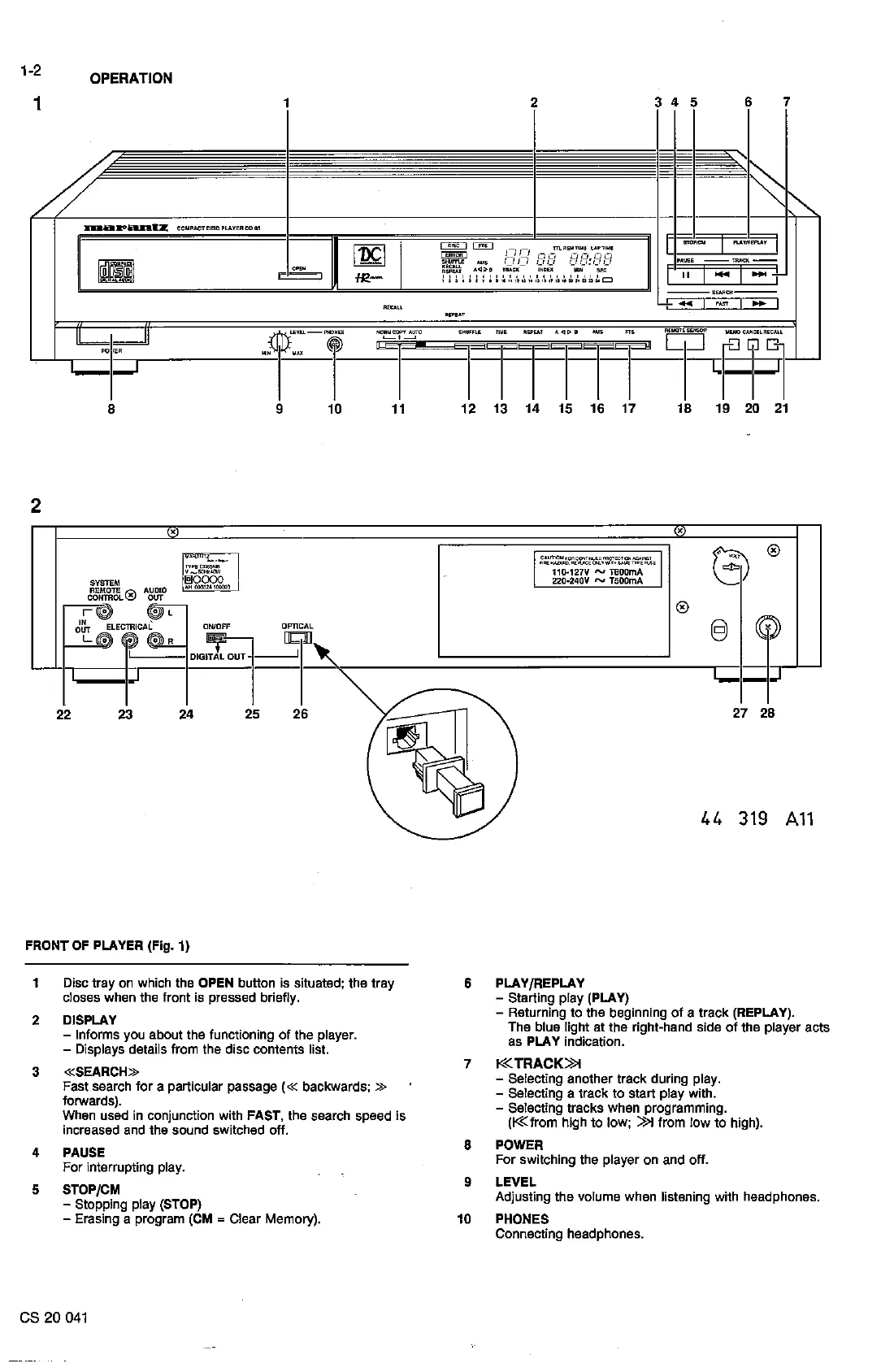
FRONT
OF
PLAYER (Fig. 1)
1
Disc
tray
on
which the
OPEN
button is situated; the tray
closes when the front is pressed briefly.
2 DISPLAY
- lnforms you about the functioning
of
the player.
- Displays details from the disc contents list.
3
«SEARCH»
Fast search for a particular passage ( « backwards; »
forwards).
yY"hen
used
in
conjunction with FAST, the search speed is
mcreased and the sound switched off.
4 PAUSE
For
interrupting play.
5 STOP/CM
- Stopping play (STOP)
- Erasing a program (CM = Clear Memory).
es 20
041
27 28
44
319
A11
6 PLAY/REPLAY
- Starting play (PLAY)
- Returning
to
the beginning
of
a
track
(REPLAY).
The blue light at
the
right-hand side
of
the player acts
as
PLAY
indication.
7 K<TRACK>>t
- Selecting another
track
during play.
- Selecting a track
to
start play with.
- Selecting tracks when programming.
(K<
!rom
high
to
low;
>>t
!rom
low
to
high).
8 POWER
For switching the player on and off.
9 LEVEL
Adjusting
the
volume when listening with headphones.
10
PHONES
Connecting headphones.
0


 To Next Page