5
ENGLISH
INSTALLATION
The numbers between parentheses refer to the fold-out.
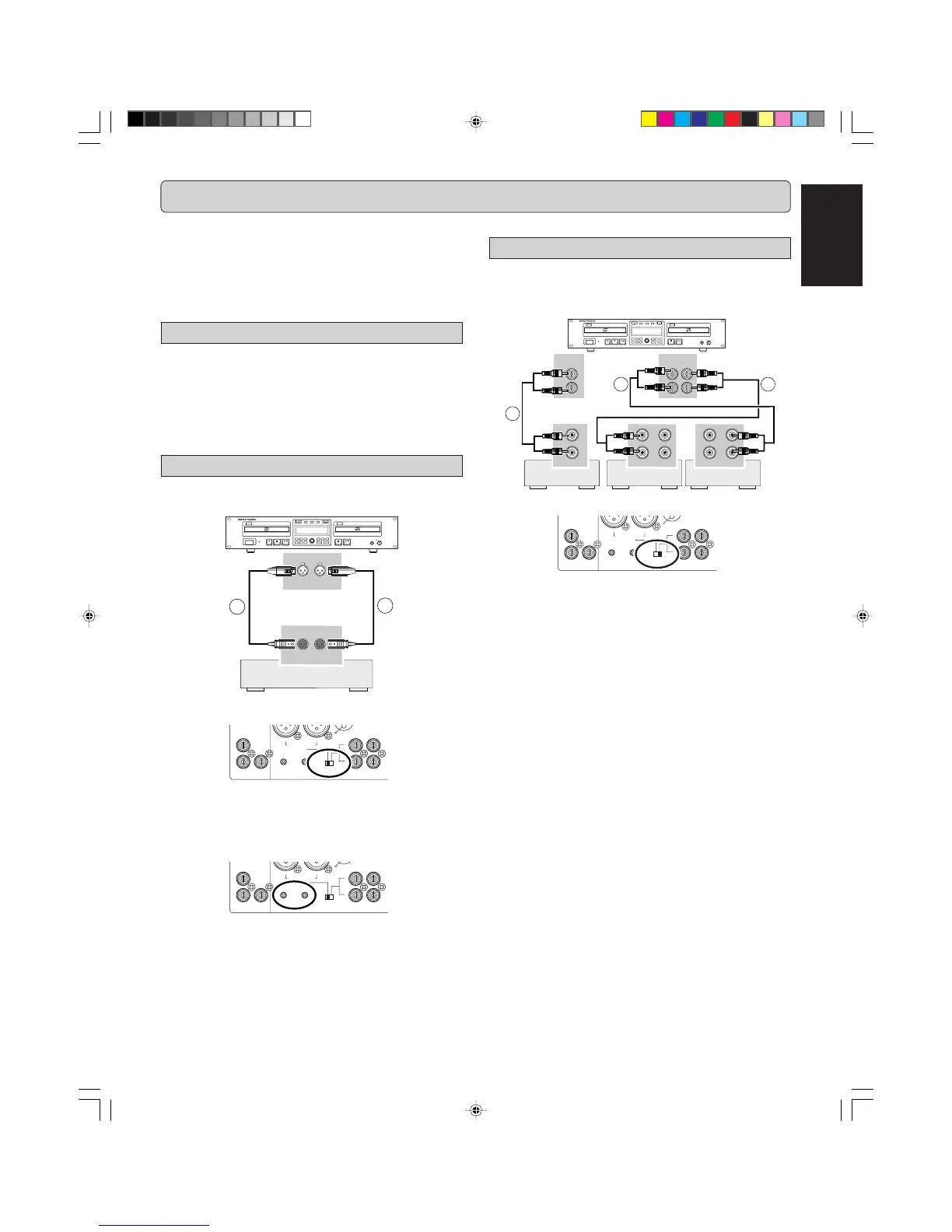
Unbalanced analog connections
1 For recording and playing, connect the CDR500 to
other equipment based on the diagram below:
Note:
- During the default playback mode (see changer Mode, page
17), the CD-Player drive will output to both the CDR and CD
analog and digital outputs.
- Never connect the CDR500 to the PHONO input on a Pre-
Amp or Receiever.
Mixer/Pre-Amp,
DAT, CD/R,etc.
Mixer/Pre-Amp,
DAT, CD/R,etc.
The CDR500 can be used to record from any digital or analog
audio source, either directly or through a mixer/pre-amplifier. In
addition, this unit can also be used as a regular CD player.
For correct connection to other audio equipement, please refer
to the operating instructions for those units.
The following options are available:
- Balanced analog connections (XLR)
- Unbalanced analog connections (RCA)
- Digital Coaxial connections
- Digital Optical connections
- Digital cascade connections
Balanced analog connections
1 For recording, connect an analog balanced cable from
the CDR500 to a source based on the diagram below:
HEADPHONE
CD RECORDER/CD PLAYER CDR500
PROG
FINAL
TEXT
LEVEL
TIME
CDPLAY MODECDR
INPUT
ERASE
MENUREC.M
POWER
IR
STANDBY
010
PUSH ENTER
REC LEVEL/SELECT
DELETE
STORE
CANCL
Recordable
ReWritable
CDR
R L
R L
BALANCED
1
2
2 Set
INPUT SELECT
switch (34) to BALANCED IN.
0 +22
IN OUT
ANALOG
0+22
L
(REF=+16dBu/0dBFS)
R -TRIM-
R
INPUT
BALANCED
L
L
R
L
COLD(-)
IN
SELECT
R
Note:
- The default (set at factory) input level is +16dBu / 0dBFS. If
you want to change the level, rotate the
TRIM
control (33) to
adjust input level for both L and R.
0 +22
IN OUT
0+22
L
(REF=+16dBu/0dBFS)
R -TRIM-
R
INPUT
BALANCED
L
L
R
L
COLD(-)
IN
SELECT
R
- Make sure that all balanced inputs do not carry phantom
power. It may damage the unit.
Mixer/Pre-Amp,
DAT, CD/R,etc.
Mixer/Pre-Amp,
DAT, CD/R,etc.
CDR500U Eng 01-14 10/11/00, 9:31 AM5



 To Next Page