11
ENGLISH
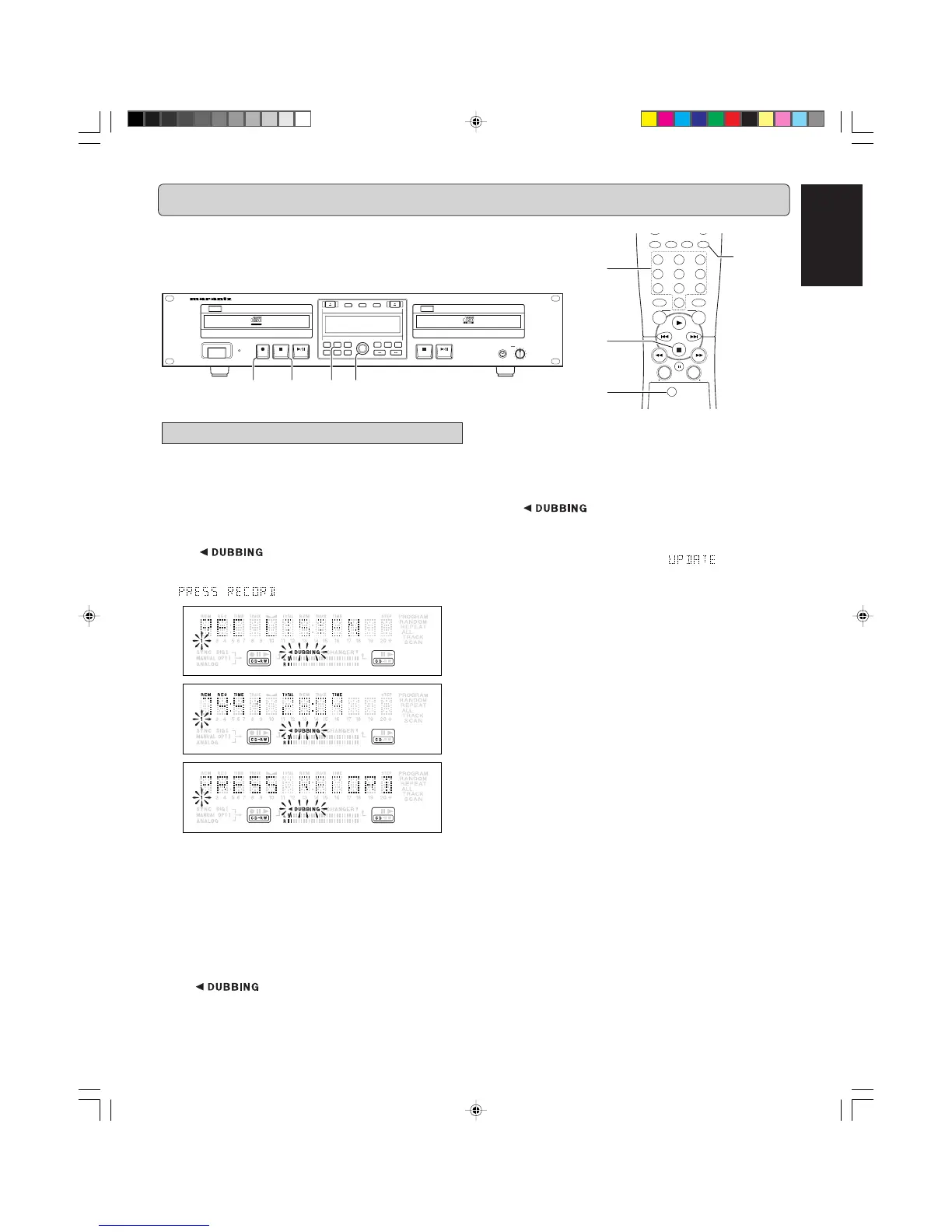
RECORDING (FROM INTERNAL CD-PLAYER)
The numbers between parentheses refer to the fold-out.
• To check the elapsed recording time, press
TIME
(14) or
DISPLAY
(77) on the remote control. This can be done dur-
ing recording.
• Recording will stop automatically.
55
55
5
To stop recording, press
99
99
9 (5, 87).
➔ goes out and recording stops.
• If 9
STOP
(5, 87) was pressed within 3 seconds after 0 (4),
no recording will take place.
• After recording, the display shows
for several sec-
onds. The Total time indications can differ slightly. However,
no music information is lost.
Note:
In this recording mode, the Pause function is not operative.
Important:
If you want to play the recorded CD-R/RW disc on any regu-
lar CD player, it must first be finalized. (See FINALIZING/
UNFINALIZING page 15.)
Finalized CD-RW discs play only on CD-RW compatible CD
players.
There is a chance that the sound will be distorted if the
recording level is set at a value that exceeds 0 dB for dig-
ital sound sources and -12dB for analog sound sources.
The factory settings at the time of shipping are 0 dB for
digital sound sources and -12dB for analog sound
sources.
Normal speed recording
Using the internal CD-Player drive.
• During the normal speed recording, you can listen to the re-
cording while you are making it.
11
11
1
Make sure that the recording disc is absolutely free of
scratches and dust particles.
22
22
2
Press
REC MODE
(10) twice.
• The
display starts blinking. After 3 seconds the
display shows the remaining CD-R/RW recording time on the left
and total time of source on the right. (every 2 seconds
is displayed) Both selection indicators are lit.
33
33
3
Press
PROG
(18 or 91) to select one or more tracks for
recording (see PROGRAMMING page 19):
- rotate the
REC LEVEL/SELECT
(13) key to the required
track number, then press
PUSH ENTER
(13).
or:
- directly select the track number via the
10-keypad
(76)
on the remote control, then press
REC LEVEL/SELECT
(13).
44
44
4
To start recording, press
00
00
0 (4).
➔
lights continuously and the selected track
or program is copied at normal speed. The recording
time left will appear.
MENU/
STORE
CANCEL/
DELETE
0
987
654
321
RANDOMPROG.REPEATSCAN
CD
CDR
ABC DEF GHI
JKL MN OPQ
RST UVW XYZ
DISPLAY
SPACE
SCROLL
FUNCTION
ENTER
HEADPHONE
CD RECORDER/CD PLAYER CDR500
PROG
FINAL
TEXT
LEVEL
TIME
CDPLAY MODECDR
INPUT
ERASE
MENUREC.M
POWER
IR
STANDBY
010
PUSH ENTER
REC LEVEL/SELECT
DELETE
STORE
CANCL
Recordable
ReWritable
w
w
r
w
werq
CDR500U Eng 01-14 10/11/00, 9:31 AM11



 To Next Page