7
ENGLISH
REMOTE CONTROL
(
RC5
)
CONNECTION
Remote control cable connections
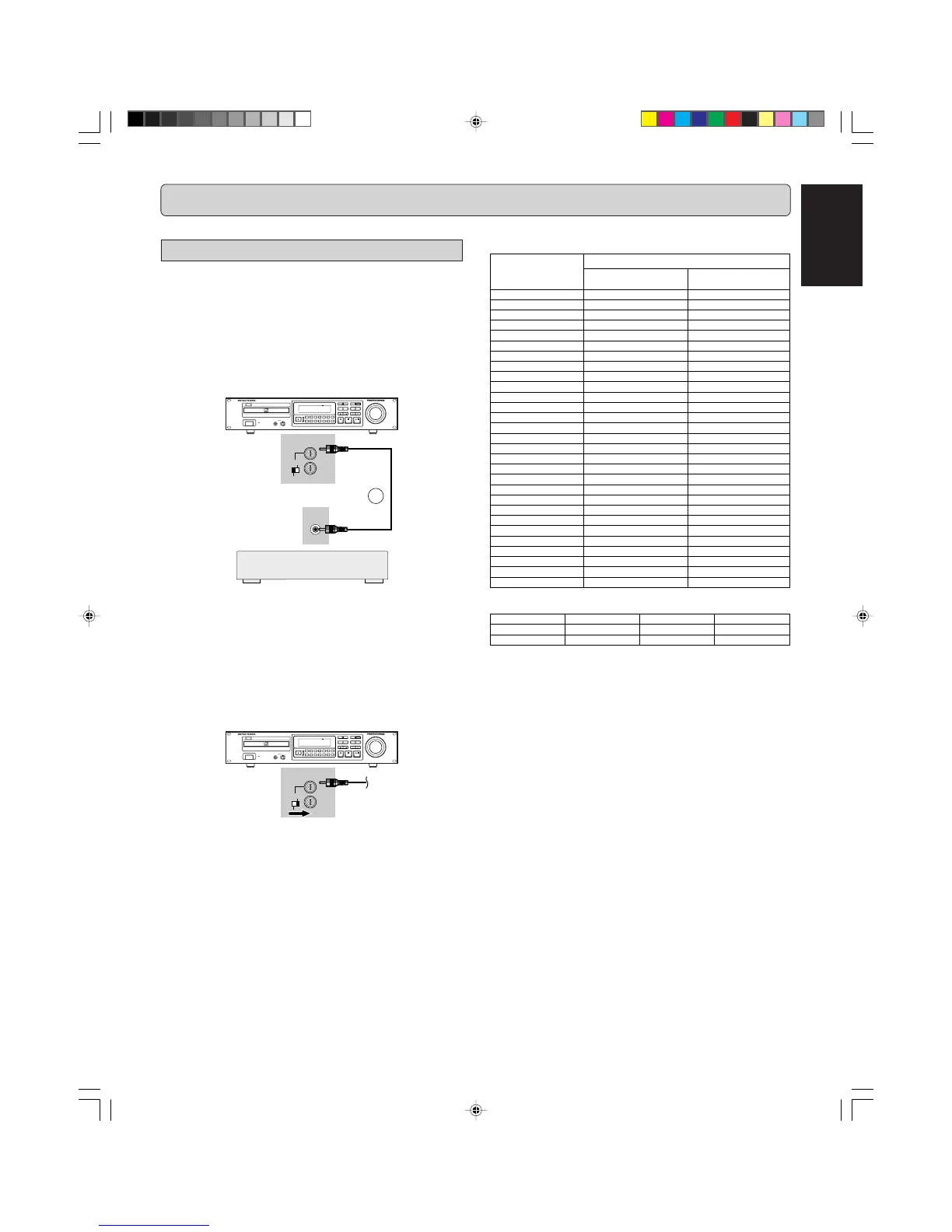
The REMOTE CONTROL (RC5) jacks on the back panel allow
an external remote control system to control the playback func-
tions of the CDR631. The control system is called RC5 and the
chart below provides the control code list. For more information
on the RC5 system and details regarding it's operation, please
contact Marantz Professional.
1. Connect a remote control cable to the CD recorder from
a control system based on the diagram below:
CD RECORDER CDR631
POWER
IR
STANDBY
Recordable
ReWritable
HEADPHONE LEVEL
010
MENU
DELETE
CANCL
TR.INCR.
REPEATRANDOM
ERASE
TEXT
0
5
9
8
7
4
3
6
12
TIME
REC MODE
STORE
FINAL
REC LEVEL/SELECT
PUSH ENTER
PROG
INPUT
INT.(IR)
EXT.
CONTROL
REMOTE
IN
OUT
RC-5
OUT
12
Notes:
- When the external remote control is not used, it is recom-
mended to leave the REMOTE CONTROL (RC5) switch in
the IR position.
- A heavily shielded single-conductor wire is recommended.
- If it is desiriable, for example in a professional studio, to dis-
able the IR receiver, set the REMOTE CONTROL (RC5)
switch to the EXT. position.
2. Set REMOTE (RC5) switch (39) to EXT.
CD RECORDER CDR631
POWER
IR
STANDBY
Recordable
ReWritable
HEADPHONE LEVEL
010
MENU
DELETE
CANCL
TR.INCR.
REPEATRANDOM
ERASE
TEXT
0
5
9
8
7
4
3
6
12
TIME
REC MODE
STORE
FINAL
REC LEVEL/SELECT
PUSH ENTER
PROG
INPUT
INT.(IR)
EXT.
CONTROL
REMOTE
IN
OUT
Remote Control Generator
The numbers between parentheses refer to the fold-out.



 To Next Page