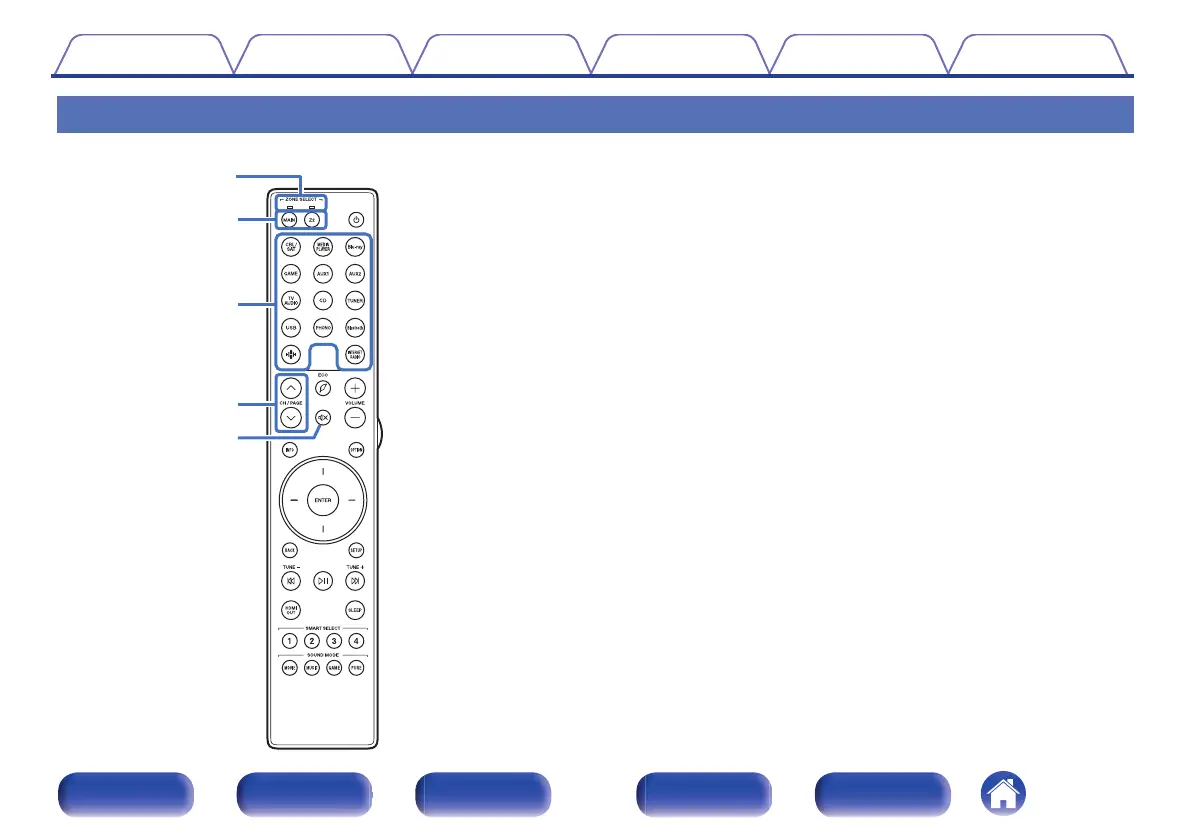
Remote control unit
A
Zone mode indicators
The indicator of the zone that you are operating lights up.
B
ZONE SELECT buttons (MAIN, Z2)
These switch the zone (MAIN ZONE, ZONE2) that is operated through
the remote control unit.
0
“Menu operations” (v p. 175)
0
“Playback in ZONE2” (v p. 168)
0
“Specifying the zone used with the remote control unit” (v p. 245)
C
Input source select buttons
These selects the input source.
0
“Selecting the input source” (v p. 74)
0
“Playback in ZONE2” (v p. 168)
D
Channel/page search buttons (CH/PAGE ml)
These select radio stations registered to presets or switch pages.
(v p. 94)
E
MUTE button (:)
This mutes the output audio.
0
“Turning off the sound temporarily (Muting)” (v p. 75)
0
“Turning off the sound temporarily (Muting) (ZONE2)” (v p. 169)
Contents
Connections Playback Settings Tips Appendix
27
Front panel Display Rear panel Remote Index



 To Next Page