o
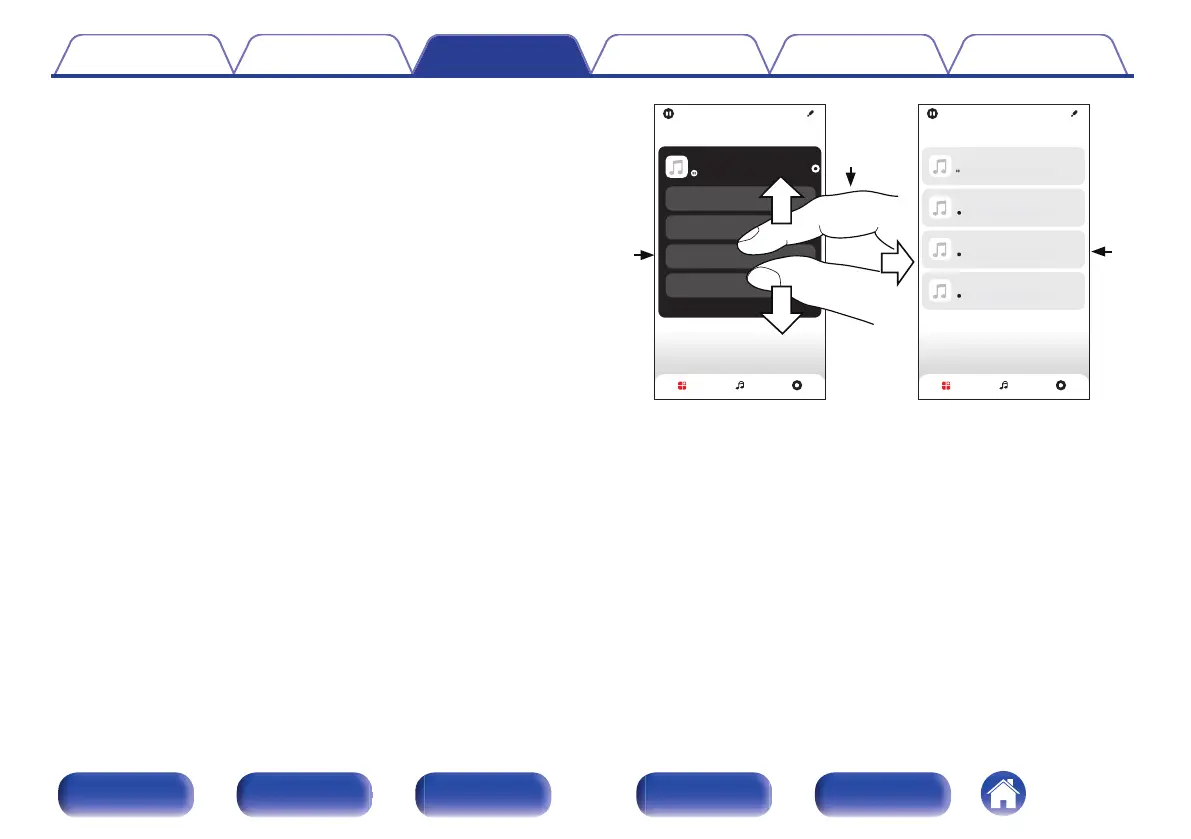
Ungrouping all rooms
You can easily ungroup all of your rooms and exit Party Mode by using
a "spread" gesture.
1
Place two fingers close together on the screen over list
of rooms.
2
Quickly spread your two fingers apart from each other
and release.
3
All of your rooms will be ungrouped.
Bedroom
Kitchen
Living
Dining
Song Name 1
Dining
Song Name 3
Kitchen
Song Name 4
Bedroom
Song Name 2
Living
Song Name 1
Dining
Rooms
Drag one room into another to group them
Rooms
Rooms Now PlayingMusic Rooms Now PlayingMusic
Drag one room into another to group them
Drag a room out of this group to ungroup it
1
2
3
Contents Connections Playback Settings Tips Appendix
107
Front panel Display Rear panel Remote Index



 To Next Page