Speaker configuration and “Amp Assign” settings
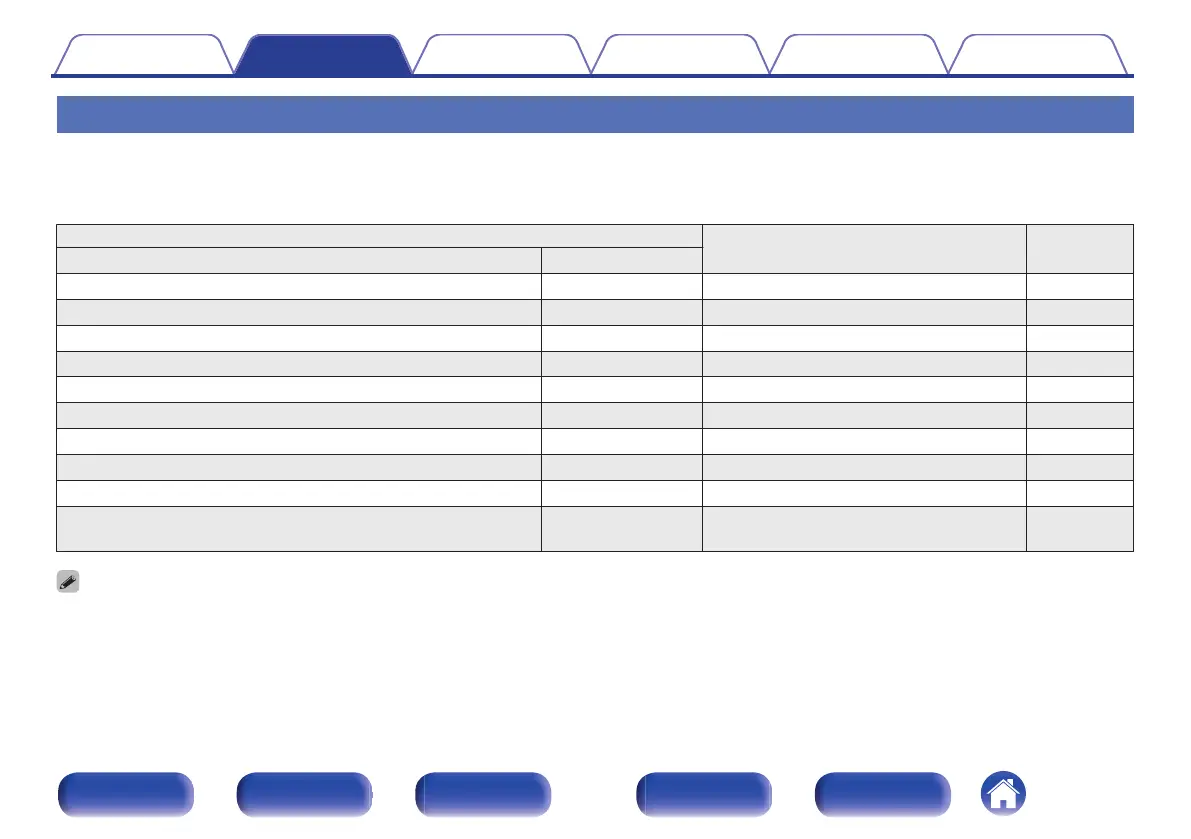
This unit has a built-in 7-channel power amplifier. In addition to the basic 5.1-channel system, a variety of speaker systems can be configured by changing
the “Speaker Layout” settings to suit the application, such as 7.1-channel systems, bi-amp connections and 2-channel systems for multi-zone playback.
(v p. 193)
Perform “Speaker Layout” settings to suit the number of rooms and speaker configuration to be installed. (v p. 193)
Playback speaker and zone
“Amp Assign” settings
Connection
page
MAIN ZONE ZONE2
5.1-channel 2-channel (Pre-out) Can be set in all “Amp Assign” settings. 42
7.1-channel (surround back) 2-channel (Pre-out) 7.1ch 43
7.1-channel (front height) 2-channel (Pre-out) 7.1ch 44
7.1-channel (top front) 2-channel (Pre-out) 7.1ch 45
7.1-channel (top middle) 2-channel (Pre-out) 7.1ch 46
7.1-channel (front Dolby Atmos Enabled speaker) 2-channel (Pre-out) 7.1ch 47
7.1-channel (surround Dolby Atmos Enabled speaker) 2-channel (Pre-out) 7.1ch 48
5.1-channel (bi-amp connection for front speaker) 2-channel (Pre-out) 5.1ch (Bi-Amp) 49
5.1-channel + second pair of front speaker 2-channel (Pre-out) 5.1ch + Front B 50
5.1-channel
2-channel
(Speaker out)
5.1ch + ZONE2 (Default) 51
0
The sound mode that can be selected varies according to the speaker configuration.
Contents Connections Playback Settings Tips Appendix
41
Front panel Display Rear panel Remote Index



 To Next Page