23
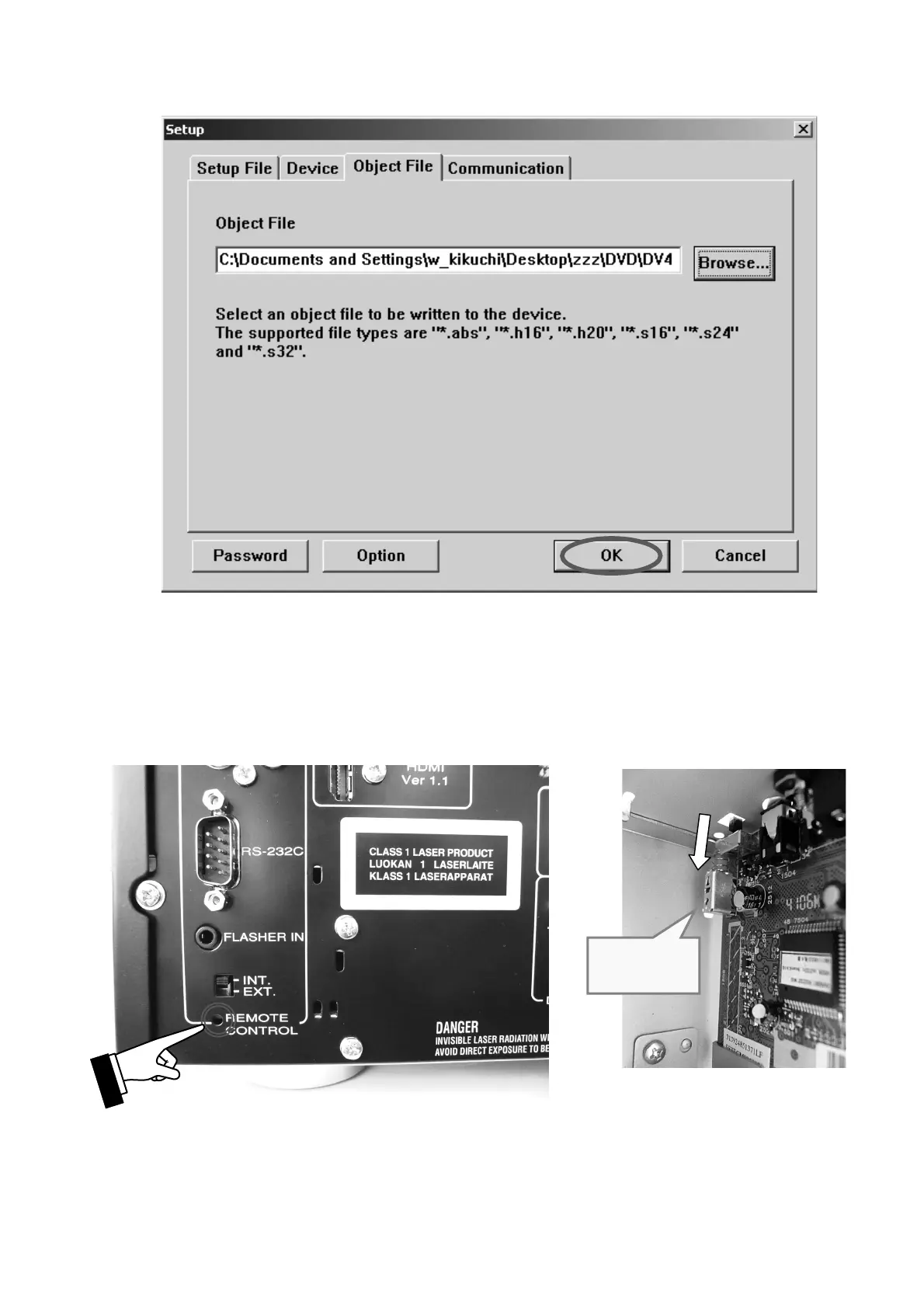
6. OKをクリックします。
7.
本機から電源コードを外します。
本機のリアパネルにあるRS-232CとWindows PCの
SerialポートをRS-232Cケーブルで接続します。
本機のリアパネルにあるEXT. INT.切替えスイッチ(
REMOTE CONTROL)下側にある穴に細い棒を差し入
れ、プッシュスイッチ(
1508)を押します。
電源コードを本機に接続します。
注意:本機はブートモードになり、このときSTANDBY
LED
は点灯しません。
6. Click the OK.
7. Disconnect the mains cord from the unit.
Connect RS-232C on the rear panel of the unit and Serial
Port of windows PC with RS-232C cable.
Insert a thin rot to the hole underside of the EXT. INT.
slide switch (REMOTE CONTROL) and push the switch
(1508) inside to turn on the switch.
Connect the mains cord into the unit.
NOTE : When the unit is into boot mode, STANDBY
LED is not lights up.
Push switch
(1508)



 To Next Page