39
ENGLISH
Getting Started Connections
Basic Operations Advanced Operations TroubleshootingExplanation termsInformationInformation Specifi cations Index
Q1
t
o
e
q
Q2
i
u
e
q
r
y
w
Q0
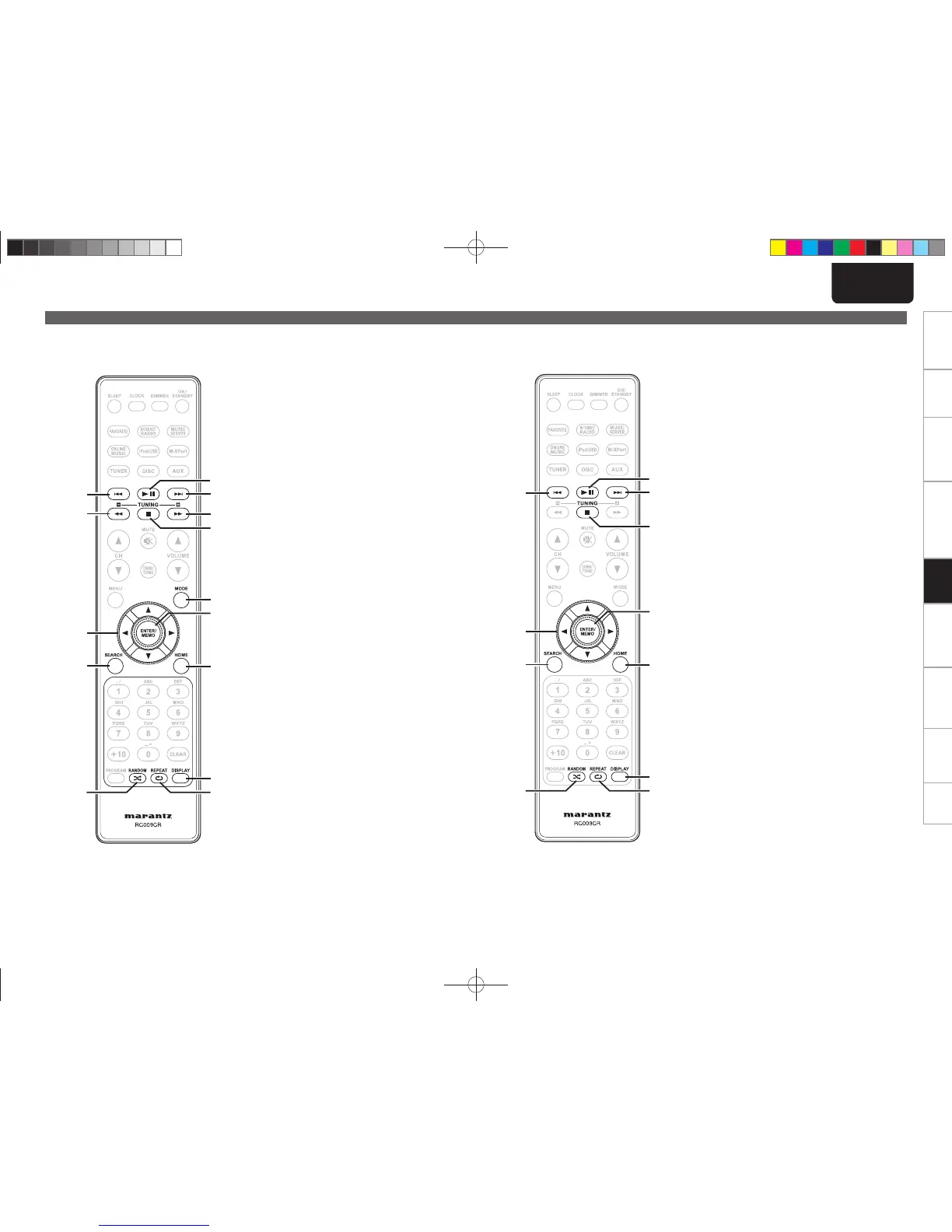
q Reverse-skip/Forward-skip buttons
(8, 9) ·················································· (19)
w Play/Pause button (1/3) ··························· (19)
e Fast-reverse/Fast-forward buttons
(6, 7) ···················································· (19)
r Stop button (2) ·········································· (19)
t MODE button ·············································· (18)
y ENTER/Memory button
(ENTER/MEMO) ·········································· (19)
u Cursor buttons (uio p) ·························· (19)
i SEARCH button ·········································· (19)
o HOME button ·············································· (19)
Q0 RANDOM button ········································ (19)
Q1 REPEAT button ··········································· (19)
Q2 DISPLAY button ·········································· (19)
n Buttons that work with iPods or USBs
The buttons listed at “Buttons that work with all input sources” can also be used.
Part names and functions
o
u
q
Q0
y
t
q
e
r
w
i
q Reverse-skip/Forward-skip buttons
(8, 9) ·················································· (21)
w Play/Pause button (1/3) ··························· (21)
e Stop button (2) ·········································· (21)
r ENTER/Memory button
(ENTER/MEMO) ·········································· (20)
t Cursor buttons (uio p) ·························· (20)
y SEARCH button ·········································· (21)
u HOME button ·············································· (21)
i RANDOM button ········································ (21)
o REPEAT button ··········································· (21)
Q0 DISPLAY button ·········································· (20)
n Buttons that work with Network
The buttons listed at “Buttons that work with all input sources” can also be used.
1.M-CR603NENG0728.indd391.M-CR603NENG0728.indd39 2010/07/2920:39:302010/07/2920:39:30




 To Next Page