11
ENGLISH
SELECTOR
INPUT
BALANCED
CD
LINE 1
DISPLAY
ATT
LINE 2
RECORDER
A
SYNC B
input
selector
power on/off
stereo
control
amplifier
sc
-
7s2
volume
Depending on your amplifier/receiver/Stereo System, there are various ways to connect to this player. For correct connection
please refer to instruction manuals of stereo system to be connected.
Caution: Do not connect output from this unit to PHONO input of your audio system.
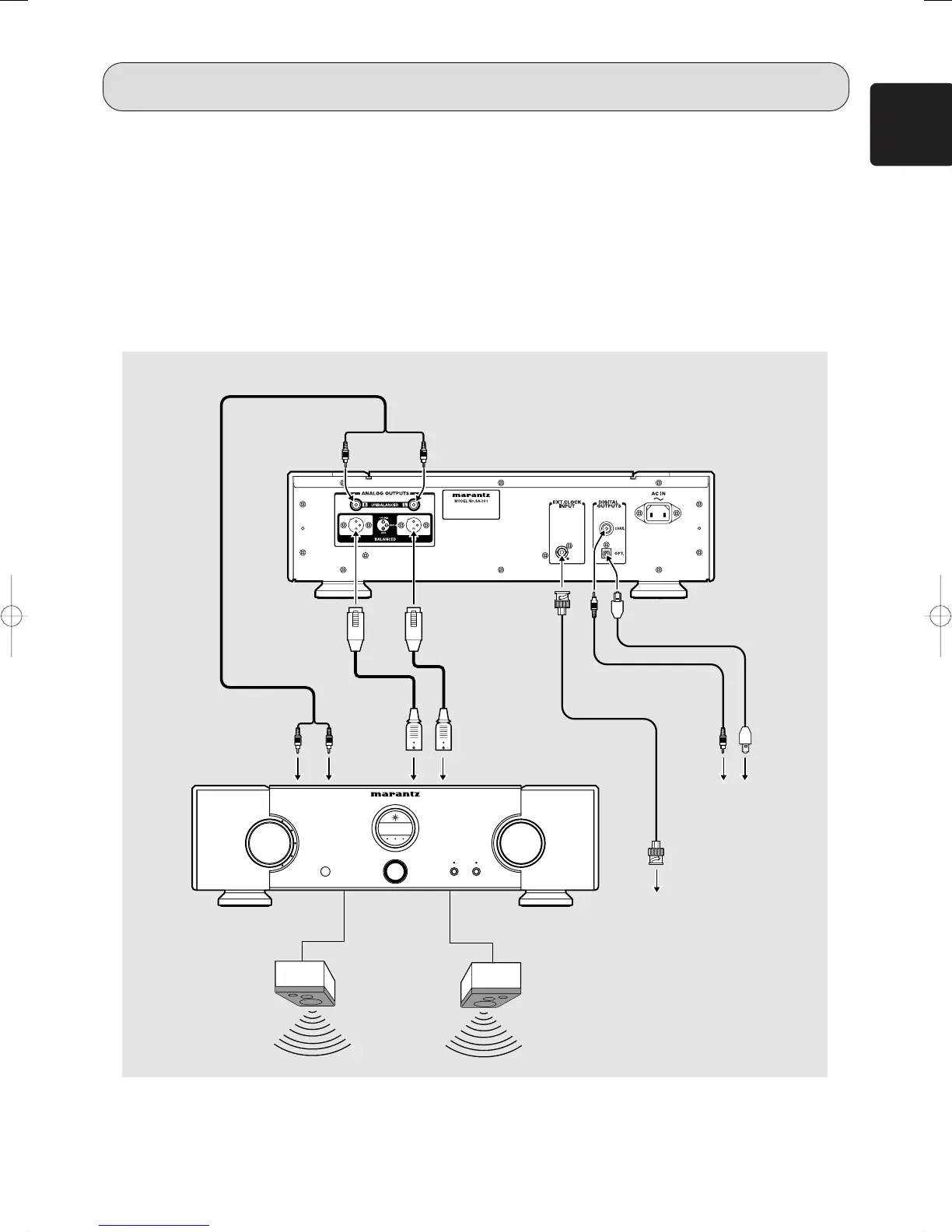
1. Connect the audio cable q to this unit’s front speaker outputs and the stereo inputs on your amplifier, receiver or stereo system.
2. Connect the optical cable w, coaxial cable e to the digital input on your AV amplifier, D/A converter, CD-R, etc..
* Signal will be output from the digital audio out jacks (OPT./COAX.) only when an Audio CD disc is played. No signal is output
when playing a Super Audio CD.
3. When connecting to an external master clock generator, use the BNC terminal coaxial cable (75Ω) r.
* Signals are output from the DIGITAL OUTPUTS connector (OPT., COAX.) only when an audio CD is being played. No signal is
output when playing a super audio CD.
To Analog Audio output
(white)
(red)
To Digital Audio
output
w
Optical cable
(Optional)
e
Coaxial cable
(Optional)
Left
speaker
Right
speaker
Audio cable q
(Supplied)
To audio input
terminals on amplifier
Connect to digital input
terminals of receiver, D/A
converter or CD recorder,
etc..
To balanced
input
terminals on
amplifier
Balanced
connection cord
(Optional)
CONNECTIONS
r
BNC terminal
coaxial cable
(75Ω)
Connect to master clock
generator
SA-7S1U01eng 06.8.29, 1:51 PMPage 11 AdobePageMaker6.5J/PPC



 To Next Page