EasyManua.ls Logo

Marantz SR-53 - Idling Current Adjustment; Voltage Conversion

Marantz SR-53
23 pages
Print Icon
To Next Page IconTo Next Page
To Previous Page IconTo Previous Page
Loading...
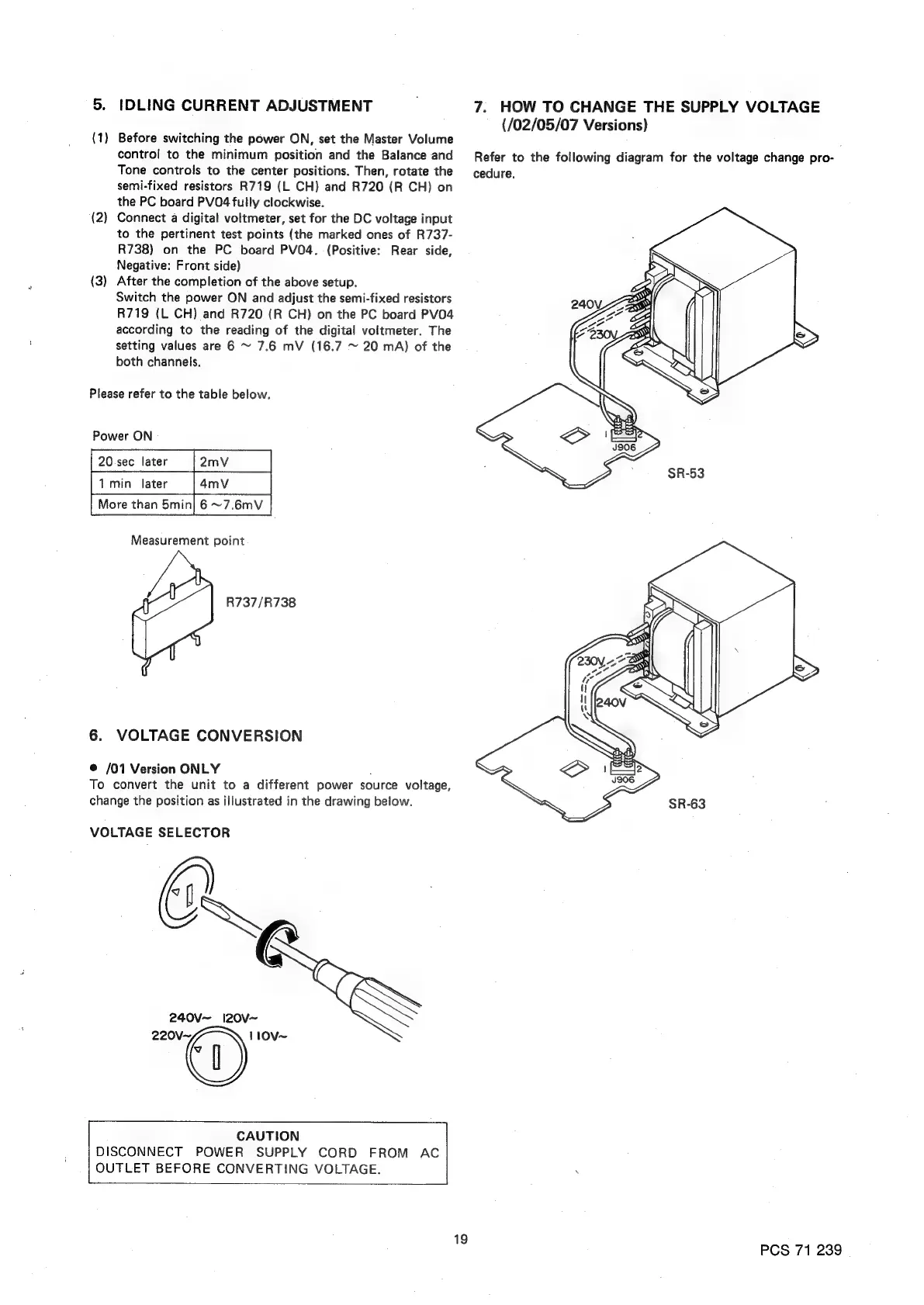
5.
IDLING
CURRENT
ADJUSTMENT
7.
HOW
TO
CHANGE
THE
SUPPLY
VOLTAGE
(/02/05/07
Versions)
(1)
Before
switching
the
power
ON,
set
the
Master
Volume
;
control
to
the
minimum
position
and
the
Balance
and
Refer
to
the
following
diagram
for
the
voltage
change
pro-
Tone
controls
to
the
center
positions.
Then,
rotate
the
cedure.
semi-fixed
resistors
R719
(L
CH)
and
R720
(R
CH)
on
the
PC
board
PV04
fully
clockwise.
(2)
Connect
a
digital
voltmeter,
set
for
the
DC
voltage
input
to
the
pertinent
test
points
(the
marked
ones
of
R737-
R738)
on
the
PC
board
PVO4.
(Positive:
Rear
side,
Negative:
Front
side)
(3)
After
the
completion
of
the
above
setup.
Switch
the
power
ON
and
adjust
the
semi-fixed
resistors
R719
(L
CH)
and
R720
(R
CH)
on
the
PC
board
PV04
according
to
the
reading
of
the
digital
voltmeter.
The
setting
values
are
6
~
7.6
mV
(16.7
~
20
mA)
of
the
both
channels.
Please
refer
to
the
table
below.
Power
ON
4mV
Ft
min
tater
[4m
Measurement
point
a
R737/R738
6.
VOLTAGE
CONVERSION
®@
/01
Version
ONLY
To
convert
the
unit
to
a
different
power
source
voltage,
change
the
position
as
illustrated
in
the
drawing
below.
VOLTAGE
SELECTOR
Vv
x
240vV~
l20V~
220V~
ap
110V~
CAUTION
DISCONNECT
POWER
SUPPLY
CORD FROM
AC
OUTLET
BEFORE
CONVERTING
VOLTAGE.
be
PCS
71
239

Related product manuals