EasyManua.ls Logo

Marantz SR480 - FRONT PANEL CONTROLS AND INDICATORS; BASIC OPERATION AND AUDIO CONTROLS; SURROUND SOUND AND MODE CONTROLS; SPECIALIZED CONTROLS AND INDICATORS

Marantz SR480
25 pages
Print Icon
To Next Page IconTo Next Page
To Previous Page IconTo Previous Page
Loading...
HSIONA
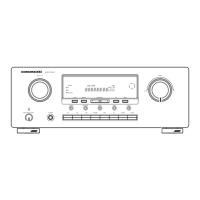
Front
panel
features
(See
page
113,
114,
115.)
@
POWER
switch
When
this
switch
is
pressed
once,
the
power
turns
ON
and
display
appear
on
the
display
panel.
When
pressed
again,
the
power
turns
OFF.
After
initialization
or
resetting,
press
this
switch
to
enter
the
stand-by
mode.
To
turn
the
power
ON,
press
any
of
the
function
buttons
of
the
main
unit
or
the
POWER
button
of
the
remote
control
unit.
@
SLEEP
TIMER
button
Press
this
button
to
set
the
receiver
to
automatically
turn
off
after
10,
20, 30,
60
or
90
minutes.
Each
time
this
button
is
pressed,
the
sleep
time
changes
as
follows.
10
—>
20
—>
30
—>
60
—>
90
—>
OFF
|
unit:
min.
|
SPEAKERS
button
Use
this
button
to
select
speaker
system
ON
or
OFF.
Please
do
not
off
when
other
main
amplifier
is
used
for
pre-out.
(SR580
only)
@
PHONES
socket
for
stereo
headphones
This
jack
is
compatible
with
a
wide
range
of
conventional
dynamic
headphone
types.
NOTE:
Change
the
surround
mode
to
STEREO
when
using
headphones.
®
Tuning/preset
UP
and
DOWN
buttons
(RECEIVER
only)
During
AM
or
FM
reception,
you
can
scan
to
other
frequencies
or
preset
number
by
pressing
these
buttons.
FM
MODE
button
(RECEIVER
only)
Press
this
button
to
select
stereo
or
mono
mode
when
listening
to
FM
broadcasts.
@
MEMORY
button
(RECEIVER
only)
Press
this
button
to
memorize
the
desired
station
frequency.
BASS
CONTROL
Adjust
the
low
frequency
level
with
this
control
according
to
your
taste
and
room
acoustics.
©
TREBLE
CONTROL
Adjust
the
high
frequency
level
with
this
control
according
to
your
taste
and
room
acoustics.
@
BALANCE
CONTROL
Adjust
the
sound
volume
between
left
and
right
front
speakers
with
this
control.
@
AUX.
audio/video
input
jacks
(FRONT)
Connect
the
audio/video
output
jacks
of
the
second
VCR
(e.g.
Camcorder)
to
thise
IN
jacks.
@
Input
selectors
These
buttons
select
the
audio
or
audio/video
source.
The
selected
source
name
will
be
displayed
on
Fluorescent
display.
Pressing
one
of
these
buttons
in
the
standby
mode
allows
to
turn
power
ON
with
the
input
function
corresponding
to
the
pressed
button.
@
INDICATOR
DISPLAY
STANDBY
indicator
This
indicator
lights
up
when
in
the
standby
mode.
AUX.
FRONT
indicator
This
indicator
lights
up
when
selected
FRONT
AUX.,
Audio
MUTE
indicator
This
indicator
lights
up
(blinking)
when
in
the
audio
mute
mode.
DISPLAY
OFF
indicator
(SR480,
PM488AV
only)
This
indicator
lights
up
when
in
the
display-off
mode.
SIMULATED
indicator
(SR480,
PM488AV
only}
This
indicator
lights
up
when
in
the
Simulate
(surround)
mode
6CH
DIRECT
indicator
(SR480,
PM488AV
only)
DIGITAL
SELECT
indicator
(SR580
only)
;
This
indicator
lights
up
when
in
the
digital
input
mode.
MID
NIGHT
Indicator
(SR580
only)
This
indicator
lights
up
when
pushed
in
the
AC-3
mode.
SUB
WOOFER
Indicator
(SR580
only)
This
indicator
lights
uo
when
SUB
WOOFER
on
mode.
(
REMOTE
SENSOR
This
receives
the
signals
from
the
remote
control
unit.
@
CENTER
MODE
button
Press
this
button
to
select
the
desired
center
mode
when
in
the
DOLBY
PRO
LOGIC
or
DOLBY
3
STEREO
mode.
Each
time
this
button
is
pressed,
the
center
mode
changes
as
follows.
+
DOLBY
PRO
LOGIC
mode:
[ee
WIDE
—>
PHANTOM
of
¢
DOLBY
3
STEREO
mode:
(ei
NORMAL
—>
WIDE
=f
The
display
panel
shows
each
mode.
@
TEST
TONE
button
Use
this
button
to
adjust
the
test
tone
volume
level
from
each
speaker.
_
When
operating
test
tone,
TEST-FL,
C,
FR
or
Ris
displayed
and
the
test
tone
is
generated
from
each
channel
in
turn
for
2
seconds.
e
When
in
DOLBY
3
STEREO
mode,
the
test
tone
is
not
generated
from
the
surround
channel.
(rear
channel)
@
DELAY
TIME
UP/DOWN
buttons
[DELAY
TIME]
When
in
the
DOLBY
PRO
LOGIC
mode,
adjust
the
delay
time
with
these
buttons
according
to
room
size
.and
acoustics.
e
Each
time
these
buttons
are
pressed,
the
delay
time
changes
as
follows.
sere
20ms
—>
25ms
30ms
I
©
20
ms
is
standard
delay
time.
[SR580
only
(AC-3mode)]
¢
Each
time
these
buttons
are
pressed,
the
delay
time
changes
as
follows
from
0
(zero)
to
15mS
cyclic
changed
CENTER
LEVEL
UP/DOWN
buttons
Use
these
buttons
to
adjust
the
sound
level
from
the
center
speaker
relative
to
that
from
the
front
speakers
only
when
in
the
normal
or
wide
mode.
REAR
LEVEL
UP/DOWN
buttons
When
these
buttons
to
adjust
the
sound
level
from
the
rear
speakers
relative
to
that
from
the
front
speakers.
@
MASTER
VOLUME
CONTROL
Adjust
the
overail
sound
volume
from
the
front,
center
and
rear
speakers
with
this
control.
@)
SURROUND
MODE
button
:
Surround
mode
changes
as
follows
whenever
as
follows
whenever
you
pushes
this
button.
SR580:
AC-3
PROLOGIC
3STEREO
THEATER
HALL
STADIUM
CHURCH
AC-3
SR480/PIM488AV:
PROLOGIC
3STEREO
THEATER
STADIUM
HALL
SIMULATE
PROLOGIC
NOTE(SR580
only)
:
AC-3
cannot
be
selected
when
the
function
is
other
that
LD,
DVD
and
AUX.
.
@
STEREO
(SURROUND
OFF)
button
When
switching
from
surround
mode
to
stereo
mode,
This
button
|
pushes.
:
®
DIGITAL
SELECT.
button
(SR580
only)
This
button
to
swich
the
digital
signal.
@
DISPLAY
OFF
button
(SR480/PM488AV
only}
You
pushes
this
button
to
turn
off
display.
@
MID
NIGHT
button
(SR580
only)
The
source
with
large
dynamic
range
is
compressed.

Other manuals for Marantz SR480

Related product manuals