EasyManua.ls Logo

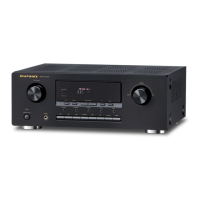
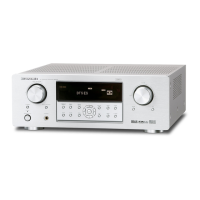
Marantz SR4320 - User Manual

Marantz SR4320
25 pages
Print Icon
To Next Page IconTo Next Page
Loading...
Model SR4320 User Guide
Receiver
R

Other manuals for Marantz SR4320

Questions and Answers

  • C
    Charles WaltonAug 20, 2025
    Why is there no sound from my Marantz SR4320 speakers?
    • R
      Rodney HuertaAug 20, 2025
      There are several reasons why you might not be getting sound from your speakers: * The speaker cables might be disconnected; check the speaker connections. * The master volume may be too low; adjust the master volume. * The mute button may be on; press the MUTE button to cancel. * The speaker switches may not be set correctly; press the speaker switch to ON. * The program source may be selected incorrectly; select the desired program source correctly. * The connections between the components may be incorrect; make connections correctly. * Headphones may be connected; disconnect the headphones as speakers will not output any sound when headphones are connected.
  • B
    Briana DominguezAug 22, 2025
    What to do if there is no sound from the speakers of my Marantz SR4320?
    • M
      Melissa FosterAug 22, 2025
      If you're not getting any sound from your Marantz Receiver speakers, start by checking all speaker connections to ensure they are properly connected. Then, make sure the master volume isn't set too low and that the mute button is not activated. Also, verify that the correct program source is selected and that the speaker switches are set to the ON position. Finally, disconnect any headphones, as they will disable the speakers.
  • B
    bobbyhillAug 25, 2025
    Why does the remote control unit of my Marantz SR4320 Receiver not operate?
    • Z
      zschultzAug 25, 2025
      If your Marantz Receiver remote control isn't working, first replace the batteries with new ones. If that doesn't solve the issue, make sure there's nothing blocking the remote sensor on the receiver.
  • L
    Lisa OlsenAug 26, 2025
    How to fix a Marantz SR4320 Receiver remote that is not working?
    • A
      Angela HuffmanAug 26, 2025
      If your remote control is not working, the batteries may be exhausted or not loaded properly; replace the batteries with new ones. Also, the remote sensor may be obstructed; remove any obstacles from in front of the remote sensor.
  • A
    Andrea MoodyAug 27, 2025
    What to do if my Marantz Receiver has no power?
    • J
      James SimpsonAug 27, 2025
      If your receiver has no power, it could be due to a disconnected AC input cord; connect the cord securely. Another possibility is a poor connection at the AC wall outlet, or the outlet is inactive; check the outlet using a lamp or another appliance.
  • J
    Justin MuellerAug 29, 2025
    Why is my Marantz Receiver not receiving radio stations?
    • R
      renee26Aug 29, 2025
      If you are not receiving any stations, it may be because no antenna is connected; connect an antenna. Alternatively, the desired station frequency may not be tuned in; tune in the desired station again.
  • D
    David ThomasAug 31, 2025
    How to improve FM/AM reception on my Marantz Receiver?
    • W
      Wesley HayesAug 31, 2025
      If FM or AM reception fails, the antenna connection may be incomplete. To resolve this, correctly connect the indoor FM and AM antennas to the FM and AM antenna terminals.
  • R
    Robert CunninghamSep 2, 2025
    Why is sound only coming from one speaker on my Marantz SR4320 Receiver?
    • O
      osmithSep 2, 2025
      If sound is only coming from one front speaker, the BALANCE control may be set to one end; adjust the BALANCE control. Also, check if one of the connection cords is disconnected; connect the right and left connection cords securely.
  • R
    richardsonangelSep 4, 2025
    How to reduce noise during AM reception on Marantz SR4320?
    • M
      Mr. Edward RamosSep 4, 2025
      If you are experiencing noise during AM reception, it could be due to interference from other electrical fields; try changing the location where the AM indoor antenna is set up. It's also possible that radio waves from the broadcasting station are weak; in this case, install an FM external antenna.
  • T
    Timothy GreeneSep 6, 2025
    Why is my Marantz SR4320 not receiving the preset station?
    • D
      Dean MaySep 6, 2025
      If you are not receiving the preset station, an incorrect station frequency may have been memorized; memorize the correct station frequency. It is also possible that the memorized stations are cleared; memorize the stations again.

Summary

Safety and Regulatory Information

General Safety Warnings

Details risks associated with electric shock, fire, moisture, and proper usage to prevent hazards.

FCC Compliance Statement

Confirms the device meets FCC Part 15 limits for Class B digital apparatus, ensuring reasonable interference protection.

Important Safety Instructions

General Operating Precautions

Emphasizes reading and retaining instructions, heeding warnings, and following basic operational guidelines.

Installation and Usage Guidelines

Provides instructions on using approved attachments, avoiding water/moisture, and proper ventilation and placement.

Electrical Safety and Grounding

Covers polarized plugs, power cord protection, grounding, and preventing electrical shock hazards.

Safety Precautions and Grounding

Servicing and Damage Handling

Guides on when to seek qualified service, handling damaged parts, and safety checks after repairs.

Antenna Grounding Diagram

Illustrates the National Electrical Code requirements for proper grounding of antenna systems.

Product Features Overview

Included Accessories List

Front Panel Controls and Functions

Power and Basic Operations

Covers turning the unit on/off, muting sound, setting the sleep timer, and connecting headphones.

Source Selection and Audio Adjustment

Explains how to select input sources, adjust balance, tone (bass/treble), and speaker systems.

Tuning, Display, and Volume

Describes radio tuning operations, display indicators, brightness control, and volume adjustment.

Rear Panel Connectivity Guide

Antenna and Ground Connections

Information on connecting FM, AM antennas, and the ground terminal for optimal reception.

Audio and Video Input;Output Jacks

Guides for connecting audio sources (PHONO, CD, TAPE, etc.) and video devices (VCR, DVD, etc.).

System Expansion and Power Interfaces

Details PRE OUT, MAIN IN, REMOTE CONTROL jacks, AC outlets, and speaker terminals for system integration.

Remote Control Unit Operations

Basic Control and Navigation

Covers power, source selection, numeric input, and common control buttons on the remote.

Tuning and Input Configuration

Details remote functions for radio tuning, input selection, speaker mode, and direct mode.

Audio Settings and Volume

Explains how to use the remote for tone adjustment (bass/treble) and volume control.

Remote Control Usage and Setup

Operational Range and Placement

Describes the optimal distance and angle for effective remote control signal transmission.

Battery Installation Procedure

Step-by-step instructions for inserting batteries into the remote control unit correctly.

Connecting Speaker Systems

Speaker Wire Preparation

Steps for stripping insulation and preparing speaker wire ends for secure terminal connection.

Banana Plug Connection Method

Guidance on how to use banana plugs for a reliable connection to speaker terminals.

Speaker Terminal Safety Precautions

Crucial warnings to prevent damage and ensure safe connection of speaker wires.

Connecting External Audio Components

Connecting Tape Decks and CD Recorders

Instructions for connecting tape decks and CD/MD recorders for audio input and output.

Connecting Turntables and CD Players

Steps for connecting analog turntables (with ground) and CD players to the receiver's inputs.

External Amplifier and Equalizer Links

How to use PRE OUT and MAIN IN jacks to connect external power amplifiers or graphic equalizers.

Connecting Video Components

VCR and Monitor Video Connections

Details on connecting VCRs for playback/recording and monitors for video output.

DVD Player and Satellite Tuner Video Links

Guides for connecting video outputs from DVD players and satellite tuners.

Video Connection Best Practices

Important notes and tips for ensuring optimal video signal connectivity.

Connecting Marantz Components Remotely

System Interconnection for Remote Control

Using REMOTE CONTROL jacks to enable control of connected Marantz devices.

Setting Remote Control External Mode

Procedure for setting the control switch on external units for compatibility.

Connecting Antenna Terminals

AM Loop Antenna Assembly

Step-by-step guide to assemble and position the AM loop antenna.

FM and AM Antenna Setup

Guidance on connecting supplied FM/AM antennas and external options.

External Antenna Connection Notes

Important considerations for connecting external FM and AM antennas safely.

Basic Operation and Playback

Performing Normal Playback

Steps for powering on, selecting an input source, and starting audio playback.

Adjusting Balance and Tone Controls

How to use the JOG MODE and MULTI-JOG knob to fine-tune sound settings.

Muting and Headphone Listening

Instructions for temporarily silencing audio output and listening via headphones.

Advanced Listening and Display Options

Multi-Source Audio;Video Sync

How to listen to a different audio source while watching a video source.

Front Panel Display Brightness

Adjusting the brightness of the receiver's front panel display.

Sleep Timer Configuration

Setting the sleep timer to automatically turn off the unit after a specified period.

Recording Operation Guide

Radio Tuning and Reception

Manual Radio Tuning

Detailed steps for manually selecting radio frequencies and modes (stereo/mono).

Automatic Radio Tuning

How to use the auto-tuning function to scan and lock onto available stations.

Frequency Direct Call Tuning

Using the remote control's keypad to directly input desired radio frequencies.

Preset Station Management

Automatic Station Presetting

Enables the receiver to automatically scan and store the strongest stations.

Recalling Saved Preset Stations

How to select and listen to previously stored radio stations.

Manual Station Preset Storage

Steps to manually store current station frequencies and reception modes.

Advanced Preset Tuning Functions

Preset Station Scanning

How to sequentially scan through stored radio stations for quick selection.

Clearing Preset Station Memory

Procedure to remove specific stations from the receiver's memory.

Naming Preset Stations

Functionality to assign alphanumeric names to preset radio channels for easy identification.

Troubleshooting Common Issues

Power, Sound, and Connection Problems

Addresses issues like no power, no sound, and incorrect speaker or component connections.

Reception and Remote Control Issues

Solutions for problems related to radio reception and the remote control unit's functionality.

Noise and Performance Troubleshooting

Guides for diagnosing and resolving audio noise and general performance anomalies.

General Malfunctions and System Reset

Handling Equipment Malfunctions

Procedures for resolving issues caused by electrostatic discharge or power line interference.

Resetting the Unit to Defaults

Steps to reset the receiver's settings, including tuner presets, to their original factory state.

Memory Backup Information

Details on the receiver's backup function for preserving memory data during power interruptions.

Technical Specifications Overview

Tuner and Audio Performance Specs

Lists specifications for FM/AM tuner sensitivity, signal-to-noise ratio, and audio output power.

General and Physical Dimensions

Includes power supply, consumption, unit dimensions (width, height, depth), and weight.

Service and Support Contact Directory

Global Service Partner Locations

Directory of companies by country providing service and support for Marantz equipment.

Marantz SR4320 Specifications

General IconGeneral
Channels5.1
Tuning rangeFM, MW
Total Harmonic Distortion0.08%
Input Sensitivity200 mV (line)
Speaker load impedance8 ohms
Video Connectionscomposite
OutputSpeaker outputs

Related product manuals