EasyManua.ls Logo

Marantz SR480 - DISPLAY AND RDS FEATURES; RECEIVER DISPLAY INDICATORS; RDS AND PTY FUNCTIONS; SYSTEM CONNECTIVITY AND CONTROL

Marantz SR480
25 pages
Print Icon
To Next Page IconTo Next Page
To Previous Page IconTo Previous Page
Loading...
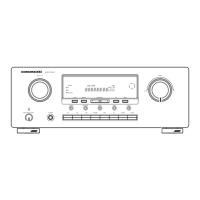
DISPLAY
(See
page
113,
114,
115.)
@
FREQUENCY/CHARACTER
DISPLAY
This
displays
the
selected
station
frequency
or
the
corresponding
words
when
selecting
a
program
source
or
a
sound
field
mode
or
operating
test
tone.
PRESET
NUMBER,
SLEEP
TIME,
DELAY
TIME,
EFFECT
and
REAR
or
CENTER
LEVEL
DISPLAY
This
displays
the
selected
preset
number,
the
sleep
time,
the
delay
time,
the
effect,
the
center
and
the
rear
level
when
operating
the
surround
mode.
©
AUTO
INDICATOR
This
indicator
lights
up
when
operating
auto
tuning.
When
in
manual
tuning
mode,
it
goes
off.
STEREO
INDICATOR
This
indicator
lights
up
when
in
FM
stereo
mode.
©
TUNED
INDICATOR
This
indicator
lights
up
when
a
broadcast
is
received
properly.
@
MEMORY
INDICATOR
When
the
MEMORY
button
is
pressed,
this
indicator
lights
up
for
about
5
seconds.
DOLBY
surround
and
other
surround
INDICATOR
This
indicator
lights
up
when
the
DOLBY
surround
or
other
surround
mode
is
selected.
RDS
INDICATOR
This
indicator
lights
up
when
RDS
broadcast
is
Received.
RDS
FUNCTIONS
(Europe
version
only)
DISPLAY
key
Each
press
of
this
key
changes
the
display
contents
as
shown
below.
EREQUENCY
>
STATION
NAME
>
PROGRAM
NAME
>
TIME(CLOCK)
TEXT
-
FREQUENCY
However,
the
above
is
not
displayed
when
there
is
no
RDS
data
with
the
station
being
received.
SEARCH
key
This
key
is
used
to
search
a
station
broadcasting
RDS,
TP
or
PTY
data
by
scanning.
Press
the
DISPLAY
key
then
press
the
SEARCH
key.
Now
“RDS”
is
displayed.
Each
further
press
of
the
SEARCH
key
changes
the
display
as
shown
below.
RDS
-+
TP
+
PTY
4
FREQUENCY
When
the
desired
item
is
displayed,
press
the
TUNING
UP
or
DOWN
key
to
start
scanning.
:
PTY
SELECT
key
When
“PTY”
is
selected
with
the
SEARCH
key,
select
the
desired
programme
type
by
pressing
the
PTY
SELECT
key.
When
the
desired
programme
type
is
displayed,
press
the
TUNING
UP
or
DOWN
key
to
start
scanning.
_
One
of
the
following
programme
types
can
be
selected:
POP
Popular
music
ROCK
Rock
music
MOR
Middle
of
the
road
music,
“easy-listening”
LIGHT
Light
classic
music
CLASSIC
Serious
classical
music
NEWS
-_
News
service
AFFAIR
Politics
and
current
events
INFO
Spatial
informative
reports
SPORT
Sports
EDUCATE
Learning
and
continuation
of
education
DRAMA
Radio
plays,
literature
CULTURE
Learning
and
continuation
of
education
SCIENCE
Programmers
about
science
and
technology
OTHER’
Other
music
WEATHER
Weather
reports,
forecasts
FINANCE
Financial
reports,
commerce,
trading
CHILDREN
Children’s
programmes
SOCIALA
Social
affairs
RELIGION
Religious
programmes
PHONEIN
Programmes
in
which
the
public
expresses
its
view
by
phone
Travel
reports
Programmes
concerning
recreational
activities
TRAVEL
HOBBIES
JAZZ
Jazz
music
COUNTRY
Country
music
NATION
M
National
music
OLDIES
Music
from
the
so-called
‘golden
age’
of
popular
music
FOLK
M
Folk
music
DOCUMENT
Documentaries
Remote
control
bus
connections
This
unit
is
equipped
with
a
remote
control
function.
By
connecting
this
unit's
remote
control
jacks
to
a
Marantz
CD
player
or
tape
deck
equipped
with
remote
contro!
(D-BUS)
jacks,
it
allows
system
remote
contro!
operation.
Connect
the
REMOTE
CONT.
OUT
jack
of
unit
to
REMOTE
CONT.
IN
of
other
Marantz
equipment,
i.e.
CD
player
or
Cassette
deck,
by
using
an
RCA
pin
cable.
The
connection
sequence
between
components
is
not
important.
Note:
If
a
component
equipped
with
remote
contro!
(D-BUS)
jacks
has
an
:
INT/EXT
switch
on
the
rear
panel,
set
the
switch
to
EXT
when
using
is
the
system
control
function.
(Connection
example)
CD
PLAYER
REAR
PANEL
RECEIVER/AMPLIFIER
TAPE
DECK
REAR
PANEL
REAR
PANEL
REMOTE
CONTROL
PRE
OUT
jacks
The
RECEIVER/AMPLIFIER
is
equipped
with
PRE
OUT
jacks.
Use
these
jacks
to
connect
to
external
power
amplifiers.
:
MAIN
IN
or
AUX
IN
FRONT
CENTER
~
REAR

Other manuals for Marantz SR480

Related product manuals