EasyManua.ls Logo

Marantz SR490 - Remote Control Operation

Marantz SR490
41 pages
Print Icon
To Next Page IconTo Next Page
To Previous Page IconTo Previous Page
Loading...
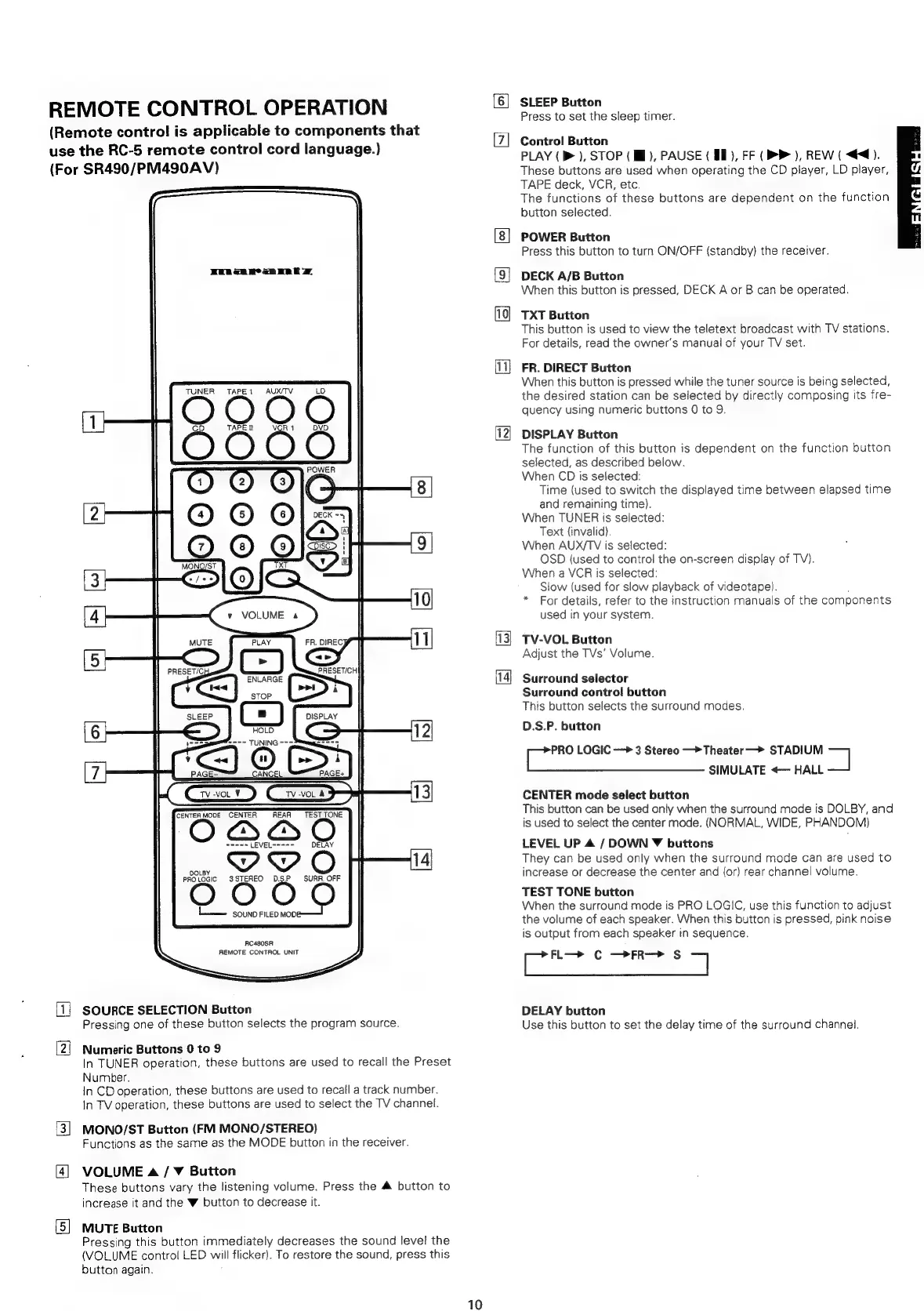
REMOTE
CONTROL
OPERATION
(Remote
control
is
applicable
to
components
that
use
the
RC-5
remote
control
cord
language.)
(For
SR490/PM490AV)
RuRen
wean
eR
EZ
TUNER
TAPE1
AUX/TV
LD
O
4
>
ae
im
i
<,
DD
O
CD
O
POWER
1
2
3
8
©
©
Ol
=
7
©
ps
|
9
MONO/ST
XT
UF,
B
+-Slo
10
(4
|
y
VOLUME
4
MUTE
fe)
FR.
DIREC,
11
[5]
PRESET/C
PRESET/CH
ENLARGE
eae
STOP
Ss
SLEEP
CC)
DISPLAY
6
HOLD
12
==
R---
TUNING
-->Smme
7
7
SJ
G
CEL
(>:
moe
iB
CENTER
MODE
CENTER
REAR
TEST
TONE
OBSQD
YOO
14
AC480SR
REMOTE
CONTROL
UNIT
(=
SOURCE
SELECTION
Button
Pressing
one
of
these
button
selects
the
program
source.
[2!
Numeric
Buttons
0
to
9
In
TUNER
operation,
these
buttons
are
used
to
recall
the
Preset
Number.
In
CD
operation,
these
buttons
are
used
to
recail
a
track
number.
In
TV
operation,
these
buttons
are
used
to
select
the
TV
channel.
3}
MONO/ST
Button
(FM
MONO/STEREO)
Functions
as
the
same
as
the
MODE
button
in
the
receiver.
4]
VOLUME
a
/
¥
Button
These
buttons
vary
the
listening
volume.
Press
the
&
button
to
increase
it
and
the
W
button
to
decrease
it.
[5]
MUTE
Button
Pressing
this
button
immediately
decreases
the
sound
level
the
(VOLUME
control
LED
all
flicker).
To
restore
the
sound,
press
this
button
again.
10
bd
SLEEP
Button
Press
to
set
the
sleep
timer.
Control
Button
PLAY
(b>),
STOP
(MB),
PAUSE
(
8D),
FF
(
BP
),
REW
(
<4).
These
buttons
are
used
when
operating
the
CD
player,
LD
player,
TAPE
deck,
VCR,
etc.
The
functions
of
these
buttons
are
dependent
on
the
function
button
selected.
POWER
Button
Press
this
button
to
turn
ON/OFF
(standby)
the
receiver.
DECK
A/B
Button
When
this
button
is
pressed,
DECK
A
or
B
can
be
operated.
TXT
Button
This
button
is
used
to
view
the
teletext
broadcast
with
TV
stations.
For
details,
read
the
owner's
manual
of
your
TV
set.
FR.
DIRECT
Button
When
this
button
is
pressed
while
the
tuner
source
is
being
selected,
the
desired
station
can
be
selected
by
directly
composing
its
fre-
quency
using
numeric
buttons
0
to
9.
DISPLAY
Button
The
function
of
this
button
is
dependent
on
the
function
button
selected,
as
described
below.
When
CD
is
selected:
Time
(used
to
switch
the
displayed
time
between
elapsed
time
and
remaining
time).
When
TUNER
is
selected:
Text
(invalid).
When
AUX/TV
is
selected:
OSD
(used
to
contro!
the
on-screen
display
of
TV).
When
a
VCR
is
selected:
Siow
(used
for
slow
playback
of
videotape).
*
For
details,
refer
to
the
instruction
manuals
of
the
components
used
in
your
system.
TV-VOL
Button
Adjust
the
TVs’
Volume.
Surround
selector
Surround
control
button
This
button
selects
the
surround
modes.
D.S.P.
button
ees
LOGIC
—»
3
Stereo
—>Theater
—>
STADIUM
=
SIMULATE
«—
HALL
CENTER
mode
select
button
This
button
can
be
used
only
when
the
surround
mode
is
DOLBY,
and
is
used
to
select
the
center
mode.
(NORMAL,
WIDE,
PHANDOM)
LEVEL
UP
A
/
DOWN
¥Y
buttons
They
can
be
used
only
when
the
surround
mode
can
are
used
to
increase
or
decrease
the
center
and
(or)
rear
channel
volume.
TEST
TONE
button
When
the
surround
mode
is
PRO
LOGIC,
use
this
function
to
adjust
the
volume
of
each
speaker.
When
this
button
is
pressed,
pink
noise
is
output
from
each
speaker
in
sequence.
foe
Cc
—>FR—>
S
7
DELAY
button
Use
this
button
to
set
the
delay
time
of
the
surround
channel.

Related product manuals