EasyManua.ls Logo

Marantz SR490 - Learning Method

Marantz SR490
41 pages
Print Icon
To Next Page IconTo Next Page
To Previous Page IconTo Previous Page
Loading...
(SR590
Only)
LEARNING
METHOD
This
remote
control
unit
(RC580SR)
can
learn,
or
program
in
itself,
the
remote
control
code
of
any
function
preset
under
any
button
of
the
remote
control
unit
of
any
system
component,
except
for
the
MAIN
POWER
switch
of
the
SR590.
The
functions
of
the
components
that
can
be
controlled
through
the
D-BUS
(RC-5)
need
not
be
learned,
but
the
functions
of
other
components
must
be
learned
before
they
can
be
controlled
from
the
RC580SR
remote
control
unit.
To
let
the
RC580SR
learn
the
remote
control
code
of
a
function
of
a
component,
foliow
the
learning
procedure
described
below.
1.
Set
the
mode
switch
to
LEARN.
2.
Select
the
component
with
the
codes
to
be
learned,
by
pressing
one
of
he
input
selector
buttons.
For
example,
when
the
CD
button
is
pressed,
most
of
the
buttons
on
the
remote
handset
get
ready
to
learn
the
CD
control
codes.
3.
On
the
RC580SR,
press
the
button
corresponding
to
the
function
to
be
earned.
For
example,
if
the
function
to
be
learned
is
playback,
press
the
PLAY
(
)
button
on
the
remote
control
unit.
The
Learn
indicator
will
ight
up.
4.
Place
the
remote
control
unit
of
the
component
with
the
function
to
be
earned
at
a
distance
of
about
20
cm
(8
inches)
from
the
RC580SR,
so
hat
the
head
(transmitting
side)
of
the
former
remote
control
unit
points
the
head
of
the
RCS80SR.
5.
On
the
remote
control
unit
of
the
component,
press
and
hold
the
button
of
the
function
to
be
learned,
until
the
learning
indicator
of
the
RC580SR
starts
to
blink
then
goes
off.
The
learning
operation
is
complete
when
the
indicator
is
extinguished.
6.
Set
the
mode
switch
to
USER.
7.
Let
the
RC580SR
learn
other
codes
by
repeating
the
steps
above
for
each
code.
Note:
When
the
system
mode
switch
is
in
the
USER
position,
the
buttons
which
have
not
learned
any
function
output
the
D-BUS
(RC-5)
codes
when
they
are
pressed.
In
the
RC-5
(D-BUS)
position,
ali
buttons
output
the
D-BUS
(RC-5)
codes.
RECALLING
THE
PRESET
FUNCTION
Even
after
a
button
has
learned
the
remote
contro!
code
of
a
function,
its
originally
preset,
D-BUS
(RC-5)
code
can
be
recalled
any
time
by
following
the
procedure
below.
1.
Set
the
mode
switch
to
LEARN.
2.
Press
the
MAIN
POWER
OFF
button
and
the
button
which
has
learned
a
function
simultaneously.
3.
Set
the
mode
switch
to
USER.
Learning
button
indications
Although
the
learning
buttons
can
be
used
to
operate
various
components,
the
indications
printed
above
the
buttons
are
Marantz
D-BUS
(RC-5)
preset
code
indications.
To
make
it
easier
to
remember
which
buttons
perform
which
operations,
therefore,
we
recommend
that
you
program
operations
into
buttons
having
the
same
or
similar
indications.
There
are
some
situations
where
programming
is
not
possible.
In
the
following
instances,
both
the
TX
and
LEARN
LEDs
blink
to
indicate
that
programming
cannot
be
carried
out.
1.
When
the
remote
contro!
unit's
memory
is
full.
2.
When
you
attempt
to
program
a
command
from
a
remote
contro!
unit
using
a
different
signal
transmission
format.
CLEARING
ALL
OF
THE
LEARNED
CODES
Use
the
following
procedure
to
reset
all
of
the
buttons
which
have
learned
remote
control
codes
and
make
them
possible
to
output
RC-5
preset
codes.
1.
Set
the
mode
switch
to
LEARN.
2.
Hold
down
the
main
POWER
ON
and
OFF
buttons
simultaneously
for
more
than
3
seconds.
3.
Set
the
mode
switch
to
USER.
19?
Operation
of
Remote
Control
(for
SR490/PM490AV)
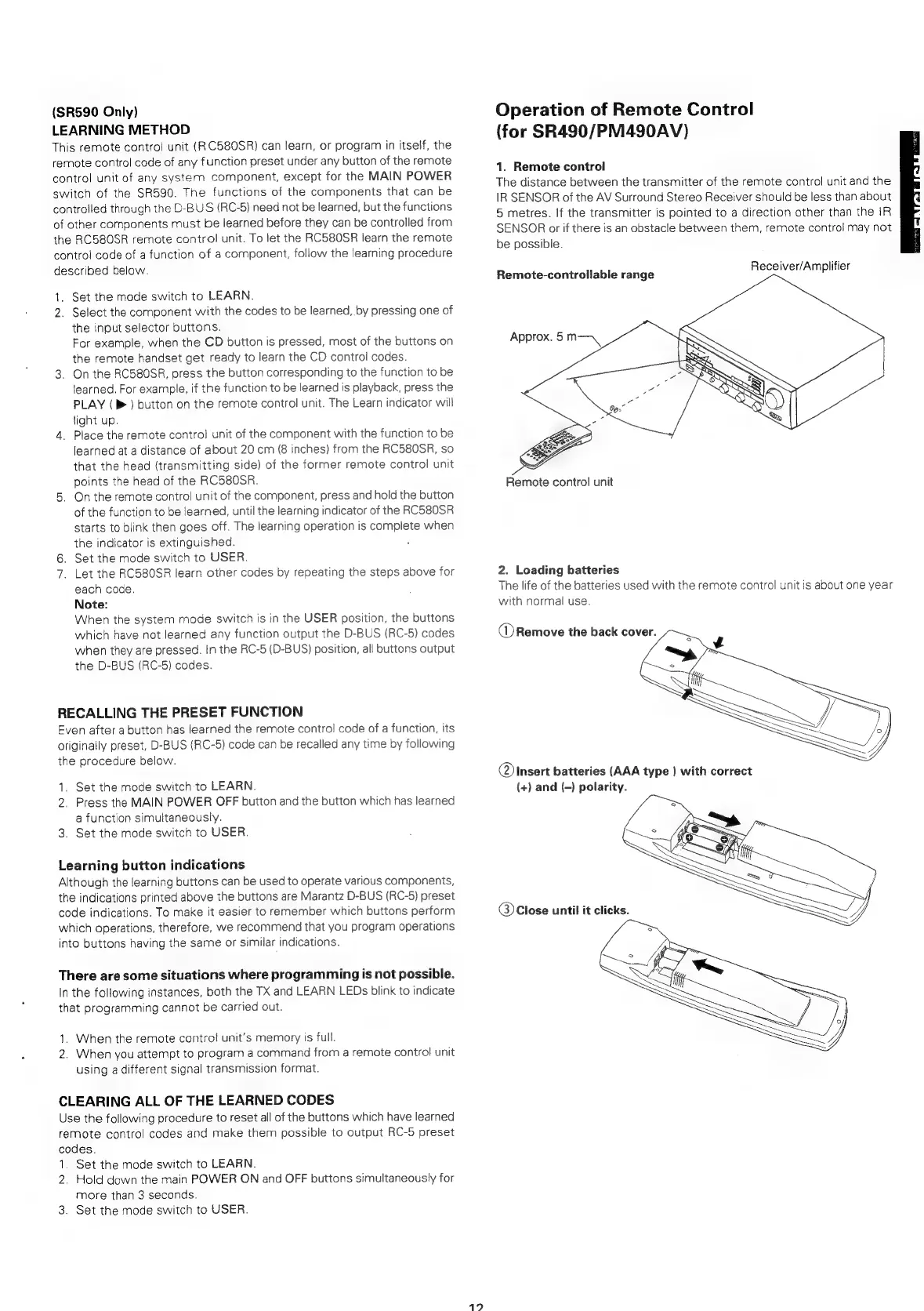
1.
Remote
control
The
distance
between
the
transmitter
of
the
remote
control
unit
and the
IR
SENSOR
of
the
AV
Surround
Stereo
Receiver
should
be
less
than
about
5
metres.
If
the
transmitter
is
pointed
to
a
direction
other
than
the
iR
SENSOR
or
if
there
is
an
obstacle
between
them,
remote
control
may
not
be
possible.
Receiver/Amplifier
Remote-controllable
range
Approx.
5
m—
Remote
control
unit
2.
Loading
batteries
The
life
of
the
batteries
used
with
the
remote
control
unit
is
about
one
year
with
normal
use.
@
Remove
the
back
cover.
@
Insert
batteries
(AAA
type
)
with
correct
(+)
and
(-)
polarity.
@)
Close
until
it
clicks.

Related product manuals