EasyManua.ls Logo

Marantz SR490 - Page 15

Marantz SR490
41 pages
Print Icon
To Next Page IconTo Next Page
To Previous Page IconTo Previous Page
Loading...
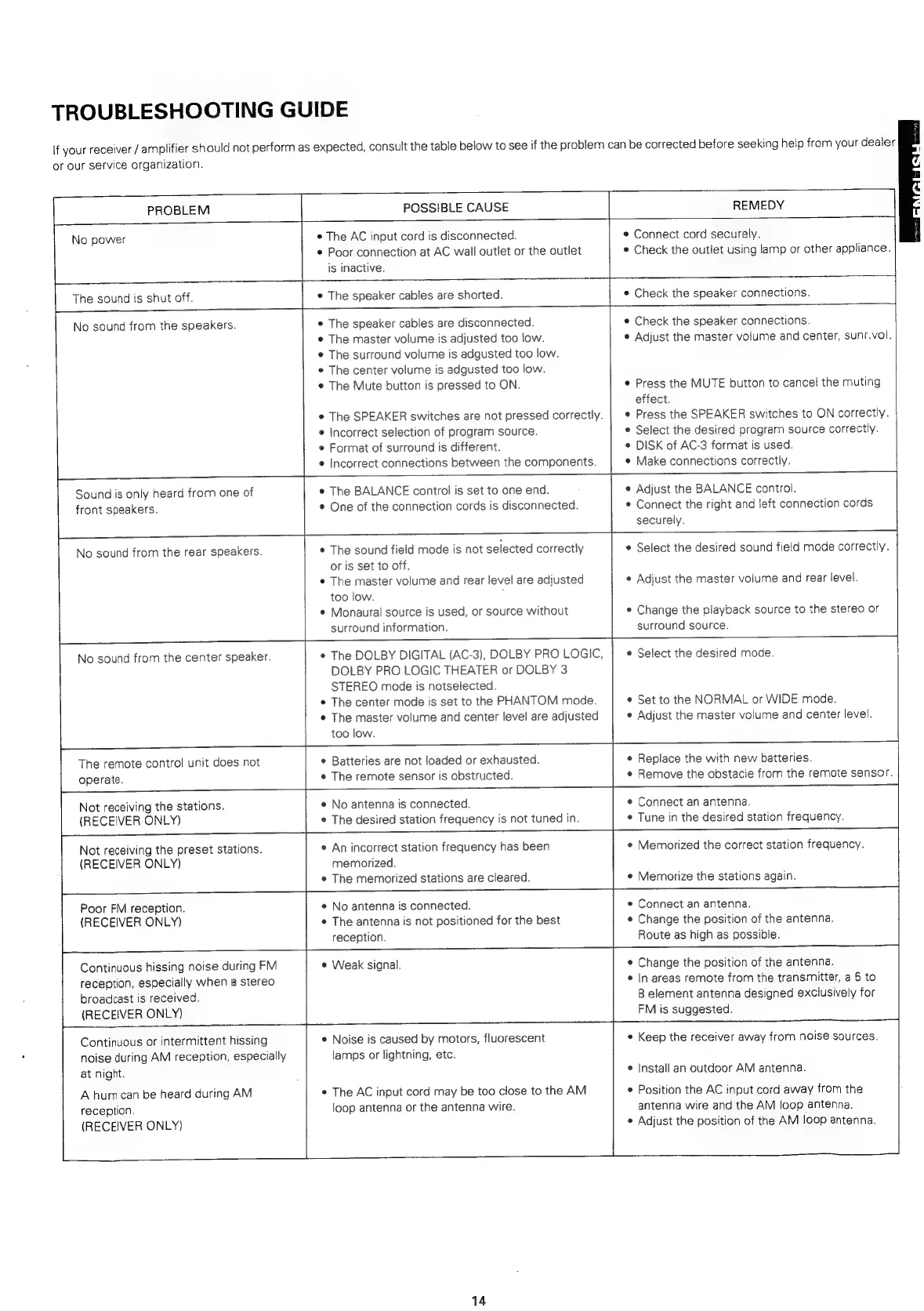
TROUBLESHOOTING
GUIDE
If
your
receiver
/
amplifier
should
not
perform
as
expected,
consult
the
table
below
to
see
if
the
problem
can
be
corrected
before
seeking
help
from
your
dealer
or
our
service
organization.
[
PROBLEM
aa
POSSIBLE
CAUSE
REMEDY
No
power
S
*
The
AC
input
cord
is
disconnected.
Poor
connection
at
AC
wail
outlet
or
the
outlet
is
inactive.
¢
Connect
cord
securely.
e
Check
the
outlet
using
lamp
or
other
appliance.
The
sound
is
shut
off.
¢
The
speaker
cables
are
shorted.
¢
Check
the
speaker
connections.
|
No
sound
from
the
speakers.
The
speaker
cables
are
disconnected.
The
master
volume
is
adjusted
too
low.
The
surround
volume
is
adgusted
too
low.
*
The
center
volume
is
adgusted
too
low.
The
Mute
button
is
pressed
to
ON.
¢
The
SPEAKER
switches
are
not
pressed
correctly.
©
incorrect
selection
of
program
source.
¢
Format
of
surround
is
different.
¢
Incorrect
connections
between
the
components.
e
Check
the
speaker
connections.
e
Adjust
the
master
volume
and
center,
sunr.vol.
¢
Press
the
MUTE
button
to
cancel
the
muting
effect.
¢
Press
the
SPEAKER
switches
to
ON
correctly.
e
Select
the
desired
program
source
correctly.
©
DISK
of
AC-3
format
is
used.
e
Make
connections
correctly.
Sound
is
only
heard
from
one
of
front
speakers.
e
The
BALANCE
control
is
set
to
one
end.
¢
One
of
the
connection
cords
is
disconnected.
e
Adjust
the
BALANCE
control.
*
Connect
the
right
and
left
connection
cords
&
No
sound
from
the
rear
speakers.
The
remote
control
unit
does
not
operate.
¢
The
sound
field
mode
is
not
selected
correctly
or
is
set
to
off.
¢
The
master
volume
and
rear
level
are
adjusted
too
low.
:
¢
Monaural
source
is
used,
or
source
without
surround
information.
surround
source.
No
sound
from
the
center
speaker.
*
The
DOLBY
DIGITAL
(AC-3),
DOLBY
PRO
LOGIC,
e
Select
the
desired
mode.
DOLBY
PRO
LOGIC
THEATER
or
DOLBY
3
STEREO
mode
is
notselected.
¢
The
center
mode
is
set
to
the
PHANTOM
mode.
¢
The
master
volume
and
center
level
are
adjusted
too
low.
¢
Batteries
are
not
loaded
or
exhausted.
¢
The
remote
sensor
is
obstructed.
securely.
e
Select
the
desired
sound
field
mode
correctly.
¢
Adjust
the
master
volume
and
rear
level.
¢
Change
the
playback
source
to
the
stereo
or
¢
Set
to
the
NORMAL
or
WIDE
mode.
e
Adjust
the
master
volume
and
center
level.
e
Replace
the
with
new
batteries.
Remove
the
obstacle
from
the
remote
sensor.
Not
receiving
the
stations.
(RECEIVER
ONLY)
¢
No
antenna
is
connected.
¢
The
desired
station
frequency
is
not
tuned
in.
¢
Connect
an
antenna.
Tune
in
the
desired
station
frequency.
Not
receiving
the
preset
stations.
(RECEIVER
ONLY)
e
An
incorrect
station
frequency
has
been
memorized.
¢
The
memorized
stations
are
cleared.
¢
Memorized
the
correct
station
frequency.
¢
Memorize
the
stations
again.
Poor
FM
reception.
(RECEIVER
ONLY)
¢
No
antenna
is
connected.
e
The
antenna
is
not
positioned
for
the
best
reception.
e
Connect
an
antenna.
¢
Change
the
position
of
the
antenna.
Route
as
high
as
possible.
Continuous
hissing
noise
during
FM
reception,
especially
when
a
stereo
broadcast
is
received.
(RECEIVER
ONLY)
©
Weak
signal.
Continuous
or
intermittent
hissing
noise
during
AM
reception,
especially
at
night.
A
humcan
be
heard
during
AM
reception.
(RECEIVER
ONLY)
e
Noise
is
caused
by
motors,
fluorescent
lamps
or
lightning,
etc.
¢
The
AC
input
cord
may
be
too
close
to
the
AM
loop
antenna
or
the
antenna
wire.
14
se
SS
et
ee
ee
Oe
¢
Change
the
position
of
the
antenna.
*
In
areas
remote
from
the
transmitter,
a
5
to
8
element
antenna
designed
exclusively
for
FM
is
suggested.
¢
Keep
the
receiver
away
from
noise
sources.
e
Install
an
outdoor
AM
antenna.
¢
Position
the
AC
input
cord
away
from
the
antenna
wire
and
the
AM
loop
antenna.
*
Adjust
the
position
of
the
AM
loop
antenna.

Related product manuals