EasyManua.ls Logo

Marantz SR490 - Page 6

Marantz SR490
41 pages
Print Icon
To Next Page IconTo Next Page
To Previous Page IconTo Previous Page
Loading...
HSITONS
Figure
1.
Surround
Speaker
Options
ae
Option
A:
Placed
or
mounted
along
side
walls
Option
B:
Placed
or
mounted
behind
listeners
Option
C:
Placed
or
mounted
facing
upward
=
Center
Speaker(s)
Again,
the
center
speaker(s)
can
be
of
a
smaller
size
and
less
expensive
than
your
main
speakers.
However,
the
upper
midrange
and
treble
response
of
the
center
speaker(s)
should
resemble
that
of
the
main
speakers.
If
there
are
significant
differences
in
frequency
response
{)
feu
i
in
this
range,
the
stereo
image
may
shift
toward
the
speaker
with
the
a
higher
output.
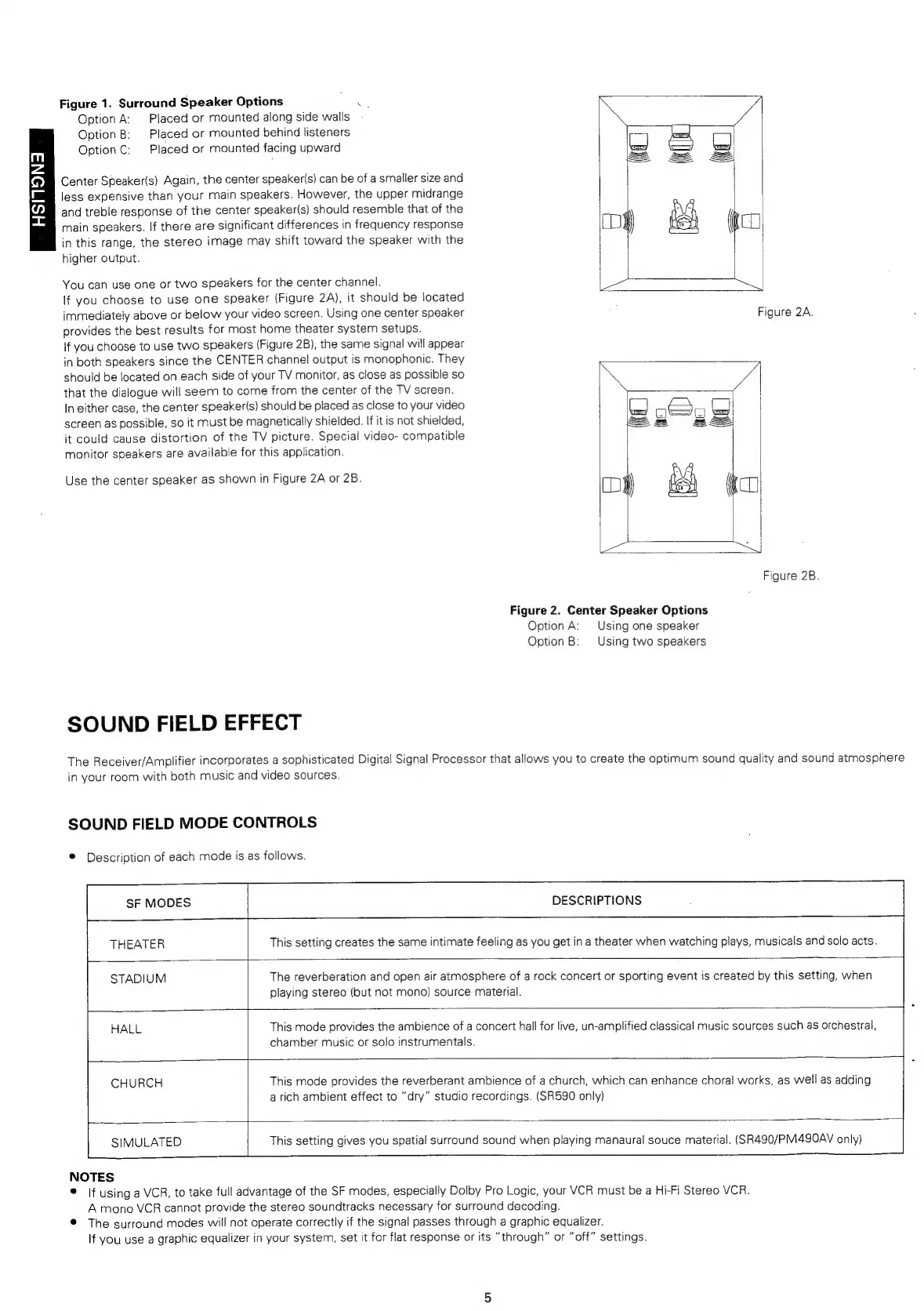
You
can
use
one
or
two
speakers
for
the
center
channel.
If
you
choose
to
use
one
speaker
(Figure
2A),
it
should
be
located
immediately
above
or
below
your
video
screen.
Using
one
center
speaker
Figure
2A.
provides
the
best
results
for
most
home
theater
system
setups.
if
you
choose
to
use
two
speakers
(Figure
2B),
the
same
signal
will
appear
in
both
speakers
since
the
CENTER
channel
output
is
monophonic.
They
should
be
located
on
each
side
of
your
TV
monitor,
as
close
as
possible
so
that
the
dialogue
will
seem
to
come
from
the
center
of
the
TV
screen.
In
either
case,
the
center
speaker(s)
should
be
placed
as
close
to
your
video
screen
as
possible,
so
it
must
be
magnetically
shielded.
If
it
is
not
shielded,
it
could
cause
distortion
of
the
TV
picture.
Special
video-
compatible
monitor
speakers
are
available
for
this
application.
CC
a
Use
the
center
speaker
as
shown
in
Figure
2A
or
2B.
i
>
oe
el
Figure
2B.
Figure
2.
Center
Speaker
Options
Option
A:
Using
one
speaker
Option
B:
Using
two
speakers
SOUND
FIELD
EFFECT
The
Receiver/Amplifier
incorporates
a
sophisticated
Digital
Signal
Processor
that
allows
you
to
create
the
optimum
sound
quality
and
sound
atmosphere
in
your
room
with
both
music
and
video
sources.
SOUND
FIELD
MODE
CONTROLS
®
Description
of
each
mode
is
as
follows.
SF
MODES
DESCRIPTIONS
THEATER
This
setting
creates
the
same
intimate
feeling
as
you
get
in
a
theater
when
watching
plays,
musicals
and
solo
acts.
STADIUM
The
reverberation
and
open
air
atmosphere
of
a
rock
concert
or
sporting
event
is
created
by
this
setting,
when
playing
stereo
(but
not
mono}
source
material.
HALL
This
mode
provides
the
ambience
of
a
concert
hall
for
live,
un-amplified
classical
music
sources
such
as
orchestral,
chamber
music
or
solo
instrumentals.
CHURCH
This
mode
provides
the
reverberant
ambience
of
a
church,
which
can
enhance
choral
works,
as
well
as
adding
arich
ambient
effect
to
“dry”
studio
recordings.
(SR590
only)
SIMULATED
This
setting
gives
you
spatial
surround
sound
when
playing
manaural
souce
material.
(SR490/PM490AV
only)
NOTES
©
|f
using
a
VCR,
to
take
full
advantage
of
the
SF
modes,
especially
Dolby
Pro
Logic,
your
VCR
must
be
a
Hi-Fi
Stereo
VCR.
A
mono
VCR
cannot
provide
the
stereo
soundtracks
necessary
for
surround
decoding.
®
The
surround
modes
will
not
operate
correctly
if
the
signal
passes
through
a
graphic
equalizer.
If
you
use
a
graphic
equalizer
in
your
system,
set
it
for
flat
response
or
its
“through”
or
“off”
settings.

Related product manuals