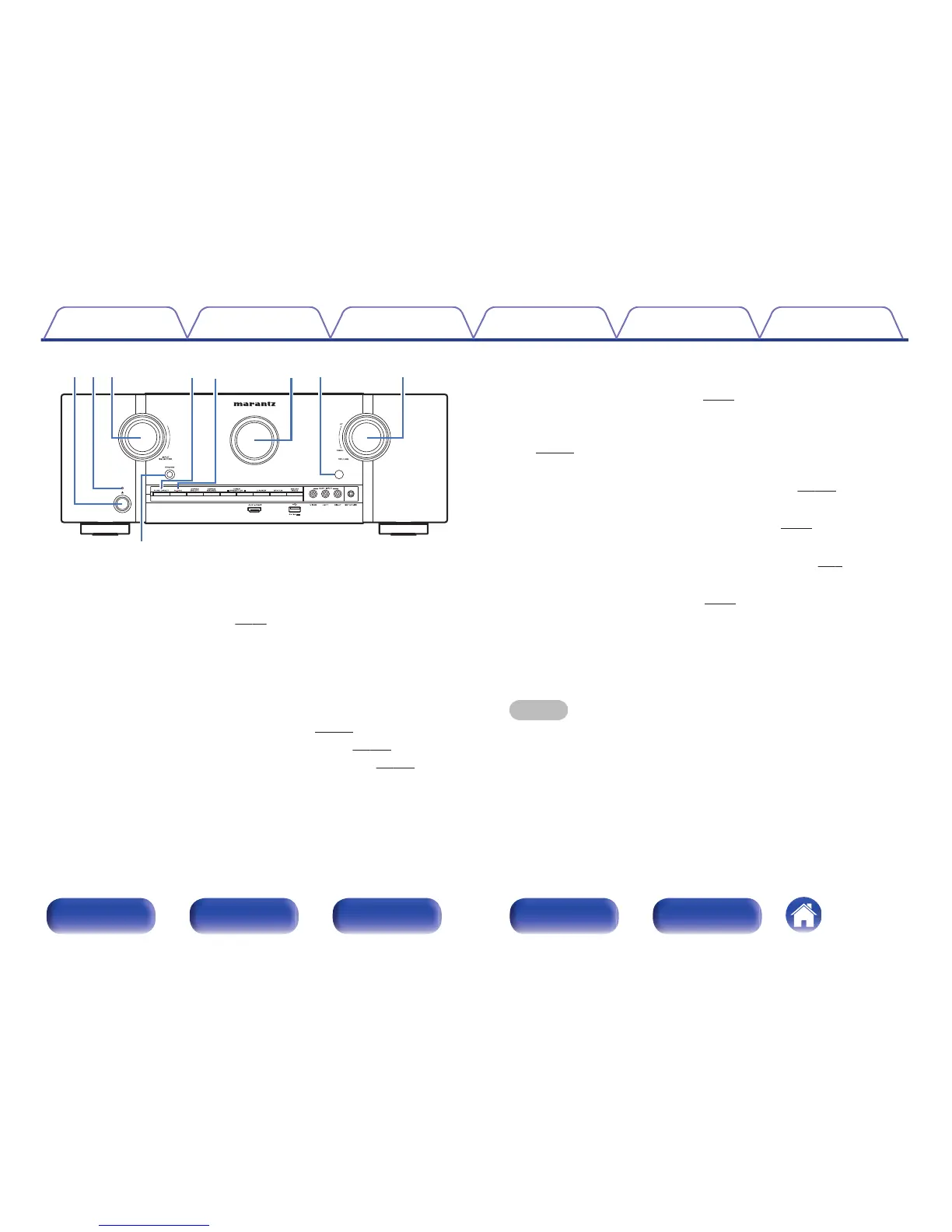
A
Power operation button (X)
Used to turn the power of the MAIN ZONE (room where this unit is
located) on/off (standby). (v
p. 69)
B
Power indicator
This is lit as follows according to the power status:
0
Off: Power on
0
Red: Normal standby
0
Orange:
0
When “HDMI Control” is set to “On” (v
p. 168)
0
When “HDMI Pass Through” is set to “On” (v
p. 169)
0
When “Network Control” is set to “Always On” (v p. 210)
C
INPUT SELECTOR knob
This selects the input source. (v
p. 69)
D
PURE DIRECT indicator
This lights when the “Pure Direct” mode is selected as the sound mode.
(v
p. 120)
E
M-DAX indicator
This lights when the M-DAX mode is selected. (v
p. 157)
F
Display
This displays various pieces of information. (v
p. 17)
G
Remote control sensor
This receives signals from the remote control unit. (v p. 8)
H
VOLUME knob
This adjusts the volume level. (v p. 70)
I
Headphones jack (PHONES)
This is used to connect headphones.
When the headphones are plugged into this jack, audio will no longer
be output from the connected speakers or from the PRE OUT
connectors.
NOTE
0
To prevent hearing loss, do not raise the volume level excessively when using
headphones.
Contents Connections Playback Settings Tips Appendix
15
Front panel Display Rear panel Remote Index



 To Next Page