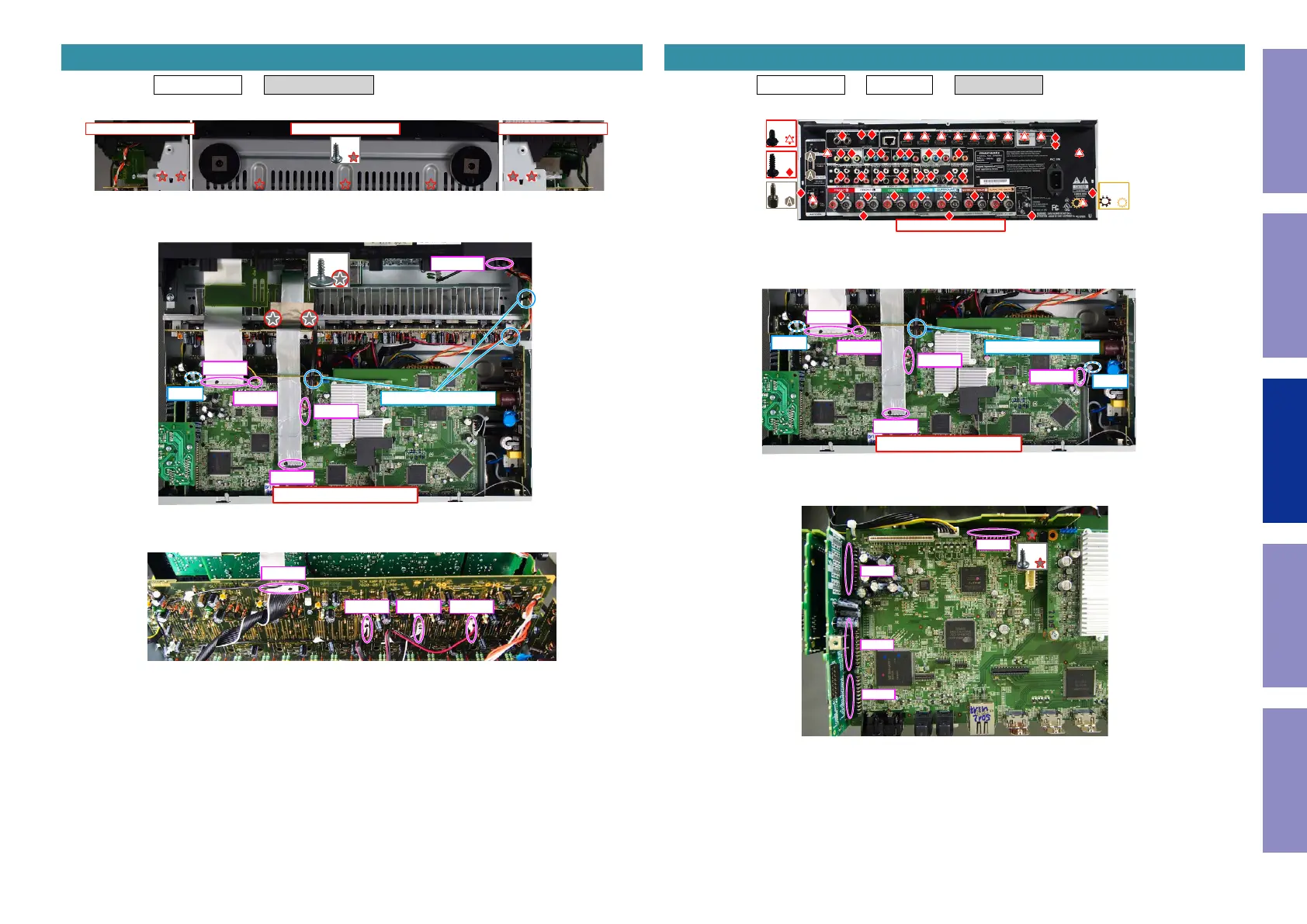
Proceeding : TOP COVER → RADIATOR ASSY
(1) Remove the screws.
(2) Remove the screws. Cut the wire clamp, then remove the CORD HOLDER and connector.
Remove the FFC.
(3) Remove the connector.
3. RADIATOR ASSY
View from the bottom
↓Shooting direction: D↓ ↓Shooting direction: C↓
x7
↑Shooting direction: A↑
x2
FFC
FFC
N1008
CP4400
N1019 CORD HOLDER
CUT
CP401
CP402 CP405CP403
Proceeding : TOP COVER → WiFi ANT → DIGITAL PCB
(1) Remove the screws.
(2) Cut the wire clamps, then remove the CORD HOLDERs and connectors.
Remove the FFC.
(3) Remove the connector.
4. DIGITAL PCB
↑Shooting direction: A↑
x34
x13
x2
x1
↑Shooting direction: A↑
FFC
FFC
N1008
N1019
N1033
CORD HOLDER
CUT
CUT
x1
N1039
N1014
N1016
N1020
76
Caution in
servicing
Electrical Mechanical Repair Information Updating


 To Next Page