1.3. File structure on USB Memory
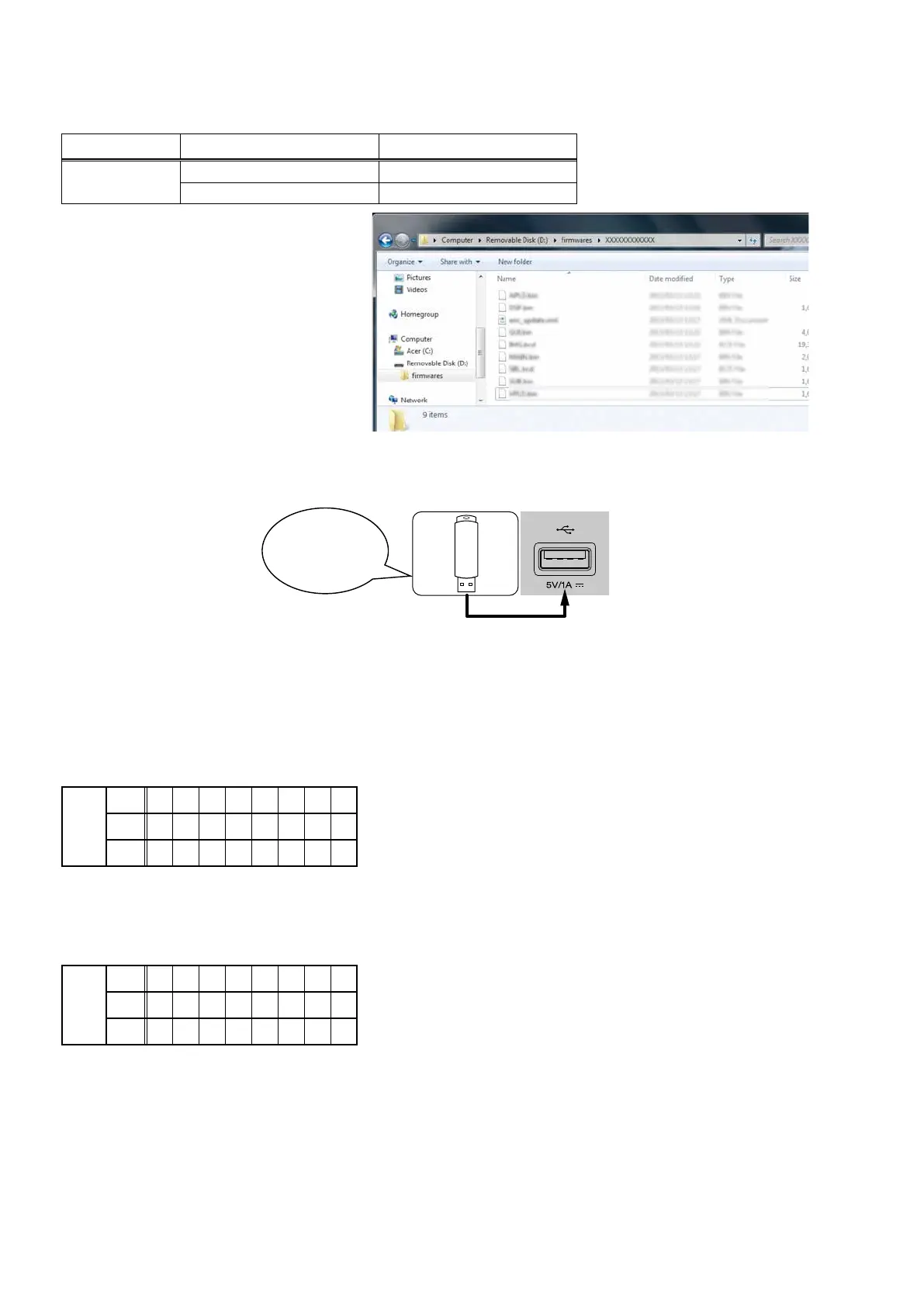
Copy the update les to the USB memory with the following structure.
USB memory root
Model Name Model Area Product ID
SR6010
North America (U) 100100420100
Europe (N) 100100420200
+ rmwares
+ 000100XXXXXX
+ APLD.bin
+ DSP1.bin
+ DSP2.bin
+ DSP3.bin
+ DSP4.bin
+ enc_update.xml
+ GUI.bin
+ IMG.bcd
+ MAIN.bin
+ VPLD.bin
1.4. Insert the USB memory into the USB port.
NOTE : Remove the LAN cable from this unit when performing updates.
1.5. Start the update.
While holding down buttons "
TUNER PRESET CH+
" and "
STATUS
" simultaneously, press the power button to turn on
the power.
1.6. Display during USB update
After around half minutes, display shows the following message.
Display
FLD
L1
U S B U p d t
L2
S t a r t
L3
1.7. Press the "ENTER" key on the remote control unit or this unit.
Then start Firmware Update.
Display
FLD
L1
U p d a t e
L2
F i l e
L3
C h e c k
Download firmware
in USB flash drive.
78



 To Next Page