44
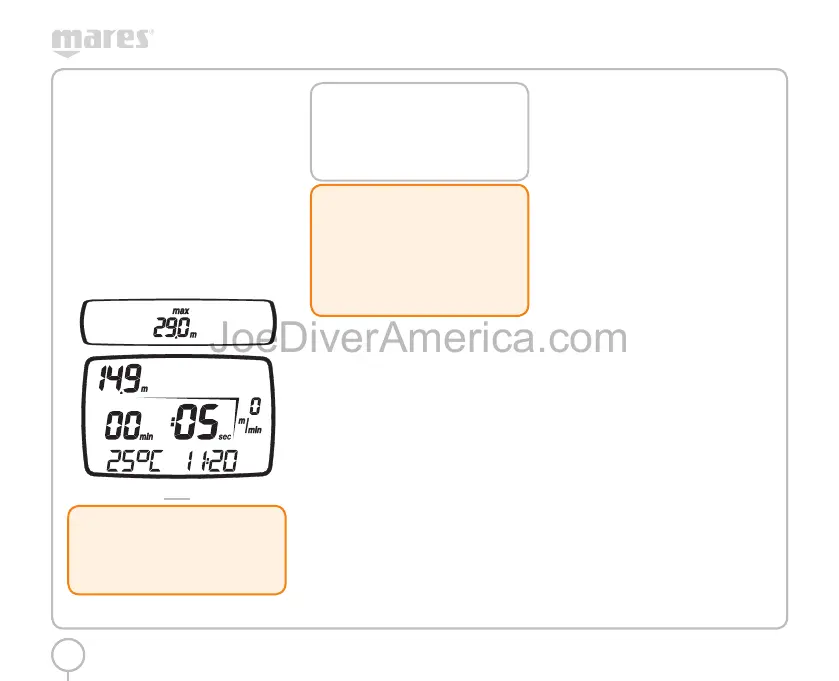
<+> button:
• Press this button to display the maximum depth
reached. Press it again to remove the maximum
depth.
• Hold down the button for 2 seconds to activate
the display backlight.
<-> button:
• this button is not enabled in this mode.
<ENTER> button:
• temporarily displays (for 10 seconds) the dive
parameter settings, just as they appear in
Predive Mode.
<ESC> button:
• this button is not enabled in this mode.
FIG. 27
!
WARNING
We advise that when diving you always put
Nemo Wide into Predive mode. Always check
that the dive computer is switched on early
in your dive.
NOTE
After a dive in “BT” mode, the transition to
“AIR” or “EAN” mode will be disabled for
24 hours. (This lockout can be disabled by
clearing the residual nitrogen memory in Set
Dive - Data mode).
!
WARNING
This option is intended only for highly
experienced divers. Users who clear the
residual nitrogen memory cannot then use
the instrument for repetitive dives. After this
operation, do not dive with Nemo Wide if
you have already dived within the previous
24 hours.
SURFACE MODE BOTTOM
TIME
The desaturation time and the delay before flying or
traveling to high altitudes are displayed in the same
way as for Air or EAN dives.
BOTTOM TIME WITH BEHAVIOR
ERROR
The following errors can occur during an air or
EAN dive:
• Uncontrolled ascent
• Omitted deco stop
In this case, Nemo Wide will inhibit the Dive - AIR
and Dive - EAN modes for 24 hours, allowing
operation in BOTTOM TIME mode only, and will
continue to display the underwater behavior error
in question.
The corresponding error icons are displayed in Dive,
Time and Logbook mode.
PLANNING: SCROLLING OF NO
DECOMPRESSION LIMITS
This function allows the user to scroll through the
no decompression limits, automatically taking into
account the current residual saturation of the tissue
compartments from a preceding dive.
The times shown during the scrolling of no
decompression limits take into account all the
Set Dive parameters, such as the Mode, Altitude,
Personal Correction Factor and, in the case of EAN
dives, the values for oxygen percentage and its
maximum permitted partial pressure.
To enter Plan mode, scroll through the Main Menu
until the “PLANNING” message appears on the
display bar, and then press the <ENTER> button.
Repeatedly press the <+> button to increase the
depth by three meters each time, up to a maximum
of 48 m (157 ft).
Press the <-> button to decrease the depth indicated
in three-meter increments, down to 0 m (0 ft).
For each depth, the display shows the corresponding
no decompression time expressed in minutes.
If EAN mode is enabled, the oxygen percentage set
is also shown (Fig. 28).
2334-Nemo Wide-ing-rev.indd 442334-Nemo Wide-ing-rev.indd 44 19/09/2006 11.09.5219/09/2006 11.09.52



 To Next Page