EN
quick guide
Time Menu Settings
Watchset mode is used for setting all the watch
("Time") functions of your Nemo dive computer.
In this mode you can set the time and the alarm.
You can also enable and set up a second time zone,
which is useful when traveling, and select the units
of measurement for temperature (°C or °F). Finally,
in this mode you can also set the audible alarms.
The different settings will all be described in more
detail subsequently. For now, we will only describe
setting the date and time of your new Nemo dive
computer.
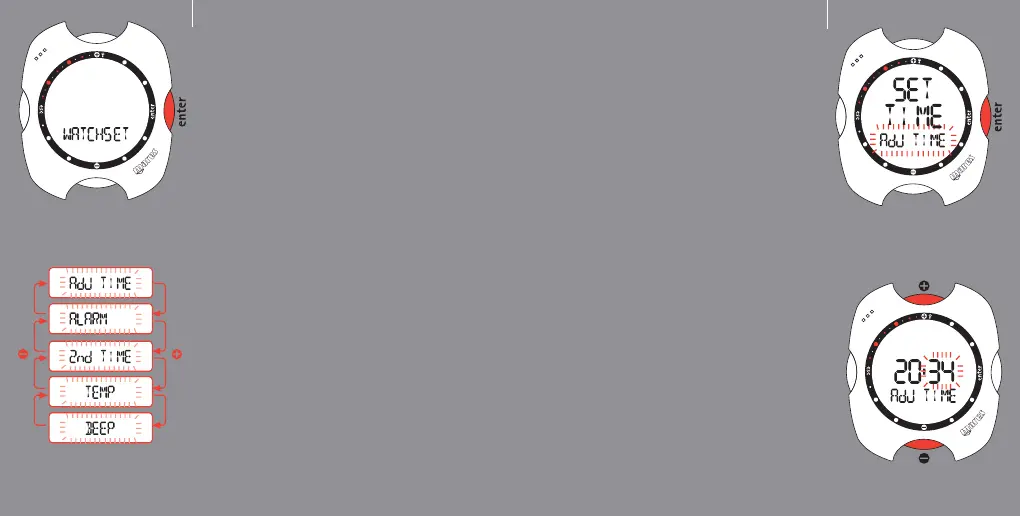
From the Time Menu, already described in the
preceding page, press the <+> or <-> buttons until
"Watchset" appears on the display bar. Press the
<enter> button to accept the selection (fig. 1).
You are now in the Watchset menu.
Press the <+> or <-> buttons to view the various
items in this menu on the display bar (fig. 2).
fig. 1
fig. 2
3
EN
Setting the date and time
Press the <+> or <-> buttons until "adj time"
appears on the display bar, and then press <enter>
to accept the selection.
You can now set the date and time. In fact, as you
will see, the digits of the minutes start to blink. Use
the <+> button to increase the value, or the <->
button to decrease. Press and release the button to
change the value by one minute at a time, or hold
down the button for rapid increment or decrement.
After setting the minutes, press the <enter> button
to set the the hour, which is done in the same way
using the <+> or <-> buttons. Use the same
procedure to set the time format (12h - 24h) and
the date, beginning with the day, followed by the
month, and finally the year.
After setting the year, press <enter> to save the
changes made. Nemo will then automatically return
to the Set Time Menu. If you do not wish to make
further adjustments, press and hold down <esc> for
2 seconds to go back to Time Mode.
Your new Nemo now shows the correct time!
4
fig. 1
fig. 2



 To Next Page