EN
quick guide
Main Menu
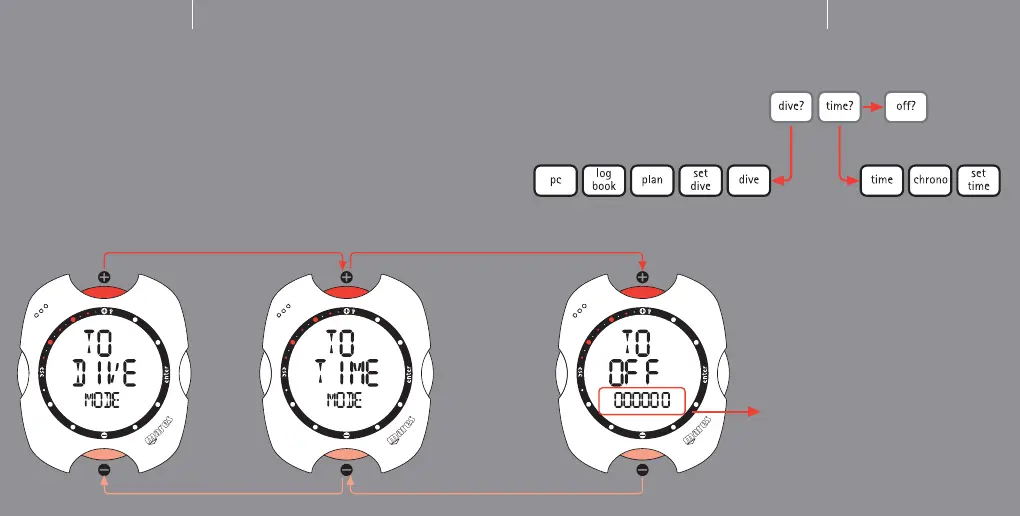
Your Nemo has three distinct Menu operating modes: Dive Menu, Time Menu and
Main Menu. In the previous sections you saw how to navigate the Time Menu. Now
we will look at the Main Menu, which provides the only link between the other two
menu modes and the "Off" function.
Mares has very clearly distinguished the different operating modes in Nemo, to
maximize its ease of use, avoid possible interpretation errors and highlight different
features depending on the situation.
5
Main Menu
Dive Menu
"Off" Mode
From the Main Menu you can access
Off Mode, which enables you to
conserve battery power when the
instrument is not in use.
Switch-on
To switch on your Nemo, simply press
any one of the buttons. During switch-
on Nemo performs a self-test of the
system and display. This procedure lasts
a few seconds.
In Main Menu mode, select the "Off"
item and the "TO OFF" message will
appear on the display, together with
the instrument serial number (on the
display bar), which is essential for the
warranty (see warranty section).
EN
6
Time Menu



 To Next Page