Puck Pro Dive Computer
8
WARNING
- An uncontrolled ascent increases your
risk of decompression sickness (DCS)
- This feature is intended for very
experienced divers only, such as dive
instructors, who take full responsibility
for the consequences of turning off this
function.
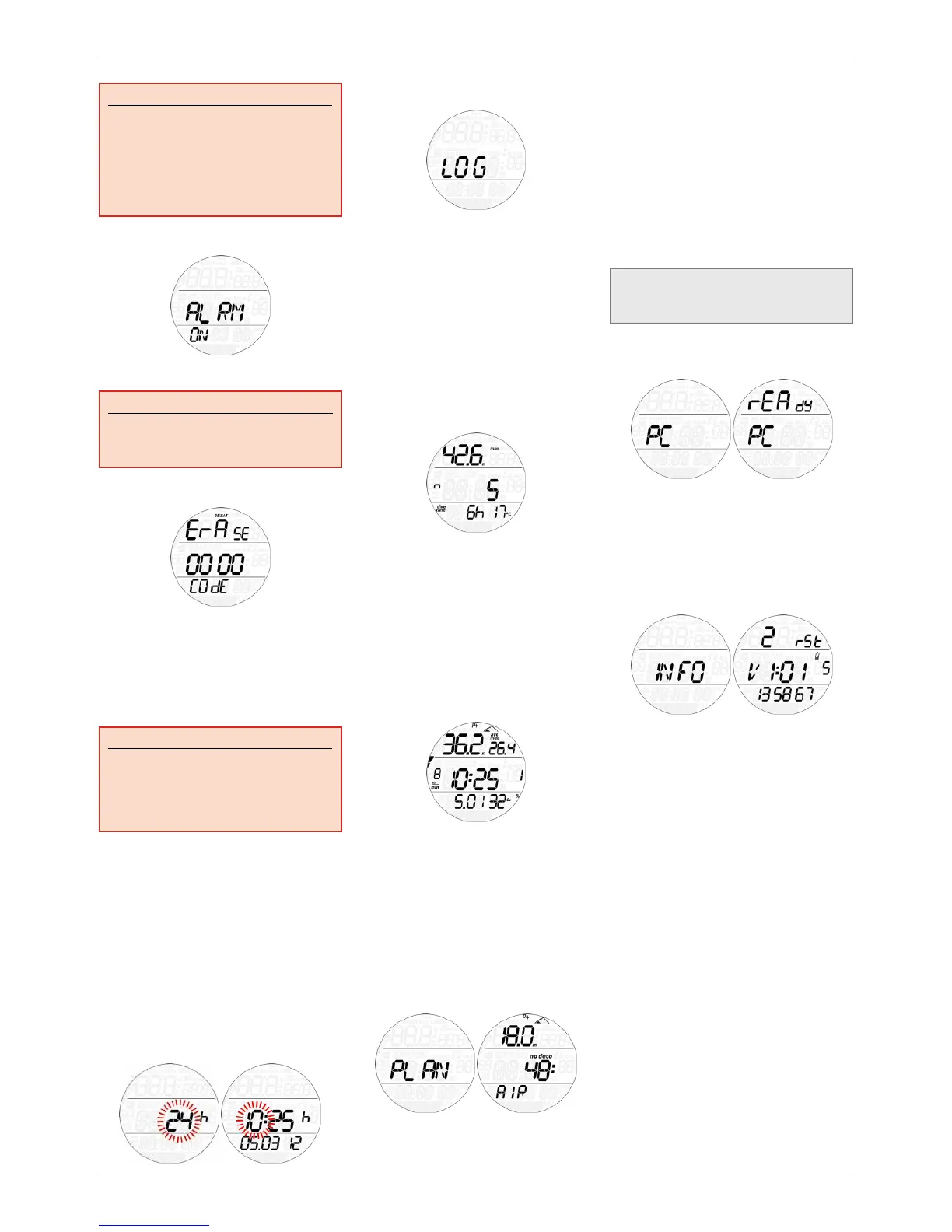
2.2.1.7 ALRM ALARMS
In this menu you can disable audible alarms.
WARNING
Disabling audible alarms can lead you into
potentially dangerous situation and could
result in serious injury or death.
2.2.1.8 ErASE ERASE DESATURATION
Puck Pro allows you to reset the desaturation
in the computer. Any tissue saturation
information from a recent dive will be reset to
zero and the computer treats the next dive as
a non-repetitive dive. This is useful when the
computer is loaned to another diver who has
not dived in the last 24hours.
WARNING
Diving after having reset the desaturation
is extremely dangerous and is very likely to
cause serious injury or death. Do not reset
the desaturation unless you have a valid
reason to do so.
In order to prevent accidental desaturation
reset, you must enter the security code once
you decide to proceed with the reset. The
security code is 1234.
After entering the security code you will get a
confirmation of the successful completion of
the operation.
2.2.2 SEt tIME
This menu allows you to set the time and date.
Press and hold the button and 24h or ampm
will start to blink. Press the button to switch
between the two and/or press and hold the
button to confirm and move on to set the hour,
the minutes and the date.
2.3 LOGBOOK
Puck Pro can record the profiles of
approximately 35hours of diving, at a sampling
rate of 5 seconds. The information can be
transferred using the optional USB clip to PC
via the Dive Organizer software or to a Mac via
the Divers’ Diary software. In addition, Puck
Pro can show most of the information directly
on the display.
When you first enter the logbook menu, you
will see a summary of all dives performed to
date. In particular, the maximum depth ever
reached, the total number of dives, the total
number of hours spent underwater and the
coldest water temperature recorded.
From here, press the button to scroll through
all dives in the memory of the computer. Press
and hold the button to view the details of a
particular dive. Each dive has three pages of
data. Each page has maximum and average
depth at the top, and time dive started, max
ascent rate and repetitive dive counter in
the middle. The bottom row contains date of
dive and O
2
% on the first page, dive time and
minimum water temperature on the second
page, and surface interval to previous dive and
CNS at end of dive on the third page.
Press the button to scroll between the pages
of information, press and hold the button to
return to the list of main logbook menu. Inside
the logbook menu, every 5 logs there is a page
with bACk on the display, which allows you
to leave the logbook menu by pressing and
holding the button. Simply press when bACk
is displayed to move on to the next dive in the
logbook.
2.4 DIVE PLANNER
This function allows you to scroll through the
no decompression limits, automatically taking
into account the current residual saturation
of the tissue compartments from a preceding
dive. The times shown when scrolling the
no decompression limits take into account
the information entered under the set dive
submenu: water type, altitude, personal
safety factor, Air, or in the case of Nitrox,
the values for the oxygen percentage and its
maximum partial pressure. For each depth,
the display shows the corresponding no deco
time expressed in minutes. If Nitrox mode is
selected, the maximum depth shown in the
planner is limited by the MOD.
NOTE
The dive planner is enabled only if either
air or nitrox mode is set
2.5 PC
This submenu allows you to download your
dive data to a PC or Mac. Press and hold
the button and the display will show PC
ready, symbolizing that Puck Pro is ready to
communicate.
2.6 INFO
This submenu provides information about
the hardware and software of your Puck Pro
and about the status of the battery with a
number from 1 to 3, 3 being the highest, 2
corresponding to a steady battery symbol and
1 to the blinking battery symbol (no dive).
• 3 DIVING WITH PUCK PRO
3.1 A FEW WORDS ABOUT NITROX
Nitrox is the term used to describe breathing
gases made of oxygen-nitrogen mixes with
an oxygen percentage higher than 21% (air).
Because Nitrox contains less nitrogen than
air, there is less nitrogen loading on the
diver’s body at the same depth as compared to
breathing air.
However, the increase in oxygen concentration
in Nitrox implies an increase in oxygen partial
pressure in the breathing mix at the same
depth. At higher than atmospheric partial
pressures, oxygen can have toxic effects on the
human body. These can be lumped into two
categories:
- Sudden effects due to oxygen partial
pressure over 1.4bar. These are not related
to the length of the exposure to high partial


 To Next Page
 Loading...