FX20 INSTALL GUIDE
14 VERSION 1.6 | APRIL 26, 2024
LEVEL THE Y-RAILS
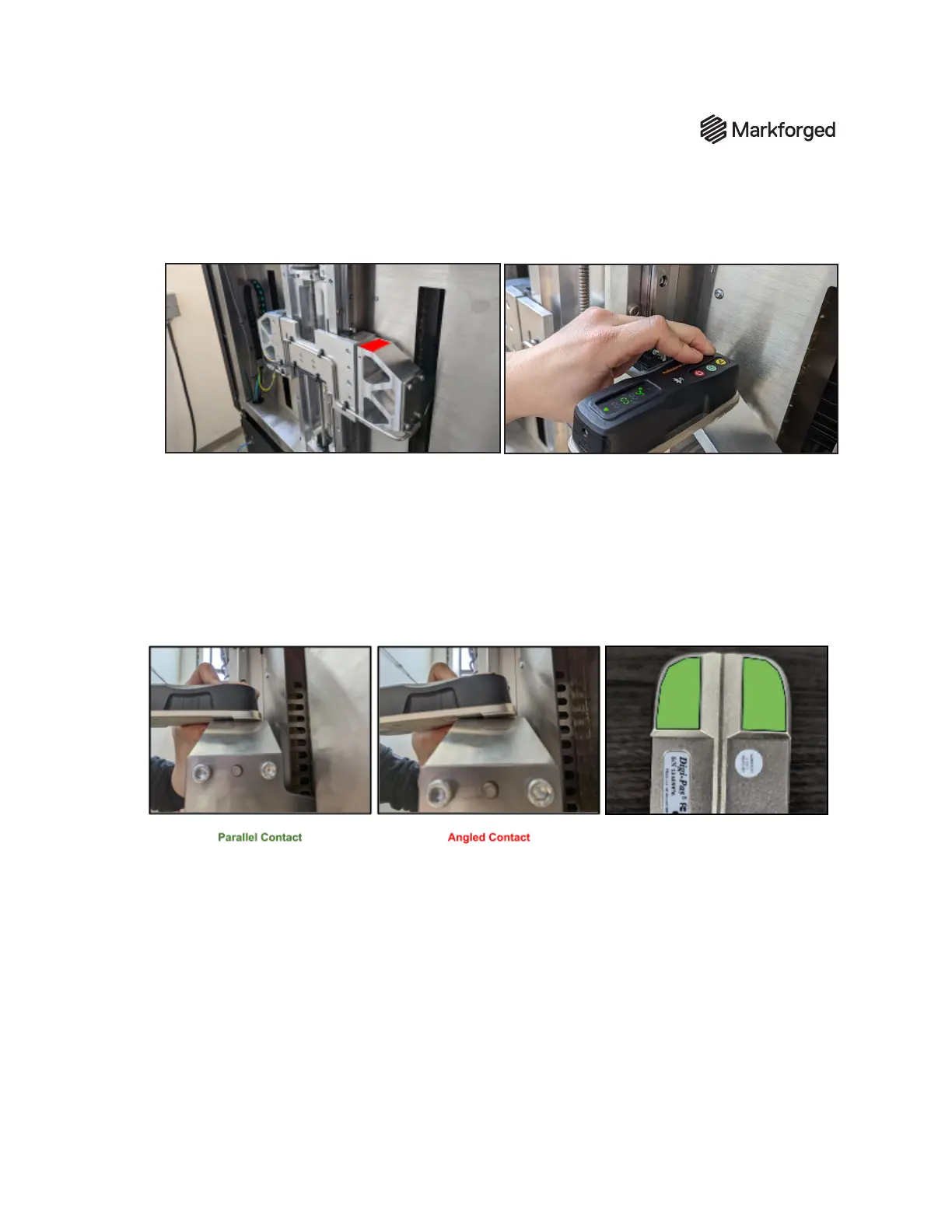
1. Place the digital level on the z-stage mounts as shown.
Note: This is not a large surface to rest the level on; you will have to hold the level steady and stable to
obtain an accurate reading. The lower surface of one end of the level, marked in green on the
photo below, should be flush with the area of the z-stage mount marked in red in the photo
above. Ensure that the level is making parallel contact, at against the mount; angled contact will skew
the readings for the remainder of the process. Take your time to ensure an accurate reading.
2. Stabilize the level and press the Alternate Zero (ALT) button. This plane is the reference for
perpendicularity between the z-axis and the y-rails and print bed.
Note: It is critical that the orientation of the digital level is consistent with the following level
placements. For example, the ALT Zero button should be facing the front of the machine for all readings.



 To Next Page