FX20 INSTALL GUIDE
22 VERSION 1.6 | APRIL 26, 2024
CHECK & ADJUST BELT TENSION
Motion system belt tension is set by the manufacturer but it's useful to conrm it at this time. We
recommend using a dedicated sonic tension meter, particularly in a noisy environment, but a precise guitar
tuner app will suce.
Begin by tuning both Y-axis belts in turn.
1. Open the printer lid and move the print head to the center of the gantry.
2. Pluck the top run of the Y-axis belt and measure the frequency. If the frequency reads 38-40Hz,
skip to next belt; otherwise, continue with adjustment.
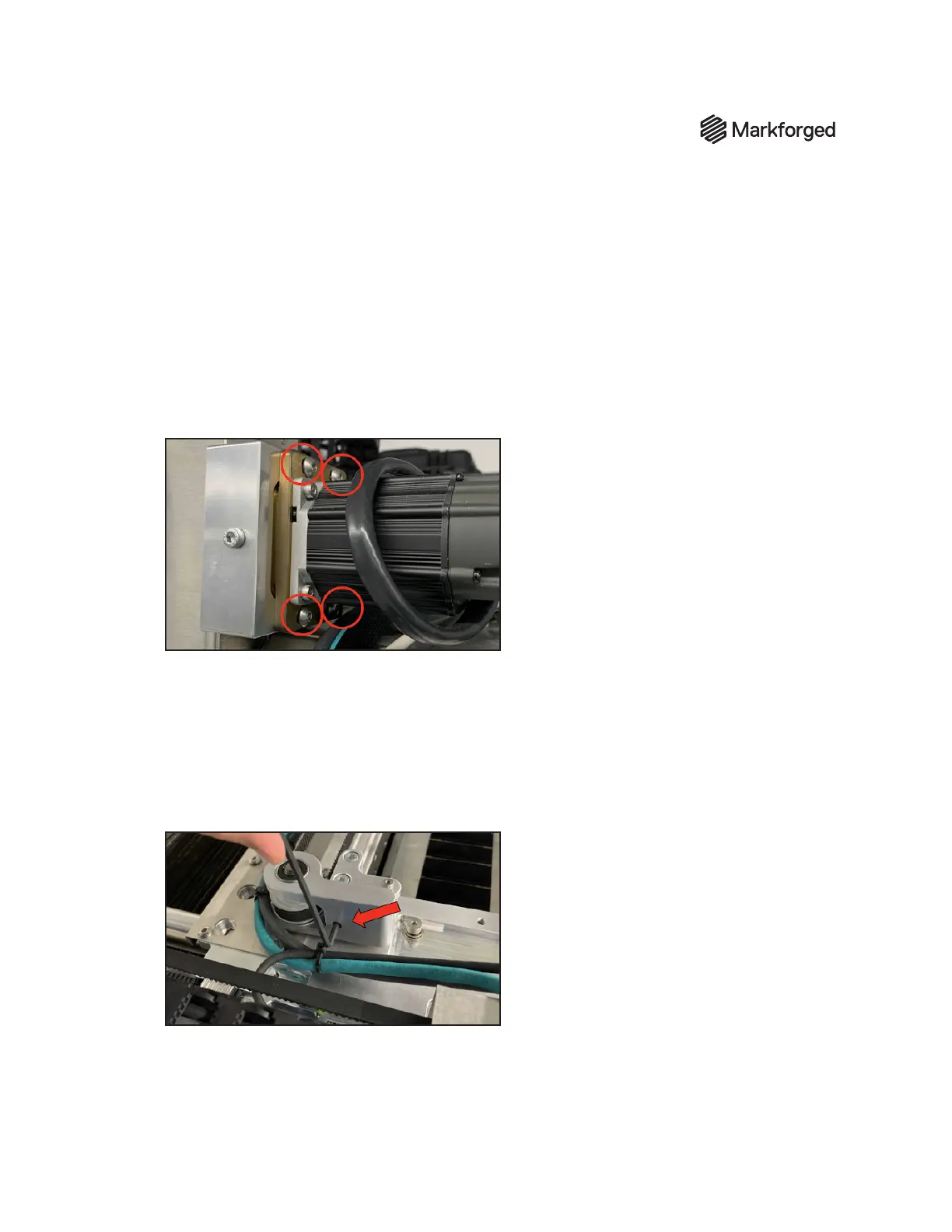
3. Use the 4mm hex key to loosen all four screws on the motor tensioner.
4. Use the 4mm hey key to adjust the tensioning bolt to a frequency reading of 38-40Hz.
5. Tighten the four motor tensioner bolts, then repeat this process for the other Y-axis belt.
Now adjust the X-axis belt.
1. Pluck the X-axis belt further from the print head. Measure the frequency at the middle of the belt.
2. Use the 3mm hex key to adjust tensioning bolt (shown below) to frequency of 35-37Hz.
3. Make sure to clear any tools/supplies out of the upper chamber, and close the lid.



 To Next Page