FX20 INSTALL GUIDE
24 VERSION 1.6 | APRIL 26, 2024
INITIAL PRINT RUN
DEVICE SETUP UTILITY
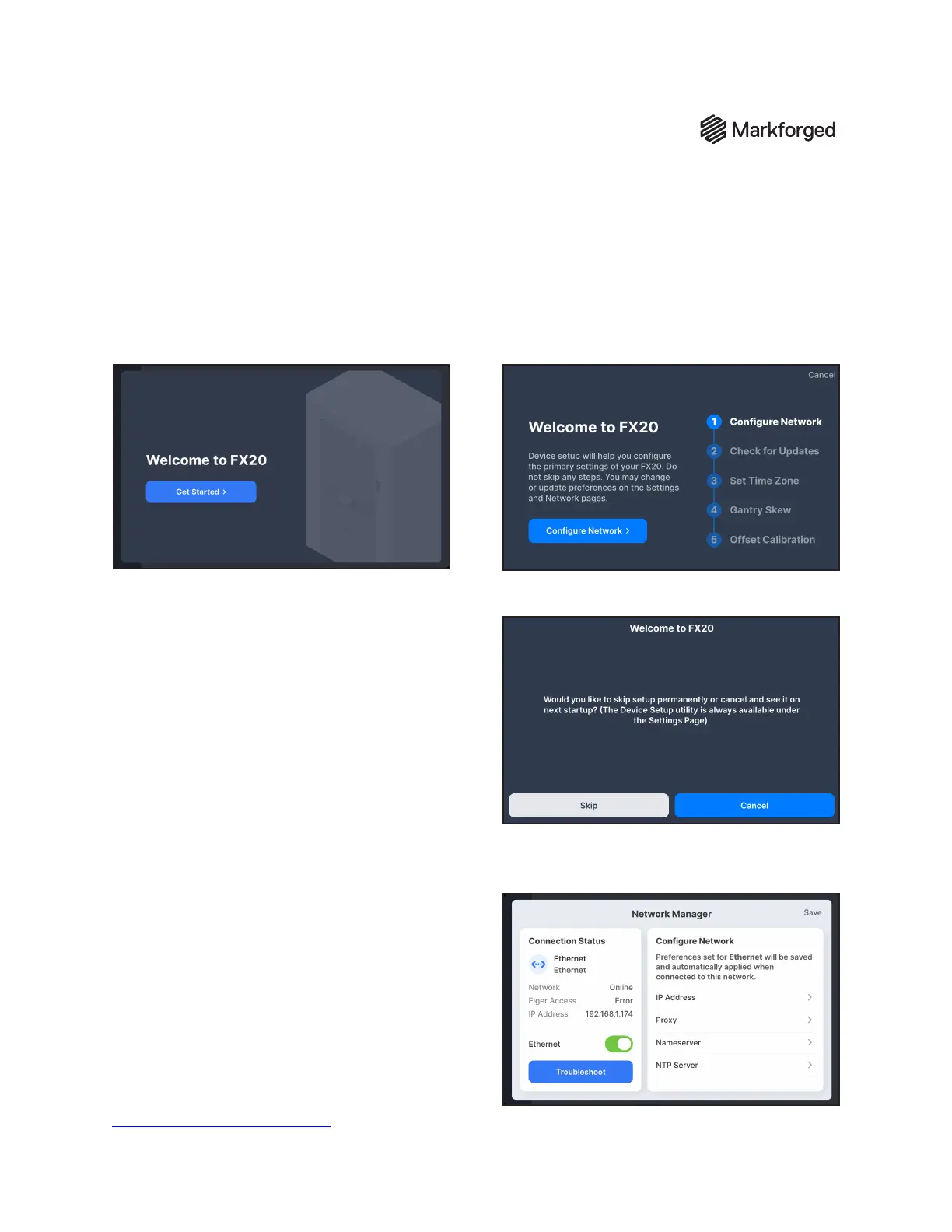
The Device Setup Utility runs the rst time you power on your FX20 printer. It will walk you through the
following setup stages: Congure Network, Check for Updates, Set Time Zone, Gantry Skew, and Oset
Calibration.
Note: If you click Cancel at any time during the
Device Setup Utility, you will be prompted to Skip or
Cancel:
1. Tap Skip to leave the utility without saving
your progress. The utility will not run on the
next device startup, but can be run again
from the Settings menu (Settings > Device
Setup).
2. Tap Cancel to leave the utility and pick up
where you left o on the next device startup.
CONFIGURE NETWORK
Use the Congure Network stage to set up your
printer's network connection.
Note: The FX20 must connect to the local network
via Ethernet; the Ethernet port is located on the rear
panel of the printer. See the FX20 Facilities Guide
for detailed network requirements. Consult your IT
department to conrm that your local network and
Internet connection meet the requirements in the
Advanced Networking Features article.



 To Next Page