FX20 INSTALL GUIDE
26 VERSION 1.6 | APRIL 26, 2024
CHAMBER TEMPERATURE CALIBRATION UTILITY
The Chamber Temperature Calibration utility helps ensure consistent and successful results each print.
This utility tests your printer’s response to changes in build chamber temperature, and then precisely
adjusts thermal settings to create an optimal print quality environment.
In particular, the Chamber Temperature Calibration utility improves performance for high-temperature prints
using Ultem 9085 Filament.
The Chamber Temperature Calibration utility takes 3-8 hours to complete. If your printer receives
regular quarterly calibration and maintenance, you may wish to include thermal calibration in that process.
Perform an additional round of thermal calibration if:
● The printer is subjected to extreme changes in operating environment.
● You perform a USB Reset while troubleshooting with Markforged Support.
● Markforged Support instructs you to recalibrate after certain hardware replacement procedures.
Note: If the Chamber Temperature Calibration utility fails, contact your reseller for support.
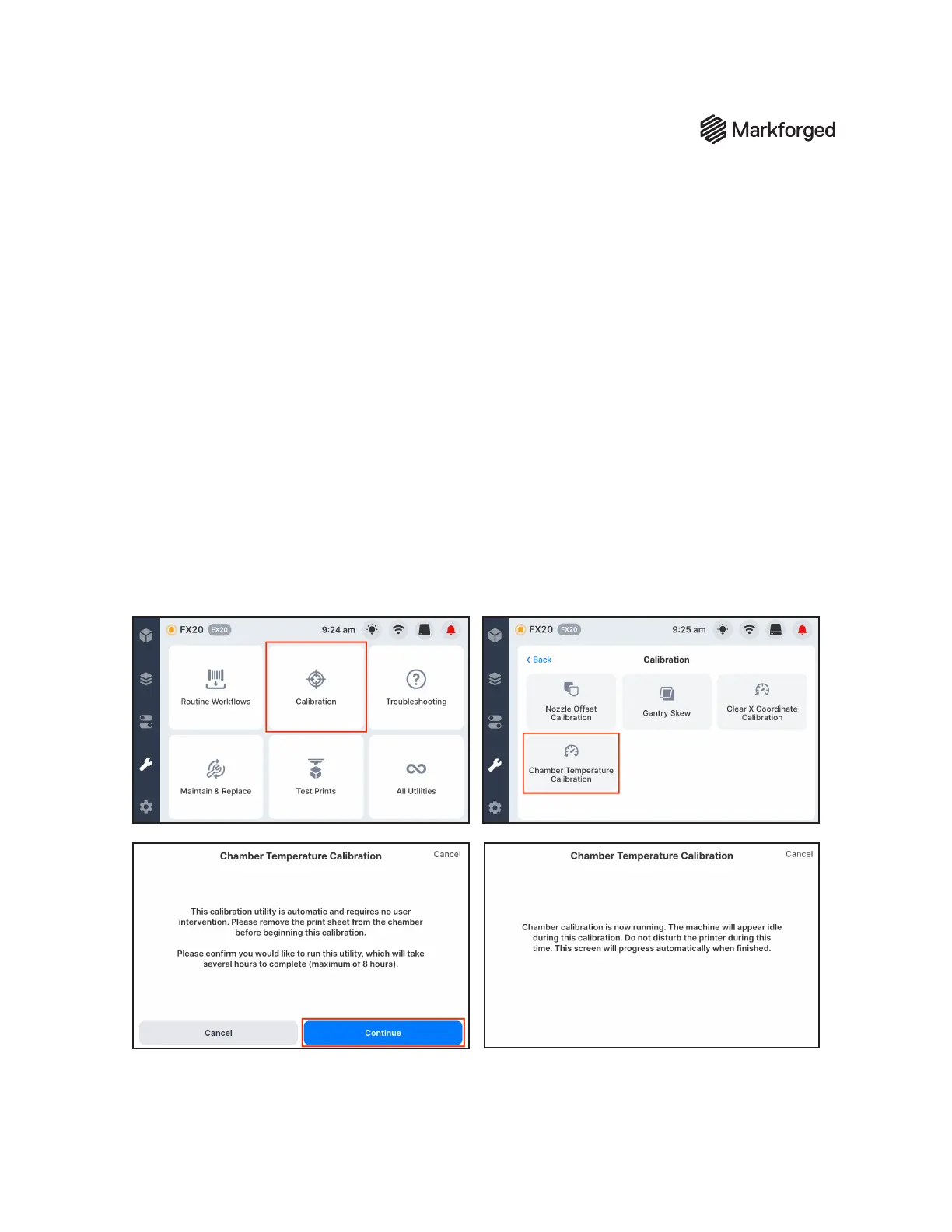
1. To run the utility, tap Calibration, tap Chamber Temperature Calibration, and then tap Continue.
The screen will progress automatically when the utility is complete.



 To Next Page