FX20 INSTALL GUIDE
30 VERSION 1.6 | APRIL 26, 2024
PROCEDURE
Note: The Mechanical Gantry Squaring procedure is not a required install step. Only complete this
procedure if your printer's Gantry Skew values are unable to be automatically compensated for.
1. Disconnect the printer from internet by disconnecting the ethernet cord from the Ethernet port on the
lower rear panel.
2. Use the touchscreen to unlock the upper printer lid, then open the lid.
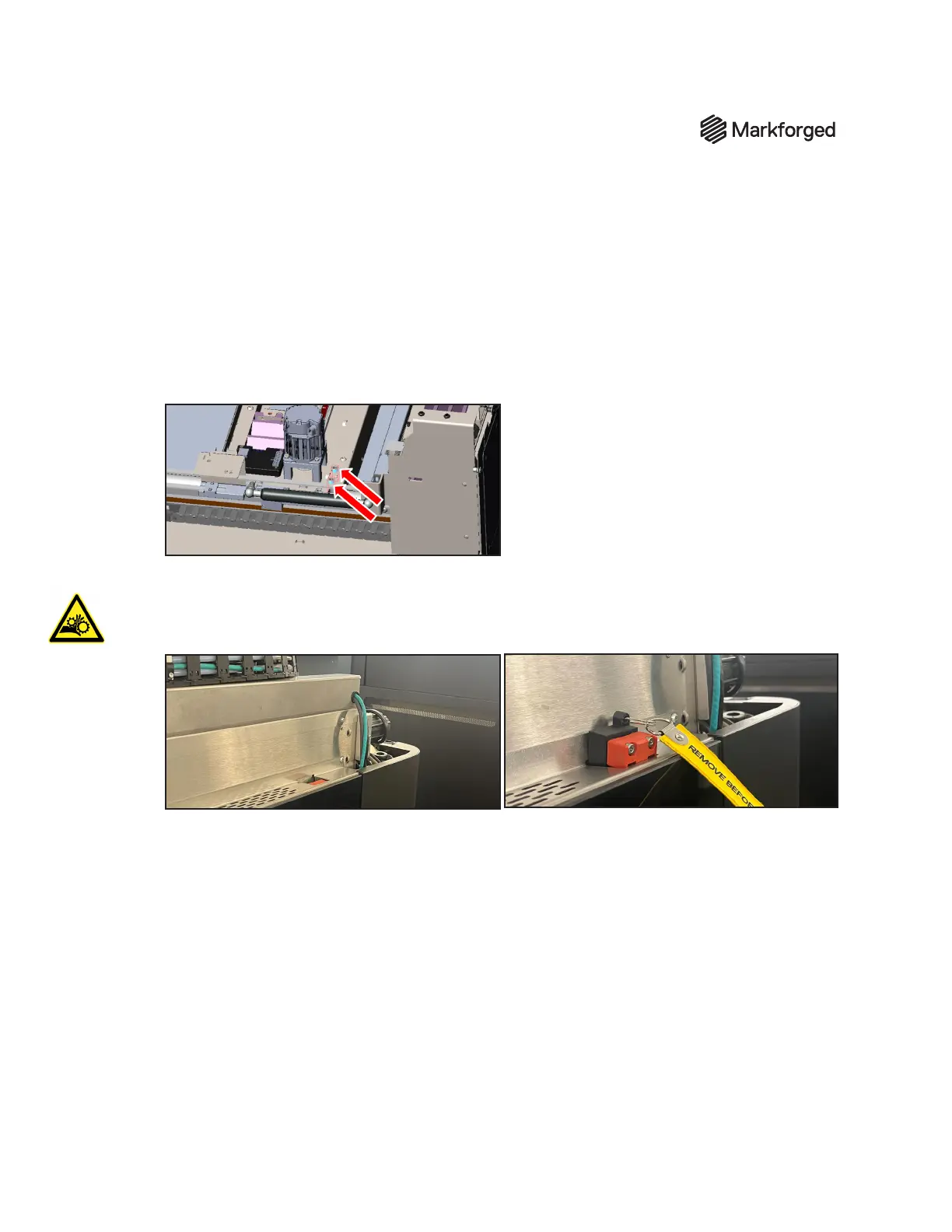
3. Use a 5mm driver to loosen by one half turn the two (2) screws on the right side of the gantry as
shown in the image. Use the ladder or step stool to safely see and reach into this area.
4. Step down from the ladder or step stool.
5. Place lid safety override on the red sensor above the door of the printer. WARNING: Take caution
while the lid safety override is installed on the printer. Motors may be energized and can cause bodily
harm if procedure is not carried out as directed.
6. Make sure the area is clear and all hands are far removed from the lid area, then start the XYZ
Initialization utility (Troubleshooting > Utilities).
7. Wait for the XYZ Initialization utility to run to completion. When the Initialization has nished, the
screen will display the message Motion system initialization successful.



 To Next Page