6
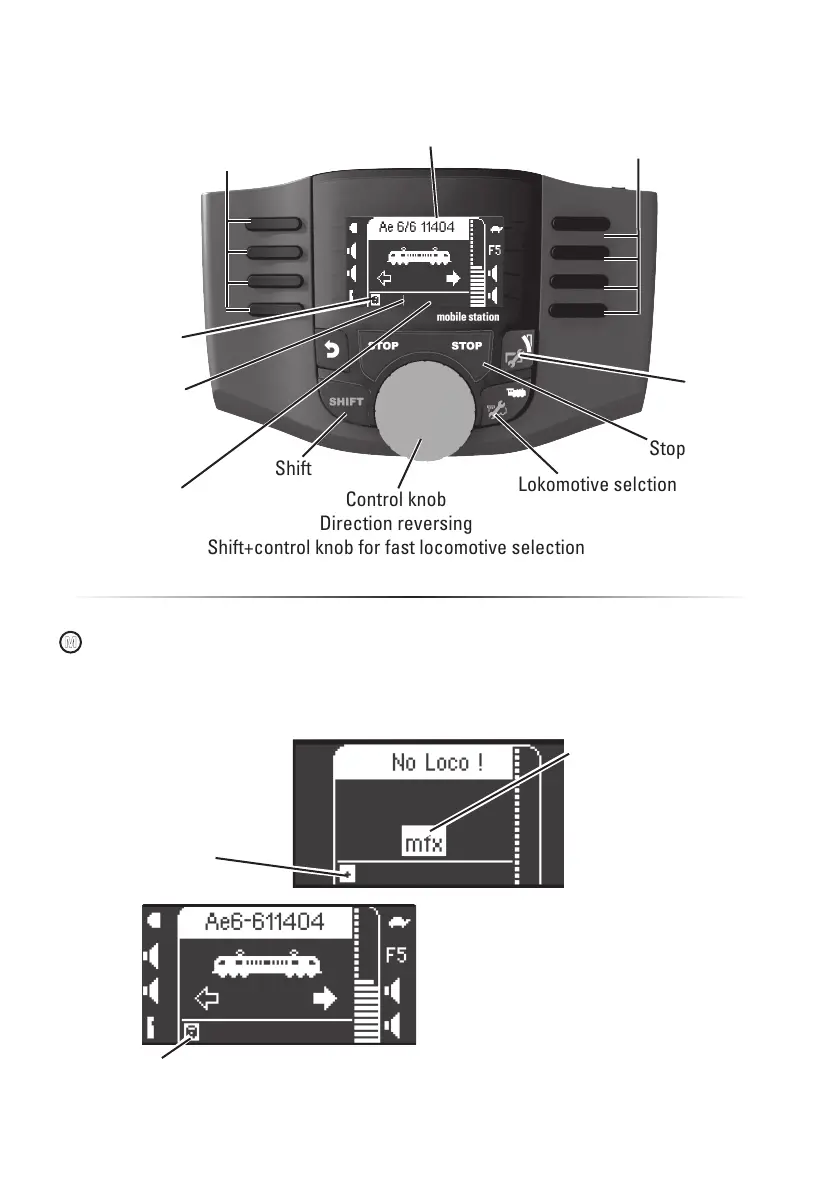
Control knob
Direction reversing
Shift+control knob for fast locomotive selection
Lokomotive selction
Locomotive icon and locomotive name
Selection
Shift
Stop
Selection
Entering a Lokomotive
Memory space
Locomotive list;
occupied
Memory space
Locomotive list;
open
Solonoid
accessories
mfx locomotive
is recognized;
data is read in.
mfx locomotive is ready to be used and can
be run.
If desired or if necessary, the locomotive
and function icons in the menu „Configuring
Locomotives“ can be edited as described
starting on page 14.
M
Registering an mfx Locomotive
“blinks“ during
registration.
Memory space in the loco-
motive list is occupied.
An open memory place in
the locomotive list is auto-
matically recognized.
Place your locomotive with the mfx-decoder on the
track. The locomotive registers itself as shown in the
following illustrations.
Current memory
space for the
locomotive list;
occupied


 To Next Page