12
Confirm selection:
MM or
DCC
Select: Scroll
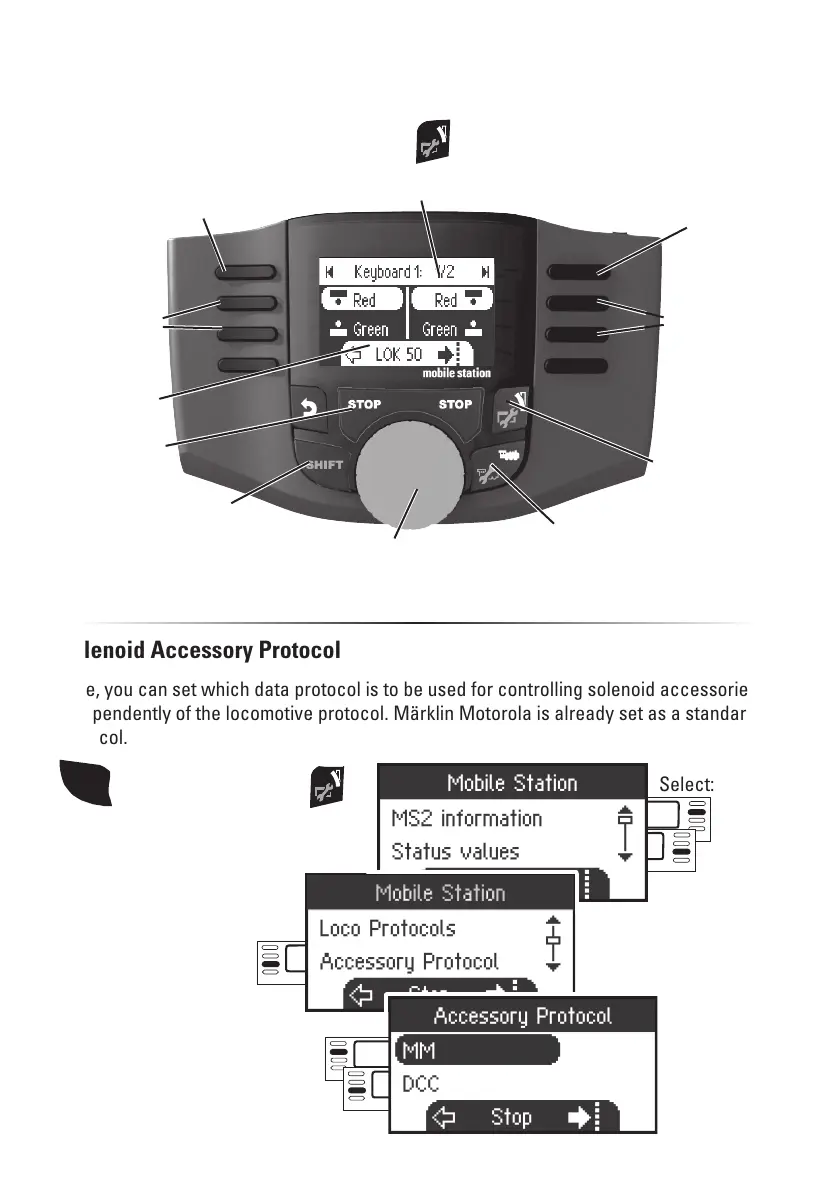
Controlling accessories (Keyboard)
Select:
Accessory Protocol
Solenoid Accessory Protocol
Here, you can set which data protocol is to be used for controlling solenoid accessories.
Independently of the locomotive protocol. Märklin Motorola is already set as a standard
protocol.
Locomotive control knob
Reversing direction
Shift + control knop for fast Keyboardn selection
Locomotive control mode
Shift + Setup
Keyboard address 1 - 320
Scroll addresses (–)
Shift
Stop
Scroll addresses (+)
Controlling
accessories
Controlling
accessories
Active
locomotive
SHIFT
then additionally press
The Keyboard is for switching solenoid items such as turnouts and signals. Press the
following button to change to the Keyboard:


 To Next Page