48
BLUETOOTH
Press the BT symbol to display the Bluetooth interface.
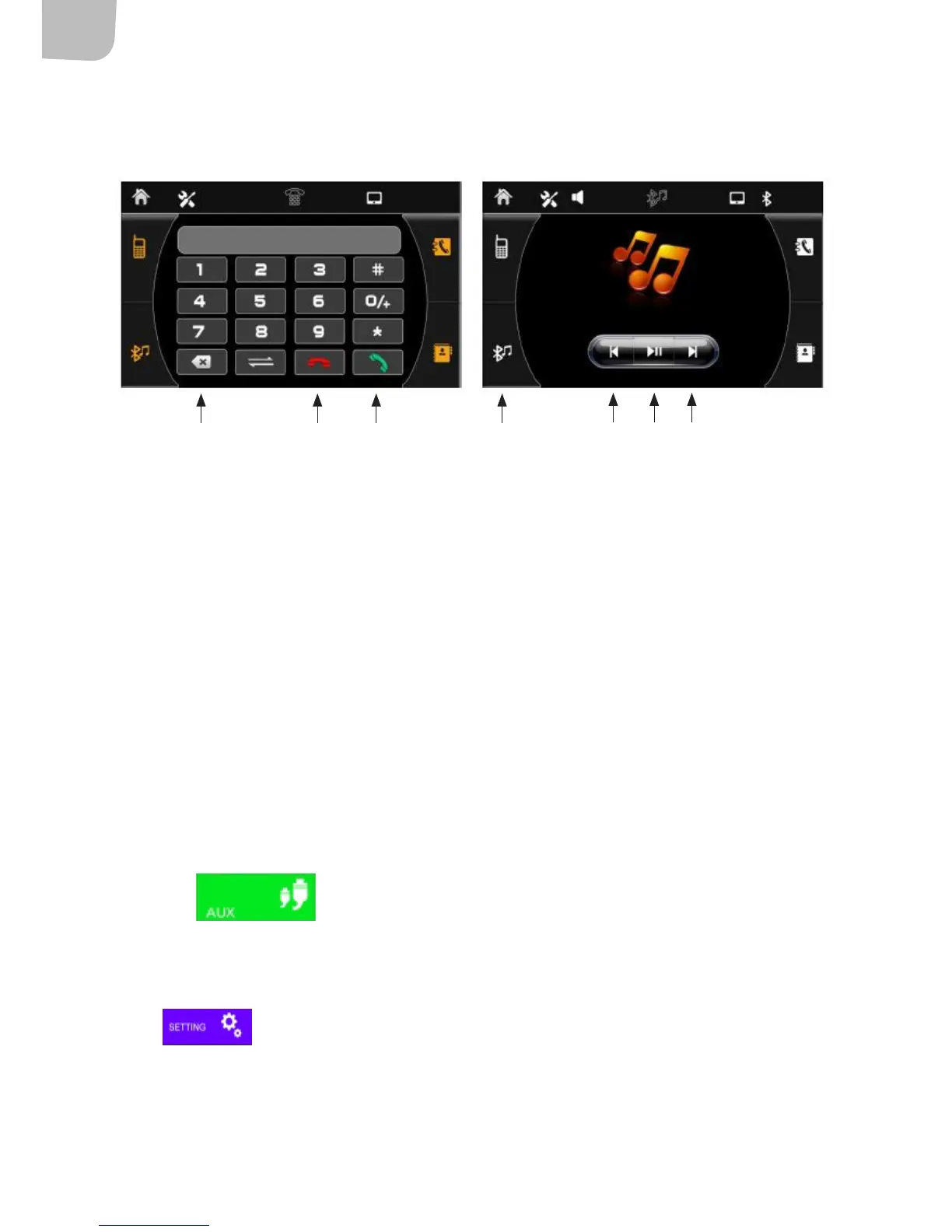
The Bluetooth interface is shown in the top left. Use your mobile phone Bluetooth function to search
for the car stereo and pair the units. A message is displayed once pairing has been completed
correctly. If your mobile phone rings when it is paired to the car stereo, the stereo will automatically
switch to sound mode. Once the call has ended, the car stereo will return to the previous mode
(if possible). NB Once ACC has been turned o and then turned back on, it takes around 30 seconds
before reconnection can be established.
Dial the telephone number and press (1) to call. Press (2) to end the call, (3) for Bluetooth music
and () to clear.
The Bluetooth music interface is shown on the right. Press (5) to play/stop music,
(6) to skip back one track and (7) to go to the next track.
AUX INPUT
•
Press the symbol to switch to AUX mode.
Settings
Press to switch to settings mode.
4 2 1 3
56 7


 To Next Page