45
Switching o
Press the power switch for three seconds to switch o the camera.
• Automatic power o; the camera switches o automatically to save battery after some time in
standby mode. The standard setting is three minutes.
• Switching o with discharged battery; when the battery is discharged
is shown on the
display. When the symbol for discharged battery is shown on the display the camera switches o
automatically.
Status lights
• The status light goes on when the camera is in use.
• The charging indicator goes on in switched o mode when the battery is charging.
Function modes
The camera has four function modes. After switching on, press the mode selector button to switch
between the following modes:
– Video recording
– Car mode (each lm sequence is three minutes long).
– Photographing (still).
– Playback.
Setting the functions
1. When the camera is switched on the video recording mode is enabled. Press the shutter
button to start recording, press again to stop recording.
2. Switch to car mode by pressing the mode selector button. Press the shutter button to start
recording, press again to stop recording.
3. Switch to photographing mode by pressing the mode selector button. Press the shutter
button to take a picture.
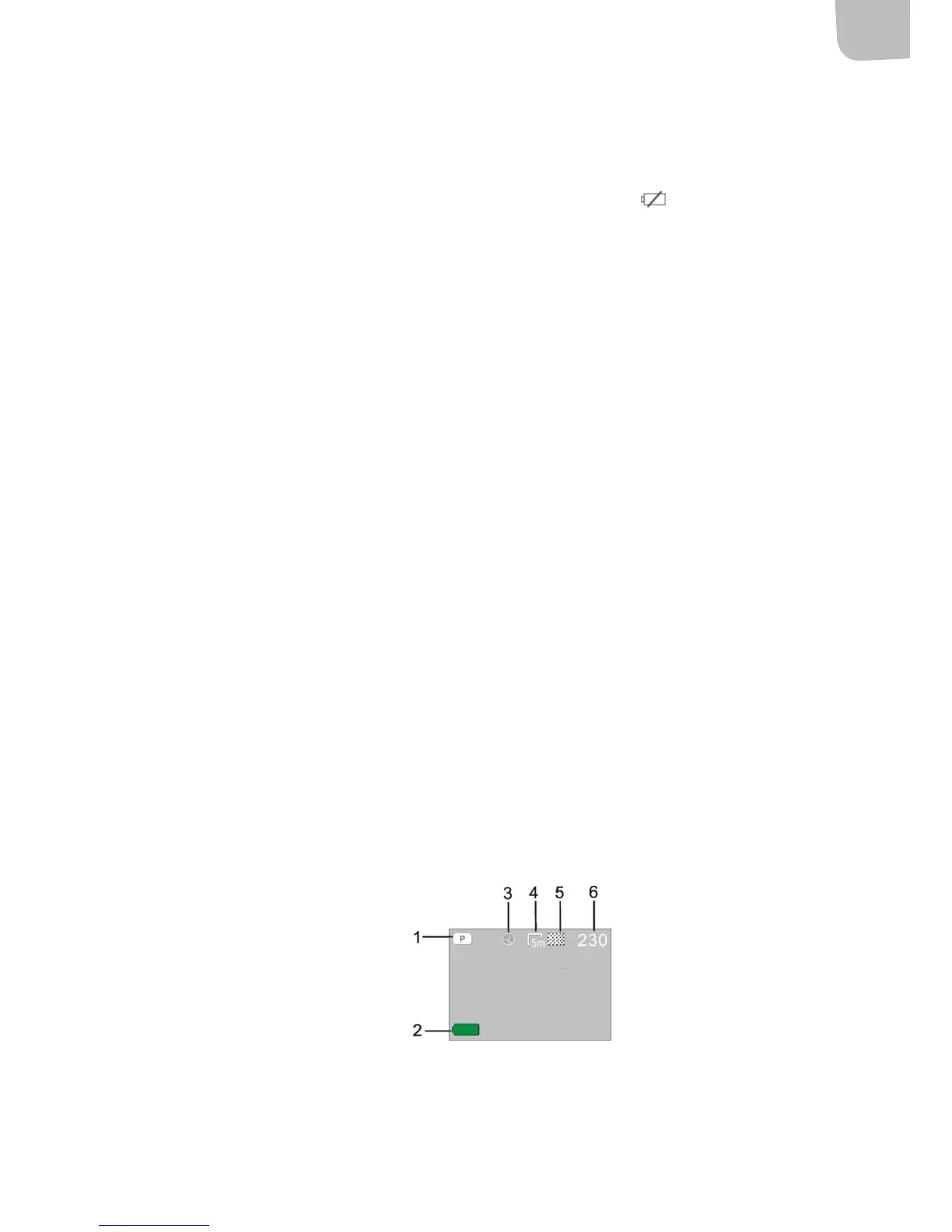
Photographing mode
1. Photographing mode
2. Battery status
3. Self-timer mode
4. Resolution
5. Photo quality
6. Available number of photos


 To Next Page