46
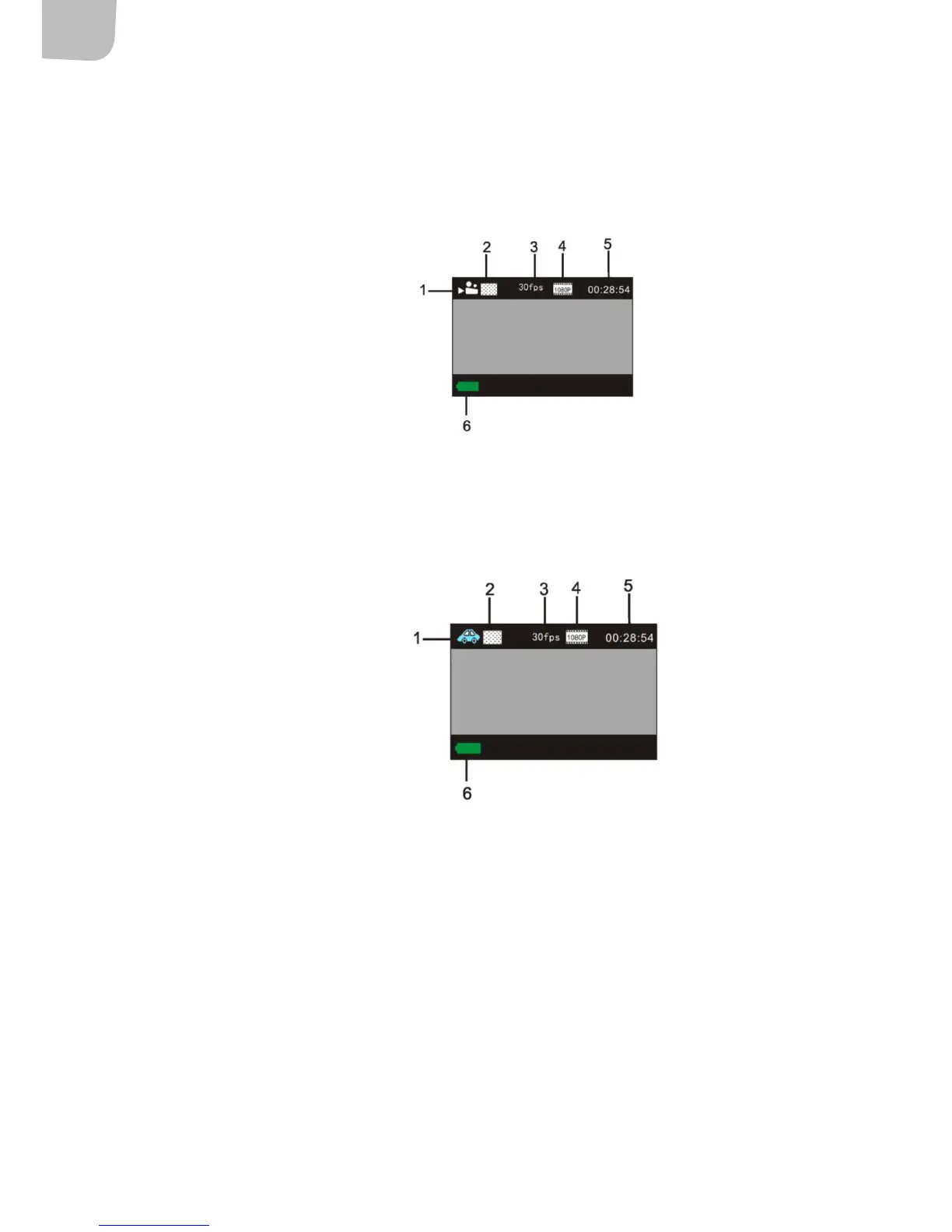
Recording mode
NOTE:
• For HD or FHD video a high speed memory card class 4, or higher is required.
• The display switches o during recording to save the battery. Enable the display by pressing one
of the buttons on the camera.
1. Recording mode
2. Video quality
3. Number of photos
4. Video resolution
5. Available recording time
6. Battery status
Car mode
Press the shutter button once during preview display to start recording. The recoding is saved every
three minutes, after which the next recording sequence starts. When the memory card is full the
oldest video sequence is deleted to make room for the next.
1. Car mode
2. Video quality
3. Number of photos
4. Video resolution
5. Available recording time
6. Battery status
Playback mode
• Start the camera and press the mode selector button to enable playback mode or select CAR/
VIDEO/JPG with the UP/DOWN buttons and press the shutter button to enable preview.
• Press the mode selector button to enable playback mode to browse among photos and lms or
to play recorded video lms.
• Use the UP/DOWN buttons to go to previous/next photo/video.
• Play lm: Press the shutter button to start/pause video playback, fast wind with the UP/DOWN
buttons and press the power switch to stop the playback.


 To Next Page