EasyManua.ls Logo

Marshall Amplification TUFTON - User Manual

Marshall Amplification TUFTON
20 pages
Print Icon
To Next Page IconTo Next Page
Loading...
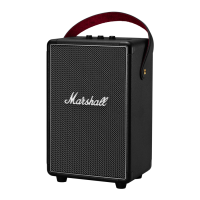
TUFTON - PORTABLE STEREO LOUDSPEAKER
USER MANUAL

Other manuals for Marshall Amplification TUFTON

Questions and Answers

  • D
    dbowmanAug 13, 2025
    Why does my Bluetooth connection drop out on my Marshall Amplification speaker?
    • S
      Scott HicksAug 13, 2025
      Bluetooth connection drops out on your Marshall Amplification speaker because the two Bluetooth devices are too far apart, there are obstacles, or there is a strong electric field. Move the devices closer, within 10 metres and without obstacles like walls or doors. Electrical disturbances may be caused by microwave ovens, wireless network adapters, fluorescent lights and gas cookers, as they use the same frequency range as the Bluetooth device.
  • S
    Stephen RossAug 17, 2025
    What to do if there is no audio from my Marshall Amplification speaker?
    • V
      Vincent WallaceAug 17, 2025
      If there is no audio from your Marshall Amplification speaker, it could be due to the wrong audio source being selected or the volume being too low. Ensure that the device is properly connected to the Tufton. Check for other connected devices that might be playing audio. Slightly increase the volume on your audio source or the speaker itself.
  • M
    Mrs. Sandra Atkins DVMAug 21, 2025
    How to fix distorted audio on Marshall Amplification speakers?
    • D
      danielchavezAug 21, 2025
      Distorted audio on Marshall Amplification speakers can be fixed by addressing several potential causes. First, turn down the playback volume on the audio source. If that doesn't work, try using a different audio file or music player. Additionally, lower the volume on the speaker itself, and reduce the bass or treble settings.
  • L
    Louis JenningsAug 25, 2025
    What to do if my Marshall Amplification speaker is not responding?
    • K
      Kyle MooreAug 25, 2025
      If your Marshall Amplification speaker is not responding, it may be due to a software problem. Try turning the speaker off by rotating the volume knob counter-clockwise until you hear a click. Wait for 15 seconds, and then turn the speaker back on. If this doesn't work, push and hold the Bluetooth button for 7 seconds to reset the speaker to its default settings. Note that this reset will cause the speaker to forget all Bluetooth pairings.
  • A
    Amy MathewsAug 28, 2025
    What to do if I cannot connect to a Marshall Amplification speaker via Bluetooth?
    • A
      adelacruzAug 29, 2025
      If you cannot connect to a Marshall Amplification speaker via Bluetooth, ensure Bluetooth is enabled on your device. Disconnect one of the connected Bluetooth devices before connecting to the speaker. Put the speaker in pairing mode by pushing and holding the Bluetooth button for 3 seconds. If a pin code is requested, use 0000.
  • X
    xbaldwinSep 1, 2025
    How to stop crackling sounds from Marshall Amplification speakers?
    • A
      Andrea SchaeferSep 1, 2025
      Crackling sounds from Marshall Amplification speakers often indicate that the amplifier is clipping due to insufficient output power. To resolve this, decrease the volume on your audio source, as well as lowering the volume or bass on the Tufton itself.
  • M
    michaelsanchezSep 5, 2025
    What causes erratic performance in Marshall Amplification speakers?
    • J
      Jenna WilliamsSep 5, 2025
      Erratic performance in Marshall Amplification speakers can be caused by interference from another electronic device. To resolve this, try moving the Tufton to a different location. Alternatively, turn off or move the electronic device that might be causing the interference.
  • R
    Robert BeckSep 9, 2025
    Why does my Marshall Amplification Tufton speaker not turn on?
    • P
      Paula LeeSep 9, 2025
      Your Marshall Amplification Tufton speaker may not turn on because the battery is discharged. Connect the mains lead to the Tufton and a working wall socket to resolve this.

Summary

Legal and Trademark Information

Disclaimer

Provides a disclaimer regarding the use of the product and limitations of the information.

Box Contents

General Description

Charging the Internal Battery

Turning the Tufton On;Off

Ways to Connect

Connecting via Bluetooth (Pairing)

Step-by-step guide to pair the Tufton speaker with Bluetooth devices.

Connecting via Aux Input

Instructions for connecting the speaker to audio sources using a 3.5mm aux cable.

Battery Level Indicator

Adjusting Volume, Bass, and Treble

Standby Mode

Performing a Factory Reset

Technical Information

Troubleshooting

Marshall Amplification TUFTON Specifications

General IconGeneral
BrandMarshall Amplification
ModelTUFTON
CategorySpeakers
LanguageEnglish

Related product manuals