11
www.LCDracks.com
Marshall Electronics
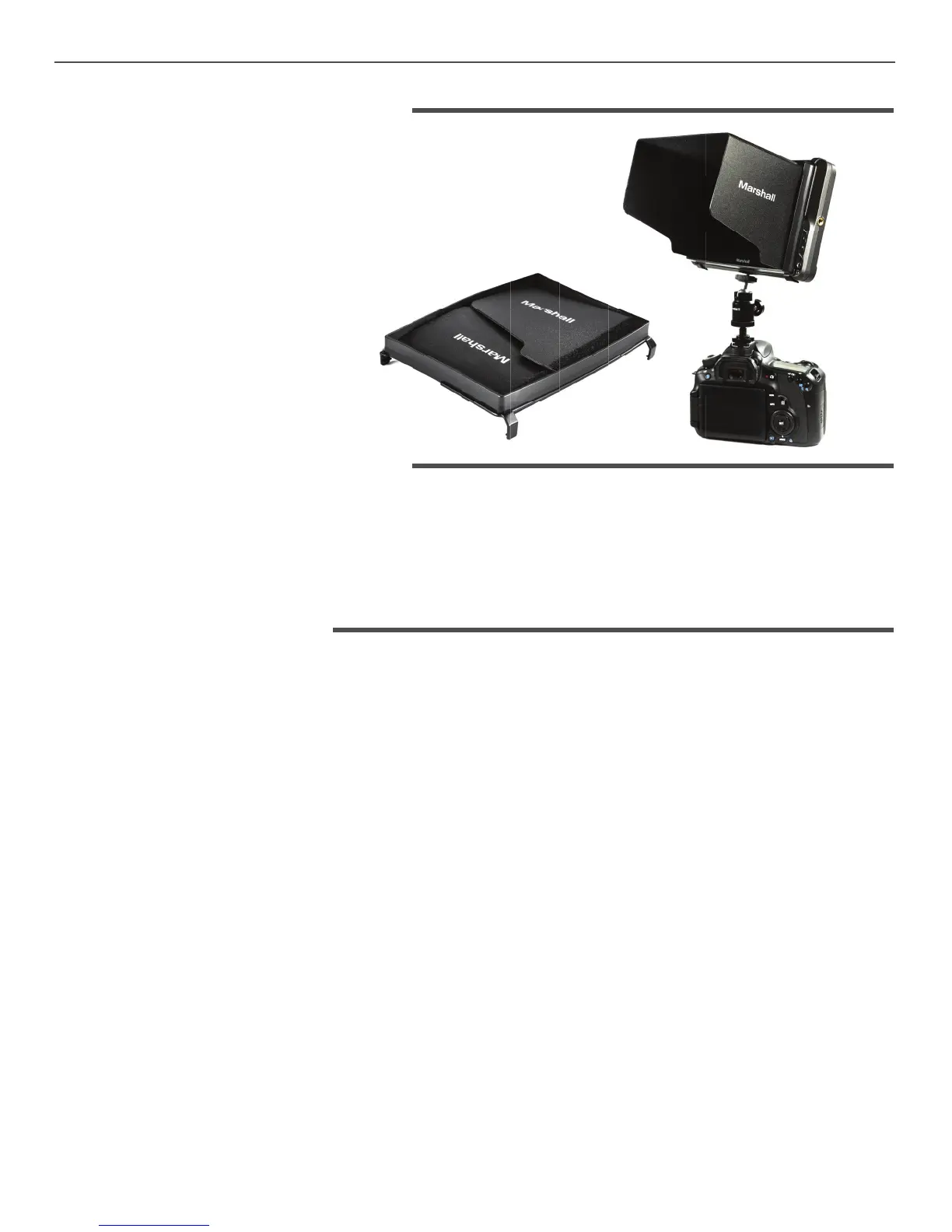
7. Sun Hood Installation
8. Included Accessories
9. Troubleshooting
Sun Hood is designed for use with
V-LCD70W-SH to shield the monitor from glare.
It features three-sided folding design.
Snap the Sun Hood to the front of the monitor.
1. Sun Hood
2. DC 12V Power adapter
3. Operations Manual
1. Power on, but no picture:
Check whether the cables are correctly connected. Also, please use the standard power adapter
coming with the product package or other power supply with the correct voltage and pin
con guration.
2. Only black-and-white display:
Check whether the color saturation and brightness are properly set. Access the Video menu and
make sure Check Field is Off
3. Wrong or abnormal colors:
Check whether the cables are correctly connected. Broken or loose pins of the cables may cause a
bad connection. Access the Waveform menu and make sure False Color is off.
4. Picture is “stuck” on screen:
Access the Video menu page and check that FREEZE INPUT is off.
5. Other problems:
The monitor can be reset to Factory original settings. This is sometimes useful to eliminate the
possibility that an improperly set menu item is interfering with the operation. To reset the monitor,
access the “System Con guration” menu page, press the Menu knob then rotate left or right to
select “Reset”. Press the knob once then rotate the knob to cause the unit to reset.


 To Next Page