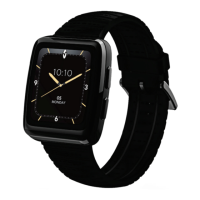
The Masimo W1 is a health and wellness watch designed to be paired with a smart device. This operator's manual provides comprehensive instructions for its proper operation, setup, and maintenance. It is crucial to read and understand all instructions, warnings, cautions, and notes before operating the device.
Function Description
The Masimo W1 system includes the Masimo W1 Device and a Masimo W1 Wireless Charger. When paired with the Masimo Personal Health app, the watch collects and displays vital sign measurements. The app also allows users to access care plan instructions from their care provider, and entered symptoms and collected measurements are sent to the care provider. The watch's Home Screen displays essential information such as Date, Time, SpO2 (when monitoring is enabled), Pulse Rate (when monitoring is enabled), and Daily Step Count.
Usage Features
The Masimo W1 features a user-friendly interface with a Menu/Back Button, a Home Button, and a Touch Screen for interaction.
- Menu/Back Button: This button serves multiple purposes. Pressing and holding it turns the watch On and Off. When the watch is On, a single press cycles through menus from the Home Screen. In submenus, it functions as a back button, allowing users to navigate back to previous screens.
- Home Button: A single press of the Home Button returns the user to the Watch Face. When on the Watch Face, pressing it once turns off the screen, conserving battery.
- Touch Screen: The touch screen allows for intuitive interaction with the watch. Users can tap or swipe to navigate through menus, select options, and interact with various functions.
Basic Setup and Use:
Before using the Masimo W1, it needs to be charged and paired with the Masimo Personal Health app.
- Charging the Watch: To charge the device, plug the charging cable into a power outlet. Remove the watch from your wrist and place the back of the watch onto the magnetic side of the charging cable. The watch will then begin charging.
- Turning the Watch On or Off: To turn the watch On, press and hold the Menu/Back Button until the watch screen illuminates. To turn it Off, press and hold the Menu/Back Button while the watch is On until it powers down.
- Pairing with Masimo Personal Health App:
- Set Up the Masimo Personal Health App: Users must first download the Masimo Personal Health App and create an account by following the instructions provided in an email or text message invitation.
- Pair the Watch: Within the Masimo Personal Health app, navigate to the Menu, then select "My Device." From the "Add Device" menu, choose "Masimo W1" and follow the on-screen instructions to complete the pairing process with the phone.
- Putting on the Watch: For accurate readings, the watch should be placed with the screen facing up, on a flat part of the wrist, avoiding the wrist bone. The strap should be tightened snugly against the wrist, ensuring the bottom of the watch is fully touching the wrist and not sliding. The manual advises checking the "Watch Status" for wristband status.
Operation:
The Masimo W1 offers various functions accessible through its Main Menu. To access the Main Menu, press the top button. Users can swipe left or right with one finger to navigate through the menu and tap on an icon to open a specific function.
- Measurement Settings: This option allows users to select and initiate measurements, enabling the collection of vital sign data.
- Step Settings: Users can enable or disable daily step tracking through this setting.
- Watch Face Settings: This feature allows for customization of the watch face, enabling users to choose from different display options.
- Watch Brightness Settings: Adjusts the screen brightness and duration the screen stays active.
- Settings Menu: Provides additional watch settings, such as vibration preferences and bedtime mode.
- About Watch: Displays information about the watch, including software version and regulatory marks.
Maintenance Features
The manual provides guidance on service and maintenance procedures to ensure the longevity and proper functioning of the Masimo W1.
- Service and Return Procedure: In case of product support needs, users are advised to contact Masimo. If a repair or replacement is necessary, an RMA (Returned Merchandise Authorization) will be provided. Before returning any equipment, it must be cleaned and fully dried according to the Maintenance and Cleaning instructions. The device should be securely packaged, preferably in its original shipping box, with the following enclosed:
- The RMA form or a letter detailing the difficulties experienced with the Masimo W1, including the RMA number.
- Warranty information, a copy of the invoice, or other applicable documentation. A Purchase Order number should be included for repair if the device is out of warranty or for tracking.
- Ship-to and bill-to information, including the name, telephone/Telex/fax number, and country of a contact person for questions about the repairs.
- A certificate stating that the device has been decontaminated for bloodborne pathogens.
- The device should be returned to the address listed in the "Contacting Masimo" section of the manual.
This comprehensive approach to usage and maintenance ensures that users can effectively operate and care for their Masimo W1 device.


 To Next Page


 General