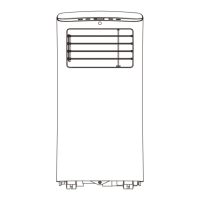
This document is an owner's manual for a Master Craft 12000 BTU Portable Air Conditioner, model NOK5Y. It provides detailed instructions for installation, operation, and maintenance, along with important safety information and troubleshooting tips.
Function Description:
The Master Craft 12000 BTU Portable Air Conditioner is designed to provide cooling, heating, dehumidification, and fan-only operation for indoor spaces. It is a portable unit, meaning it can be moved between rooms, and requires an exhaust hose to vent hot air outside through a window. The unit features a control panel on the device itself and comes with a remote control for convenient operation. It includes various modes such as Cool, Heat, Dry, Auto, and Fan, allowing users to select the appropriate setting for their comfort needs. The unit also has a Sleep/ECO mode for energy-efficient operation during sleep, and a Timer mode for scheduled on/off times. An auto-swing feature (for applicable models) allows for automatic adjustment of the horizontal louver blade to distribute air evenly.
Important Technical Specifications:
- Model: NOK5Y
- Dimensions (W x H x D): 12.8" x 24.2" x 12.5"
- BTU (Cooling): 12000
- BTU (Heating): 10000
- SACC BTU: 7700
- Voltage: 115V / 60Hz
- Watts (Cooling): 1350
- Watts (Heating): 1125
- Refrigerant Type: R410A / 16.23 oz.
- Operating Temperature Range:
- Cool Mode: 62-95°F (17-35°C)
- Dry Mode: 55-95°F (13-35°C)
- Heat Mode: 41-86°F (5-30°C)
- Temperature Setting Range: 62°F – 86°F (17°C - 30°C)
- Timer Setting Range: 0 – 24 hours
- Remote Control Range: Approximately 26 feet (8 meters)
Usage Features:
The portable air conditioner offers a range of features for user convenience and comfort:
- Modes: Users can select from AUTO, COOL, DRY, FAN, and HEAT modes using the "MODE" button on the control panel or remote.
- Temperature Adjustment: The "UP" and "DOWN" buttons allow for precise temperature settings in 1°F/1°C increments.
- Fan Speed: The "FAN" button controls the fan speed, offering LOW, MID, HIGH, and AUTO settings. Note that fan speed may not be adjustable in HEAT mode for some models, and is fixed at LOW in DRY mode.
- Swing Feature: For models with auto-swing, the "SWING" button initiates automatic louver movement. Pressing it again stops the louver at the desired angle. The remote control allows for 6-degree adjustments with each press, or continuous auto-swing by holding the button for 2 seconds.
- Sleep/ECO Mode: This mode adjusts the set temperature gradually to promote energy efficiency and comfort during sleep. In COOL mode, the temperature increases by 2°F/1°C after 30 minutes, and again after another 30 minutes, maintaining the new temperature for 7 hours before returning to the original setting. In HEAT mode, the temperature decreases similarly. This feature is not available in FAN or DRY mode.
- Timer Mode: The "TIMER" button allows users to set an AUTO ON or AUTO OFF time program, scheduling the unit to turn on or off after a specified duration (0 to 24 hours).
- LED Display: The unit's LED display shows the set temperature or timer settings. In DRY and FAN modes, it displays the room temperature. The LED display can be turned on or off via the remote control.
- Short Cut Button (Remote Control): This button allows users to save current operating settings (mode, temperature, fan speed, sleep feature) and quickly restore them.
- Error Codes: The unit displays error codes (E1, E2, E3, E4, E7) to indicate specific malfunctions, such as sensor errors or communication issues.
- Protection Code: A "P1" code indicates that the water tray is full, requiring manual drainage.
- Auto-Restart: In case of power loss, the unit will automatically resume operation with its previous settings once power is restored.
- 3 Minute Delay: To protect the cooling system, the unit cannot be restarted for 3 minutes after being stopped, shut off, or losing power.
Maintenance Features:
Regular maintenance is crucial for optimal performance and longevity of the portable air conditioner:
- Air Filter Cleaning: The air filters should be cleaned with water at least once every two weeks, or more frequently if needed. The unit should not be operated without the filters. A filter indicator light reminds users to clean the air filter after 250 hours of operation.
- Water Drainage: The unit collects water during operation, which can be drained in two ways:
- Manual Drainage: When the "P1" error code appears, the bottom tray is full. The unit beeps, and the air conditioning/dehumidification stops. Users must turn off and unplug the unit, then remove the bottom drain plug to empty the water.
- Continuous Drainage: For continuous operation without manual emptying, a drain hose can be connected to the upper drain outlet and directed to a floor drain. The hose must slope downward to ensure smooth water flow.
- Unit Cleaning: The exterior of the unit can be cleaned with a damp, lint-free cloth and mild detergent, then dried with a dry, lint-free cloth. Flammable liquids, chemicals, or spraying water directly on the unit should be avoided.
- Storage: Before storing the unit, the water collection tray should be drained, and the unit should be run in FAN mode for 12 hours in a warm room to dry it and prevent mold. The air filter should be cleaned and reinstalled. Batteries should be removed from the remote control. The unit should be stored in a cool, dark place, away from direct sunlight or extreme heat.
- Power Cord: The power cord should be inspected regularly for damage. A damaged cord should not be used, and the unit should be unplugged before any maintenance or cleaning.
The manual emphasizes important safety instructions, including warnings against using the unit in areas with combustible gases or liquids, obstructing air outlets, or attempting unauthorized repairs. It also provides guidance on proper installation, grounding, and handling of the power cord.


 To Next Page
 General