Page 18
INSTALLING & CLEANING CARTRIDGE FILTER
INSTALLING CARTRIDGE FILTER
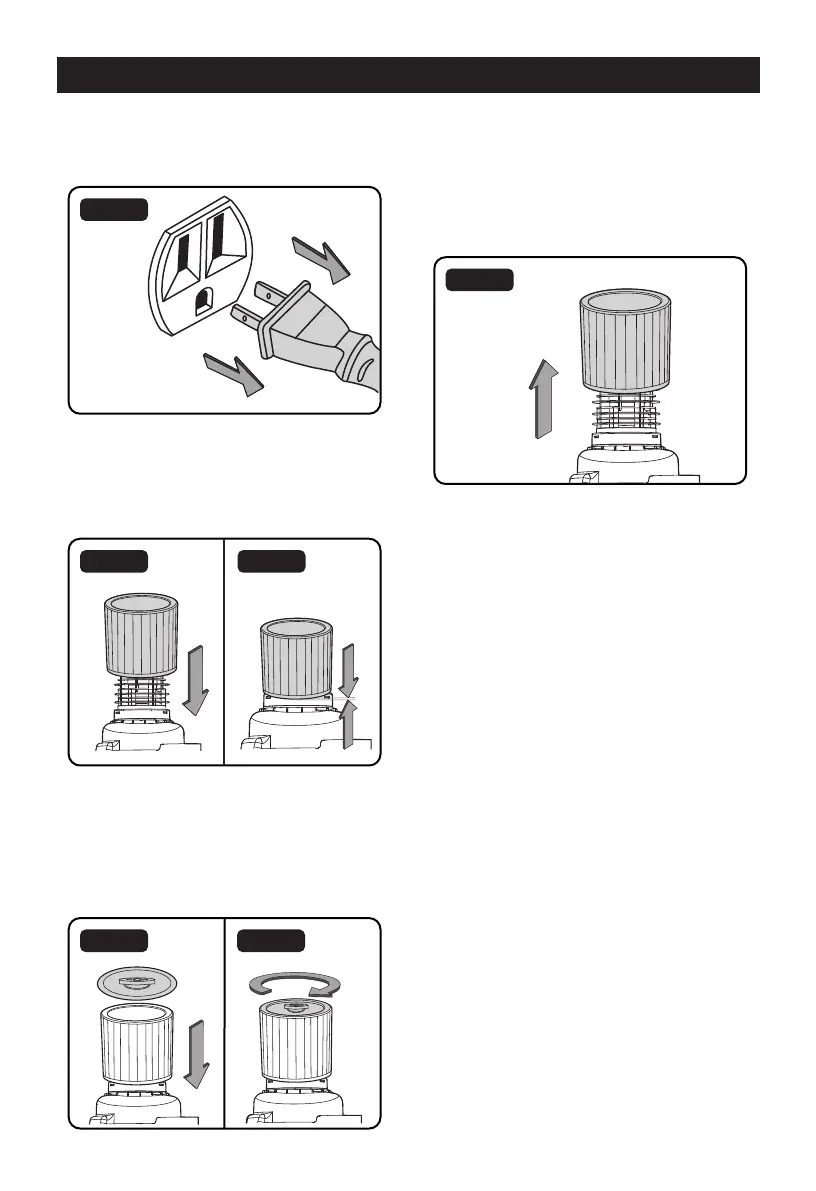
1. Verify that the power cord is disconnected
from the outlet (Fig. 1).
Fig. 1
2. Remove the power head and place in an
upside-down position.
3. Install the cartridge filter over the filter cage
making sure the cage is completely covered
(Fig. 2 & 3).
Fig. 2 Fig. 3
4.
Place the filter retainer on top of the cartridge
filter over the raised lip and tighten down by
turning the retainer clockwise; do not over-
tighten (Fig. 4 & 5).
5. Place the power head back onto the
collection tank.
Fig. 4 Fig. 5
REMOVING & CLEANING CARTRIDGE FILTER
1. Unlock and remove the filter retainer by
turning retainer handle counterclockwise.
2. With the removed power head in an upside-
down position, carefully remove the cartridge
filter from the filter cage (Fig. 6).
Fig. 6
3. Clean the cartridge filter by gently tapping
or brushing dirt off. Cleaning should not be
done indoors in living areas. For optimal
performance a new filter is recommended.
4. Install cleaned or new filter as above in steps
2-4 of Installing Cartridge Filter.


 To Next Page