7
function for perishable foods, such as meat and fish, which
may go bad when left at room temperature for hours. Cooked
rice may yield to an overly soft texture due to the long soaking
time. It may also cause a layer of burnt rice at the bottom of
the pot if it’s kept in the ‘Keep Warm’ mode for too long.
The ‘Delay Start’ function is not recommended for porridge,
oatmeal or any other foamy and sticky foods. Because of the
possibility of these foods expanding and causing the float
valve to not seal properly, which can lead to overflowing of
food content, it is highly recommended that your appliance
is not left unattended during the heating cycle. Since the
‘Delay Function’ implies leaving the appliance unattended, we
strongly recommend not using this function for these types of
food.
Warming
Pressing the ‘Keep Warm/Cancel’ key in the standby state
activates the ‘Keep Warm’ function.
CARE AND MAINTENANCE
Regular care and maintenance is essential to ensure this
appliance is safe for use. If any of the following circumstances
take place, please stop using the appliance immediately and
contact our support team.
• Power cord and plug suffer from expansion, deformation,
discolouration, damages, etc.
• A portion of the power cord or plug gets hotter than usual.
• The appliance heats abnormally, emitting a burnt smell.
• When powered on, there are unusual sounds or vibrations.
• If there is dust or dirt on the plug or socket, please remove
with a dry brush.
Cleaning
Caution: please make sure the appliance has cooled down and
is unplugged before cleaning.
1. Clean the appliance after each use. Wipe the black inner
housing rim and slot dry with a cloth to prevent rusting on the
exterior pot rim.
2. Remove the lid and take out the inner pot, wash with
detergent, rinse with clear water, and wipe dry with a soft
cloth. The stainless steel inner pot is dishwasher safe.
3. Use water to clean the lid, including the sealing ring (which
can be removed), exhaust valve, anti-block shield, and wipe
clean with dry soft cloth. Do not take apart the steam release
pipe assembly.
4. Clean the body with a damp cloth. Do not immerse the
appliance in water. Do not use a wet cloth to clean the pot
while the power cord is plugged into the outlet.
TROUBLESHOOTING
If you experience any problem with the appliance, please
review the troubleshooting tips. For technical assistance and
product return information, please contact the location of
purchase or visit: www.isalbi.com.au
The cases in the following tables do not always indicate a
faulty appliance. Please examine the appliance carefully before
contacting the support for repair.
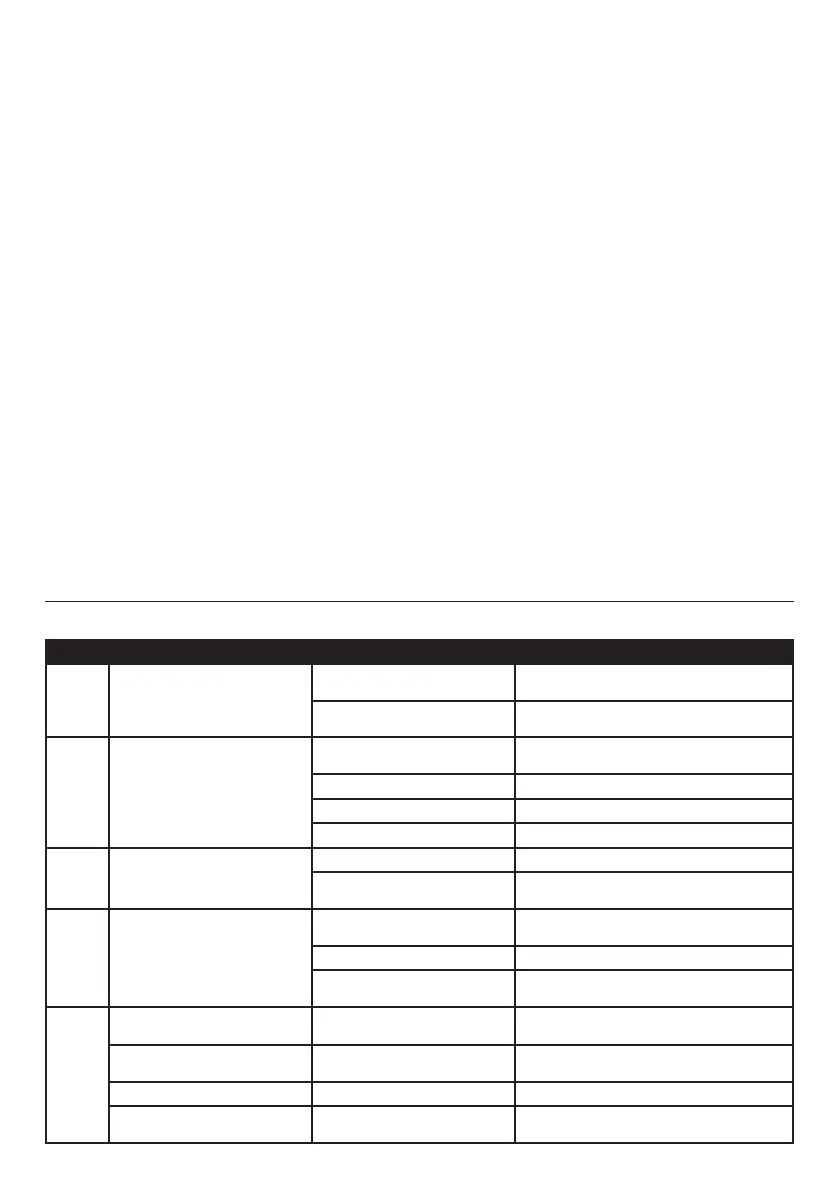
NO. Problem
1 Lid does not lock
The sealing ring is not installed
properly
Reinstall the sealing ring
The float valve is obstructing the
locking mechanism
Slightly shake the lid so the float valve drops in
position.
2 Air leak from the rim of the lid
The sealing ring is not installed
properly
Install the sealing ring
Food debris on the sealing ring Clean the sealing ring
Damaged sealing ring Replace the sealing ring
The lid does not lock properly Re-lock the lid
3 Air leak from the float valve
Food debris on the float valve Clean the float valve
The sealing ring for the float is
worn or damaged
Replace the sealing ring for the float
4 The float cannot rise up
The pressure limit valve is not in
the correct position
Replace the pressure limit valve to the centre of
the sealing location
Not enough food or water Add food or water into the inner pot
Air leak from the rim of the lid of
pressure limit valve
Send the product to our service centre for repair
5
E1
Sensors are not connected
correctly
Return the product to the retailer from whom you
purchased from
E2
Sensors short circuit
Return the product to the retailer from whom you
purchased from
E3
Over heating Add more water
E4
Pressure is low or pressure switch
is failing
Return the product to the retailer from whom you
purchased from
TROUBLESHOOTING TABLE


 To Next Page
 Loading...