EasyManua.ls Logo

Mastervolt Mac Plus 2/12-50 - Configuration

Mastervolt Mac Plus 2/12-50
36 pages
Print Icon
To Next Page IconTo Next Page
To Previous Page IconTo Previous Page
Loading...
MAC-PLUS
15
10. Configuration
The Mac Plus settings can be adjusted in two ways:
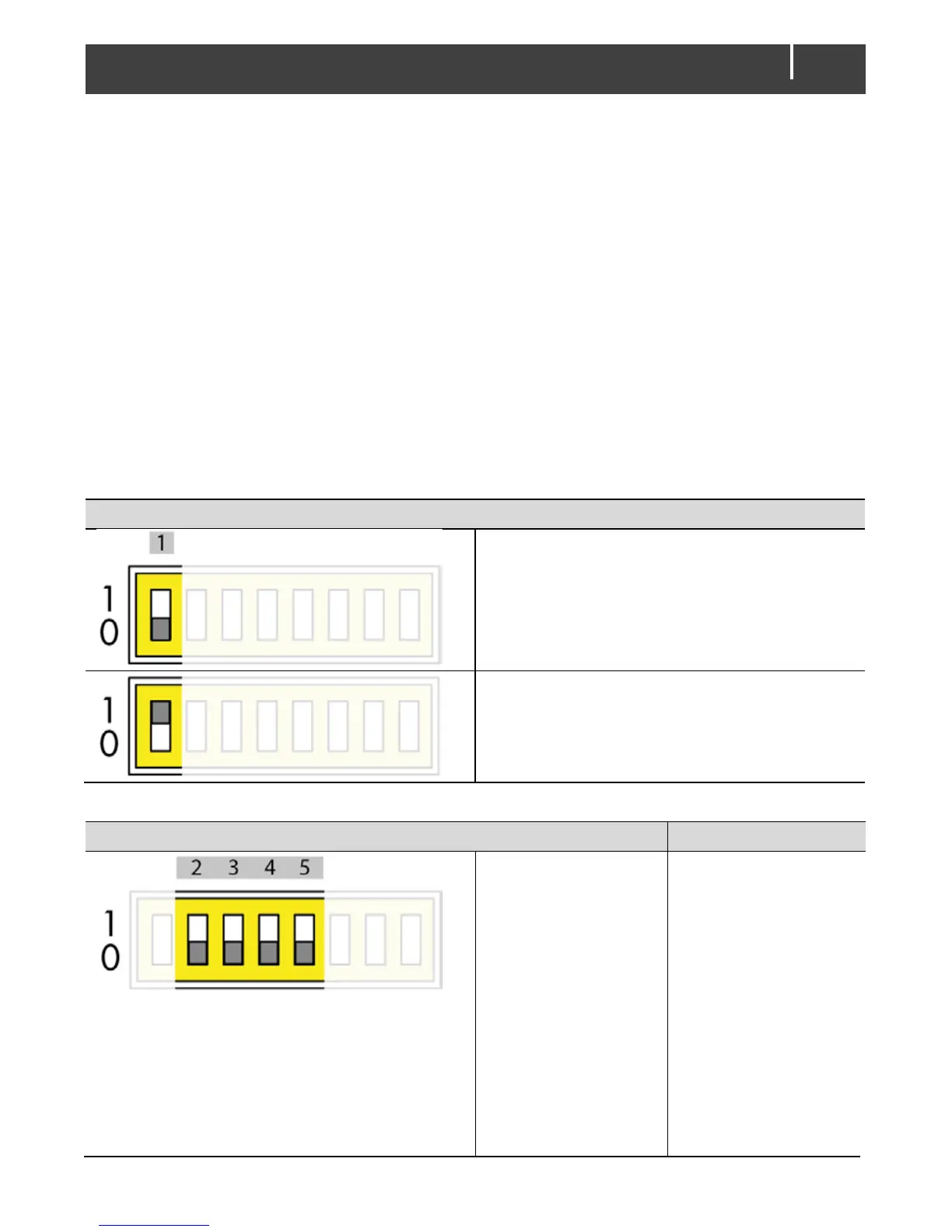
By means of DIP switches;
Via the MasterBus network (by means of a remote control panel or an interface connected to a
PC with MasterAdjust software); see chapter 14 and 15.
Once a DIP switch has been set to On, the related setting cannot be configured via MasterBus.
CAUTION!
Incorrect settings of the Mac Plus can cause serious damage to your batteries and/or the connected
load! Adjustments of settings may be undertaken by authorised personnel only!
For an overview of the various DIP switch settings, please see the following three tables.

MasterBus communication
No MasterBus communication in sleep mode
(Low no-load consumption 2 mA)
Always MasterBus communication
(No-load consumption < 10 mA)
Charger on conditions
Typical use
MasterBus settings
apply. See chapter
14 and 15.
Default factory
setting:
Remote switch input
‘active high’ and input
voltage greater than
enable voltage
setpoint (12.50 V* /
25.00 V**)
Default factory
setting:
Recommended
setting for vehicle
with proper engine
run signal

Related product manuals