USE OF MASTERADJUST SOFTWARE
EN / MasterBus - USB interface / September 2008 9
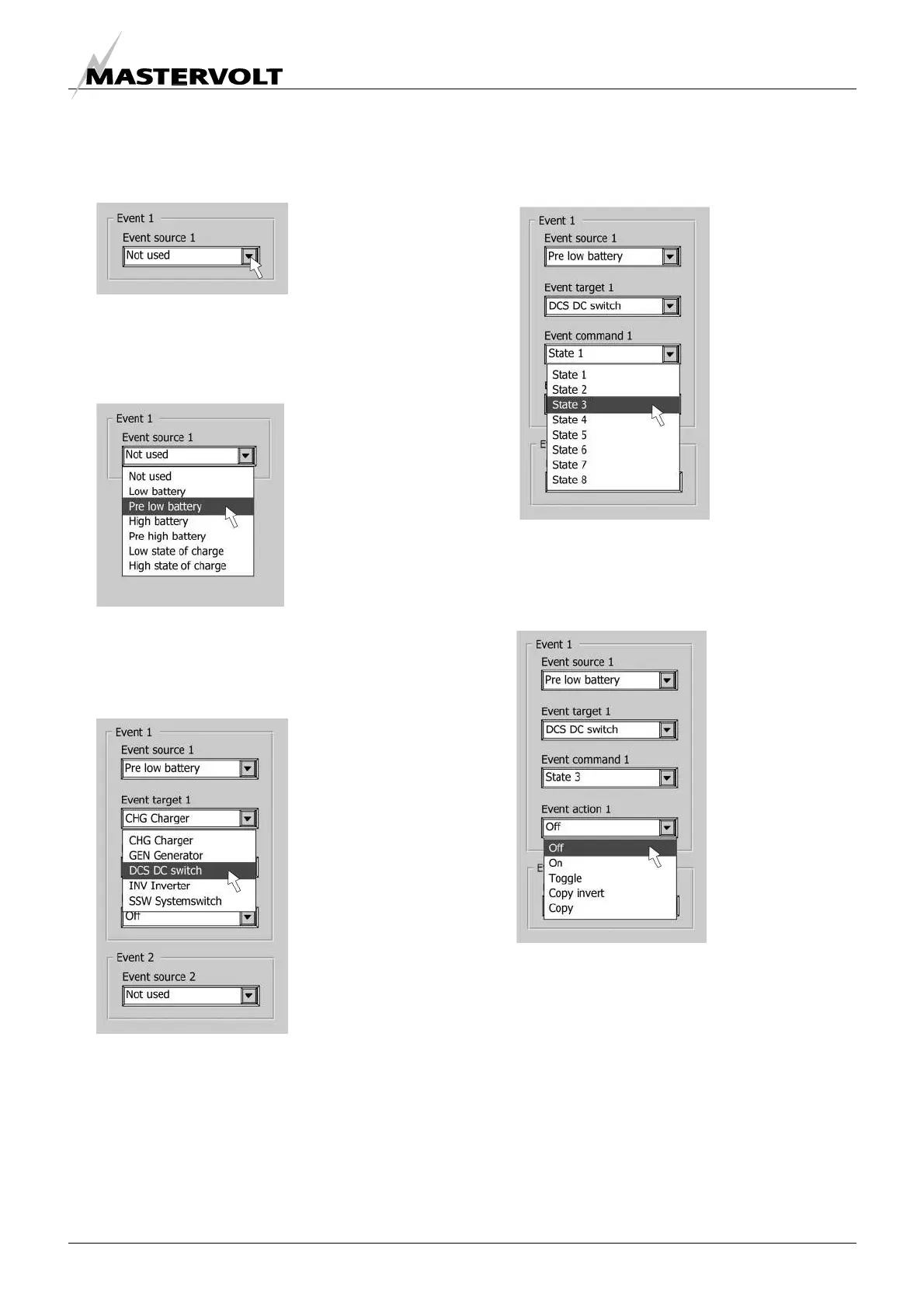
2 After selecting the command source, click on the
“Configuration” tab. One of the displayed drop
boxes is named “Event source 1” (figure 13).
3 Click on the drop box and select the event at the
command source that should be the trigger for
an action (Example: Pre low battery) (figure 14).
4 Select the name of the device that should take
action in case of this event: Event target.
(Example: DC switch) (figure 15).
5 Next select which parameter must be changed
at the target: Event command. (Example: The
state of switch 3) (figure 16).
6 Finally select the Event action, which is the
action that should take place (Example: Go off)
(figure 17).
If you want to continue programming event based
commands, proceed with Event source 2 and follow
the same procedure as described above.
Figure 17
Figure 16
Figure 15
Figure 14
Figure 13


 To Next Page