en
21| AC442 | A/C System service
1901016-85
9.6
Flushing after changing type of Oil
When servicing a vehicle, the type of oil in the vehicle's
A/C system should be noted to prevent a cross-
contamination inside the AC440. If a PAG system is
serviced and another vehicle with a POE system is to be
serviced next, a flush routine must be performed to
prevent a cross-contamination of the oils.
If the AC440 is not flushed the internal hydraulic system
and the vehicle air conditioning system could be
damaged as a result of cross-contamination. MATCO
cannot accept liability for any such damage.
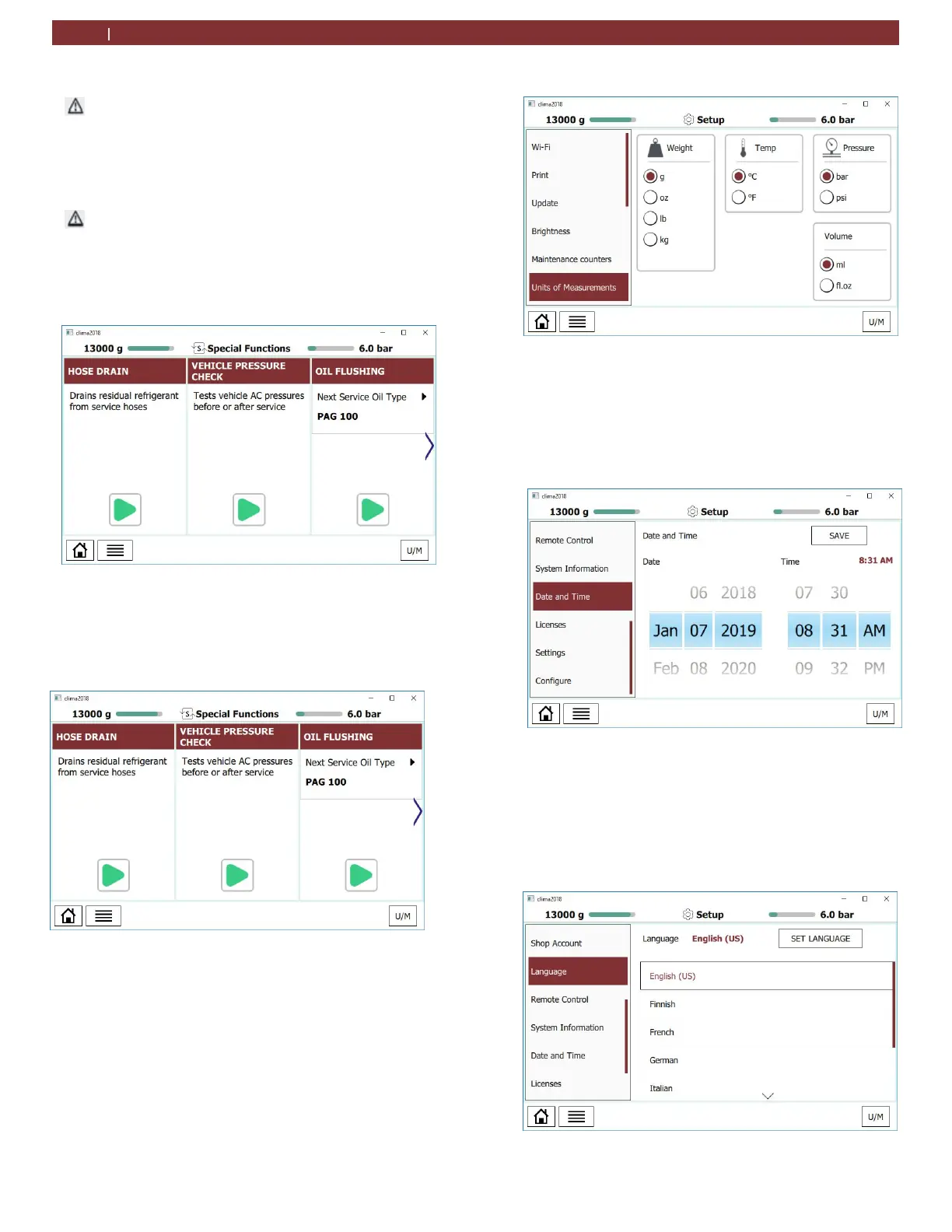
1. From the MENU, scroll to SPECIAL FUNCTIONS and
select. The SPECIAL FUNCTIONS screen will now be
displayed.
Fig. 22: Oil Flushing
2. Follow the menu prompting to complete oil flushing.
9.7
V
ehicle Pressure Check
1. From the MENU, scroll to SPECIAL FUNCTIONS and
select. The SPECIAL FUNCTIONS screen will now be
displayed.
Fig. 23: Vehicle pressure check
2. This will test vehicle A/C pressures before and after service
9.8
Unit of measure
1.
From the SETUP menu, scroll to UNITS OF MEASURE.
2.
The user has the option of selecting the units of
measure for:
Weight
Temperature
Pressure
Volume
Fig. 24: Unit of measure
9.9
Clock
Adjustment
1. From the SPECIAL FUNCTIONS menu, scroll to SET UP
and select DATE and TIME .
2. The operator can now scroll to the desired date and
time settings.
3. After selection is complete, press save.
Fig. 22: Clock Adjustment
9.10
Setting language
1. From the SETUP menu, scroll to LANGUAGE
2. The user now has the option of seven language
selections.
3. Scroll to the desired language and select.
4. Press SET LANGUAGE to save your selection.
Fig. 23: Language


 To Next Page