49
48
CHAPTER 9: PART REPLACEMENT GUIDE
9.6 UPPER HANDLEBAR REPLACEMENT
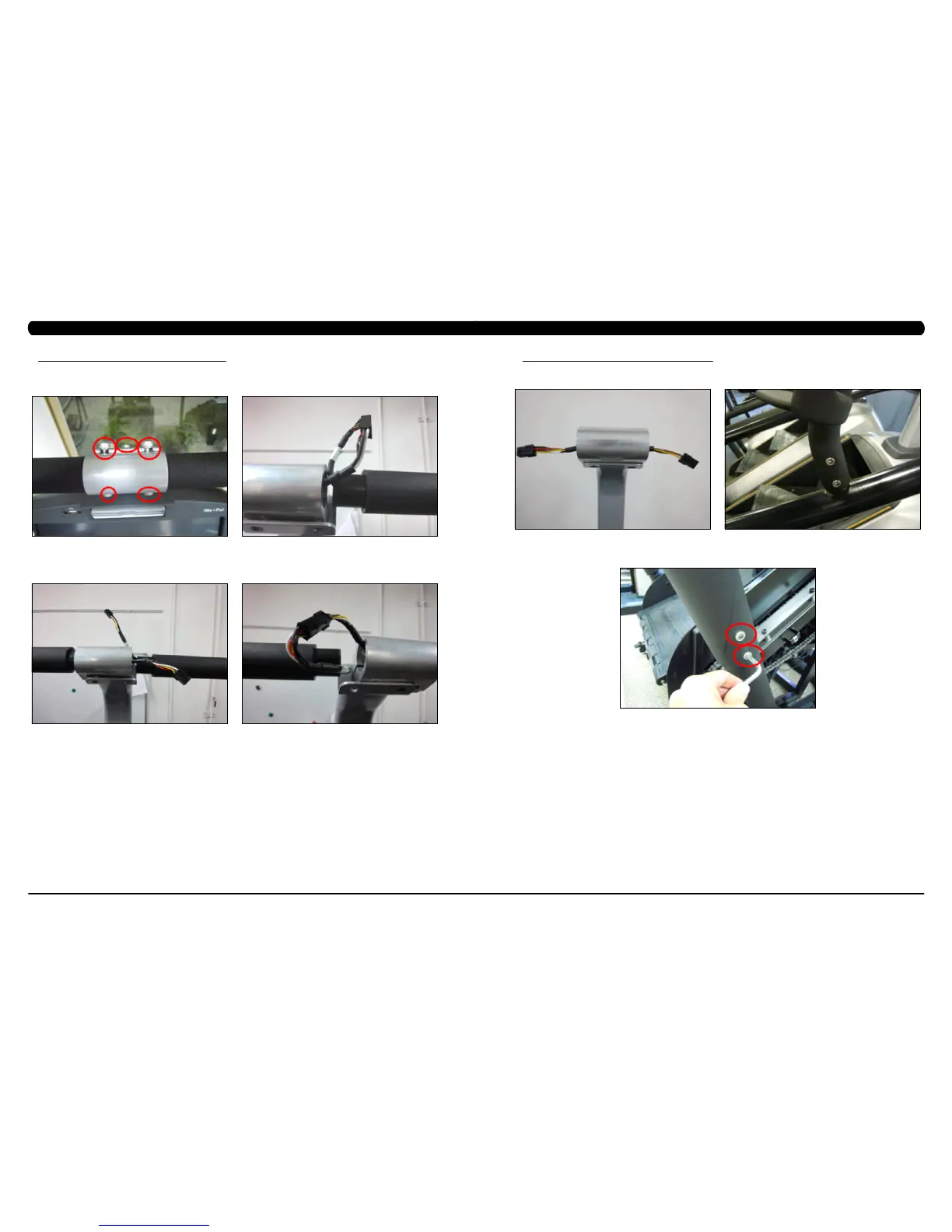
FIGURE A FIGURE B
1) Turn off power and disconnect the cord from the machine.
2) Remove the 5 screws holding the upper handlebar set to the console mast (Figure A).
3) Pull out the right handlebar and hand grip cable (Figure B).
4) Disconnect the wiring that connects the left hand grip cable to the hand pulse extension wire (Figure C).
5) Pull out the left handlebar and hand grip cable (Figure D).
FIGURE D FIGURE C
CHAPTER 9: PART REPLACEMENT GUIDE
9.6 UPPER HANDLEBAR REPLACEMENT SET - CONTINUED
6) Disconnect the wire that connects the left hand grip cable to the hand pulse extension wire (Figure E).
7) Remove the 2 screws on each side holding the front of the upper handlebar set to the lower handlebar set (Figure F).
8) Remove the 2 screws on each side holding the rear of the upper handlebar set to the lower handlebar set (Figure G).
9) Reverse Steps 1-8 to install a new upper handlebar set.
10) Test the Climb Mill for function as outlined in Section 9.21.
FIGURE E
FIGURE F
FIGURE G


 To Next Page