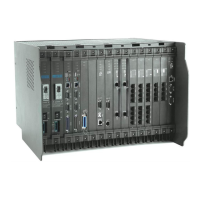
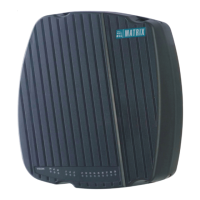
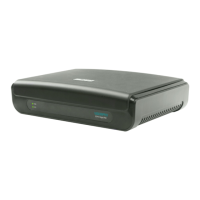
Need help?
Do you have a question about the Matrix ETERNITY and is the answer not in the manual?
Steps to add a second call while on an active call, and how to retrieve held calls.
Basic procedure for answering incoming calls by lifting the handset or using speakerphone.
Accessing contacts via the system's global directory.
Accessing contacts stored in the personal directory.
Using account codes by dialing them before the desired number.
Setting a single-occurrence alarm.
Setting a recurring daily alarm.
Cancelling a previously set one-time alarm.
Managing alarms using voice prompts.
Automatically redialing when an extension or trunk is busy.
Auto redialing when the called extension does not answer.
Deactivating the auto call back feature.
Configuring automatic redial.
Deactivating automatic redial.
Enabling background music for an extension.
Disabling background music for an extension.
Scheduling call forwarding based on specific time periods.
Scheduling call forwarding for daytime working hours.
Scheduling call forwarding for designated break times.
Cancelling previously scheduled call forwarding settings.
Scheduling call forwarding for night or non-working hours.
Cancelling all scheduled call forwarding across all time zones.
Activating call forwarding from a remote location.
Deactivating call forwarding from the current extension.
Placing an active call on hold.
Resuming a call that was placed on hold.
Temporarily storing a call for later retrieval.
Retrieving a call that was parked.
Forwarding a call to another extension.
Forwarding a call to an external trunk line.
Restricting the display of caller ID.
Enabling the display of caller ID.
Establishing a three-way conference call.
Planning a dial-in conference call.
Starting or joining an active dial-in conference.
Terminating an active dial-in conference.
Conducting and managing multi-party calls.
Exiting a conference call temporarily.
Returning to a conference call after temporary leave.
Permanently exiting a conference call.
Terminating an active multiparty conference.
Activating the Digital Output Port.
Deactivating the Digital Output Port.
Configuring DND for different call types (all, internal, external).
Disabling the Do Not Disturb feature.
Opening a door lock device remotely.
Unlocking a COSEC door controller.
Setting scheduled door phone routing.
Setting manual door phone routing.
Setting manual destination for door phone calls to extensions.
Setting manual destination for door phone calls to external numbers.
Manually configuring dynamic lock settings.
Automatically configuring dynamic lock settings.
Toll control setting allowing all calls.
Toll control setting for local calls only.
Toll control setting for national calls.
Toll control setting blocking all calls.
Activating hotdesking from a remote location.
Deactivating hotdesking from the current extension.
Configuring a direct line to a destination.
Enabling direct outward dialing.
Setting direct outward dialing to a specific number.
Configuring the duration for a hotline.
Deactivating hotline and outward dialing services.
Indicating a new message is waiting.
Clearing the message wait indicator.
Accessing waiting messages.
Muting the microphone before initiating a call.
Muting the microphone during an active call.
Restoring microphone audio after muting.
Securing an outgoing trunk line.
Releasing a reserved trunk line.
Marking the user as absent.
Marking the user as present.
Modifying the user password.
Retrieving voicemail from an extension.
Accessing a general mailbox.
Creating a reminder notification.
Deleting a set reminder.
Managing reminders using voice prompts.
Entering another extension's service class.
Exiting another extension's service class.
This document is a user guide for SLT (Single Line Telephone) devices, specifically for use with ETERNITY and SARVAM UCS (Unified Communication Server) systems. It outlines how to access and utilize various features available on these telephone systems, primarily focusing on call management, communication enhancements, and system-specific functionalities. The guide is structured to provide step-by-step instructions for each feature, often including dial codes and expected system responses.
The SLT device, when integrated with ETERNITY or SARVAM UCS, serves as a comprehensive communication tool, enabling users to make and receive calls, manage call flows, and access a range of advanced telephony features. It supports both internal and external communication, with options for direct dialing, department group calls, and operator assistance. The system facilitates efficient call handling through features like call forwarding, call hold, and call transfer, ensuring that calls are routed appropriately and managed effectively.
For enhanced communication, the SLT system offers features such as conference calling, allowing multiple parties to participate in a single conversation. It also includes functionalities like conversation recording for documentation or review purposes, and paging for broadcasting announcements within designated zones. The system supports various call types and routing options, including those related to door phones and digital output ports, which can be integrated for security and control applications.
The SLT system also provides personal productivity tools, such as abbreviated dialing for quick access to frequently called numbers, and alarms for reminders. It incorporates features for managing user presence and availability, like Do Not Disturb (DND) and user absent/present status, which help in controlling incoming communications. Security and access control are addressed through dynamic lock and toll control features, allowing users to manage phone access and restrict certain types of calls.
For hospitality environments, specific features like room maid status, floor service, and mini bar management are integrated, streamlining operations and improving guest services. The system also includes redundancy notification calls, ensuring users are informed about system status changes.
Making Calls: Users can make calls to extensions by dialing the extension number, to department groups by dialing the group number, and to an operator by dialing 9 or 0 (for users in USA). External calls can be made by dialing a Trunk Access Code (TAC) followed by the external number. For voice mail access, specific dial codes (3931 for ETERNITY LE/ME/GE/PE, SARVAM UCS; 390 for ETERNITY NE) are provided, followed by VMS prompts.
Making a Second Call: To initiate a second call while on an existing call, users can flash the hook switch, dial the desired extension or external number (preceded by TAC for external calls), and then speak.
Receiving Calls: To answer an incoming call, users simply lift the handset or press the speaker key.
Abbreviated Dialing: The system supports both global and personal directories for abbreviated dialing. Global directory numbers (100-999) can be accessed by dialing 8 or 6 (for users in USA) followed by the index. Personal directory numbers (001-025) are accessed similarly. Users can program numbers into their personal directory using a specific dial code (1071) followed by the index, external number, and TAC.
Account Code: To make calls using an account code, users dial 1058, followed by the account code, TAC, and the desired number.
Alarms: Users can set once-only alarms or daily alarms by dialing 161, followed by the hour, minute, and a code (1 for once-only, 2 for daily). Alarms can be canceled by dialing 161 followed by #. Voice-guided alarms can be set or canceled by dialing 163.
Auto Call Back (ACB): If an extension or trunk is busy, users can activate ACB by dialing '2' during the busy tone. If an extension is not responding, ACB can be activated by dialing '2' during the ring back tone. ACB can be canceled by dialing 102.
Authority Code (Using Walk-In Class of Service): To use an authority code, dial 111-2, followed by the authority code, password, and the desired number.
Auto Redial: If an external number is busy, users can activate auto redial by going on-hook, then off-hook, and dialing 17. Auto redial can be canceled by dialing 1070.
Background Music: Background music can be set on an extension by dialing 1099. It can be canceled by dialing 1099 again.
Barge-In: To barge into a busy extension, dial '4' during the busy tone. The dialed extension will receive beeps, and upon answering, the other party will hear on-hold music.
Blind Transfer to Extension Users Mailbox: While in speech, flash the hook switch, dial 1078, and then the extension number.
Call Chaining: While in speech with a trunk or extension, flash the hook switch, dial 1050, and then the transfer target extension.
Call Forward (CF): Various call forwarding options are available: unconditional, if busy, if no reply, and if busy/no reply. These can be set to an extension, department group, VMS, or an external number (using TAC). Dial codes range from 131 to 134, with specific codes for enabling/disabling dual ring (136-1/136-0) and canceling all call forward settings (130).
Call Forward - Scheduled: Scheduled call forwarding can be set for working hours (day) and non-working hours (night), with similar options as regular call forwarding. Dial codes range from 1175-1-1 to 1175-3-5-0, allowing for granular control over call routing based on time zones.
Call Follow Me: Users can set call follow me from a remote extension by dialing 135, their extension number, and user password. It can be canceled by dialing 130.
Call Hold: To put a party on hold, flash the hook switch and keep the handset aside, or tap the hook switch. To retrieve a held party, flash the hook switch and speak.
Call Park: To park a call, flash the hook switch, dial 115, and then an orbit number (personal or general). To retrieve a parked call, dial 116 and the orbit number.
Call Pick Up - Group: To answer a ringing extension within a group, go off-hook and dial '4'.
Call Pick Up - Selective: To answer any ringing extension, go off-hook, dial '12', and then the number of the ringing extension.
Call Toggle: While in speech with party 1, flash the hook switch, dial party 2's number, speak with party 2, then flash and dial 1 to toggle back to party 1, and so on.
Call Transfer: Calls can be transferred to an extension by flashing the hook switch, dialing the extension (transfer target), and going on-hook. Calls can be transferred to a trunk by flashing, dialing TAC, and the external number (transfer target).
Calling Line Identification Restriction (CLIR): CLIR can be enabled by dialing 1031 and disabled by dialing 1030.
Cancel all Features of an Extension: Dialing 1051 will cancel various features including auto answer, auto call back, auto redial, background music, call forward, do not disturb, hot line, trunk reservation, and walk-in class of service.
Conference: A 3-party conference can be established by making the first call, then the second, flashing the hook switch, and dialing *3.
Conference - Dial-In: Users can schedule a dial-in conference by dialing *19-1, a conference number, and assigning a 4-digit password. To initiate or join, dial *19-2, the conference number, and password. To cancel, flash and dial 190 during an active conference.
Conference - Multiparty: A multiparty conference is established by making the first call, then the second, flashing and dialing *3, then the third call, flashing and dialing *3, and so on, until all desired parties are included. Participants can temporarily leave (Flash - 191), rejoin (Go Off-Hook - 191), or permanently leave (while active, Go On-Hook). The conference can be canceled by flashing and dialing 190.
Conversation Recording: To start recording a conversation, flash the hook switch, dial 1095, and a beep will indicate recording has begun.
Digital Output Port (DOP): DOP can be turned on from an extension by dialing 1174 (or 1104 for Philippines users), the DOP number, and 1. To turn off, dial 0 instead of 1.
DISA Login: To log in to a DISA-enabled trunk, dial 1079, the extension number, and user password.
Do Not Disturb (DND): DND can be set by dialing 18 and a type of call (1 for all calls, 2 for internal, 3 for external). DND can be canceled by dialing 18-0.
DND Override: If a dialed extension has DND set, users can override it by dialing '4' during the feature tone, which will ring the dialed extension.
Door Lock: To open a door lock device, flash the hook switch and dial 1173 (or 1103 for Philippines users) during a door phone call. To unlock a COSEC Door Controller, flash and dial *7 during a door phone call.
Door Phone: Routing modes for door phones can be set to scheduled (1171/1101, door phone extension number, 1) or manual (1171/1101, door phone extension number, 2). Routing destinations for manual mode can be set to an extension (1172/1102, door phone extension number, 1) or an external number (1172/1102, door phone extension number, 2).
Dynamic Lock: Dynamic lock can be set manually or automatically by dialing 142, user password, and minutes (00 for manual, 01-99 for automatic).
Dynamic Lock (Cont.) - Toll Control: Toll control levels (0 for all calls, 1 for local, 2 for national, 3 for no calls) can be set by dialing 141, user password, and the respective level number.
Emergency Call: To make an emergency call, go off-hook and dial the emergency number, or dial TAC followed by the emergency number.
Flashing on Trunk: While on a trunk call, flash the hook switch and dial * followed by the PSTN code (for CO Trunk only).
Forced Answer: If a dialed extension doesn't respond, dial '5' during the ring back tone to turn on the phone speaker of the called extension. This feature requires the called extension to be a DKP/Extended IP Phone.
Forced Call Disconnection: If a dialed extension or accessed trunk is busy, dial '# *' during the busy tone to disconnect the call, followed by the extension number or TAC.
Hotdesk: Hotdesk can be set from a remote extension by dialing 1091, your extension number, and user password. It must be canceled on both the current and remote extensions.
Hotline: Hotline can be set to an extension/department group/VMS by dialing 151. Hot outward dialing can be set by dialing 152 (TAC) or 153 (TAC, external number). A hotline timer can be set by dialing 154 and seconds. Hotline/hot outward dialing can be canceled by dialing 150.
Interrupt Request: If a dialed extension is busy, dial '3' during the busy tone. The called extension will receive beeps. If the called extension dials Flash, speech is established. If not, the calling extension receives an error tone.
Last Caller Recall: To call the last internal number from which a call was received, dial 1092.
Last Number Redial: To redial the last external number, dial 7.
Live Call Supervision: To supervise an extension, dial 1098 and the extension number. Your extension will ring, and you can observe CLI. This requires a CLI phone on the supervising extension.
Meet Me Paging: To answer a paging call announced for you, dial 1093 and the paging extension number.
Message Wait: Message wait can be set by dialing 1076, extension number, and 1. It can be canceled by dialing 0 instead of 1. New messages can be retrieved by dialing 1077.
Mute: To mute before a call, dial 1052 and the desired number. To mute during an ongoing call, flash the hook switch and dial 1052. To unmute, flash and dial 1052 again.
Paging: To start an announcement, dial 1074 and the page zone number. SLT/ISDN Terminal users cannot be paged.
Presence: Users can set their presence status by dialing 104, user password, and a message code (0 for absent, 1 for present, 2 for auto detect, 3 for away, 4 for on the phone, 5 for do not disturb, 6 for I am mobile, 7 for in meeting, 8 for out for meal, 9 for out of office). Setting '0' means not receiving any calls.
Raid: If a dialed extension is busy, dial '5' during the busy tone to establish a three-way speech where all parties hear beeps.
Trunk Reservation: To reserve a trunk, dial '6' during a busy tone when accessing a trunk. When the trunk is free, the extension rings. Answer the call, and dial the desired number. Trunk reservation can be canceled by dialing 102.
User Absent/Present: Users can set their status as absent by dialing 104, user password, and 0. To set as present, dial 1 instead of 0.
User Password: To change the user password, dial 114, current user password, new user password.
Voice Help: To listen to a message, dial 1090.
Voice Mail: Voice mail can be accessed from an extension by dialing 3931 (ETERNITY LE/ME/GE/PE, SARVAM UCS) or 390 (ETERNITY NE), and following VMS prompts. General mailbox can be accessed by dialing 1176.
Reminder: Reminders can be set by dialing 162, followed by date, time, and confirmation. Reminders can be canceled by dialing 162-#. Voice-guided reminders can be set/canceled by dialing 164.
Room Monitor: To monitor a room, dial 1073 and the extension number (only DKP/Extended IP Extensions can be monitored). Room conversation can be heard.
Selective Port Access: The guide provides a table of port types (CO, BRI, T1E1, E&M, Mobile, SIP Trunk, LD Port) with their respective port access codes and port numbers for ETERNITY, SARVAM UCS, and NE variants. Port types and numbers vary by system variant.
Walk-In Class of Service: To walk into another extension, dial 111-1, your extension number, user password, and the desired number. To walk out, dial 111-0.
Forced Release Order (for E&M MFCR2 only): During 3-way speech, press Flash, dial *38, and the second party will be disconnected, allowing speech with the desired party.
Manual Priority Intrusion (for E&M MFCR2 only): If a dialed extension is busy, press Flash on the busy tone, dial *37-3, to establish a 3-way speech.
Floor Service (for Hospitality): Dial 38 to talk.
Mini Bar (for Hospitality): Dial 1056, item number (00-99), quantity (00-99).
Room Maid Status (for Hospitality): Dial 1054, followed by a status code (1: Maid in Room, 2: Room is Dirty, 3: Room Clean and can be rented, 4: Room Clean yet to be inspected, 5: Room is Out of Service). Status options for Micros Opera PMS Interface and Extended Starlight PMS Interface are also provided.
User Definable Fields: Dial 1096, digit string, # *, to set user definable fields.
The document primarily focuses on user-level operational features rather than explicit maintenance features. However, some aspects can be considered related to system health and user management:
User Password Management: The ability to change user passwords (Dial 114) is a fundamental security and maintenance feature, ensuring that individual user accounts remain secure and can be updated as needed. This helps prevent unauthorized access to phone features and personal settings.
Cancel All Features of an Extension: The "Cancel all Features of an Extension" (Dial 1051) functionality can be seen as a maintenance-related feature. If an extension is experiencing issues due to conflicting or incorrectly configured features, this option provides a quick way to reset all settings to a default state, aiding in troubleshooting and restoring normal operation.
Redundancy Notification Call: The "Redundancy Notification Call" feature informs users about the completion of a redundancy process. While not a direct maintenance action, it is a crucial notification for system administrators and users, indicating that the system's failover mechanisms have been activated or resolved. Users can acknowledge this call by pressing digits (0-9, * or #), which helps in confirming system stability. This feature is particularly important for ensuring business continuity and awareness of system health, though it is noted as not supported in ETERNITY and may not display on SLT devices without FSK CLI support.
Dynamic Lock and Toll Control: These features (Dial 142 and 141) allow for the management of phone access and call restrictions. While primarily usage features, they contribute to system security and resource management, which are aspects of system maintenance. By controlling who can make certain types of calls or access the phone, administrators can prevent misuse and manage costs.
Selective Port Access Information: The table detailing "Selective Port Access" provides information about different port types and their access codes/numbers. While this is configuration information, understanding these details is essential for system administrators during setup, troubleshooting, and maintenance of the telephony infrastructure.
In summary, while the guide is user-centric, the underlying system capabilities and the provided features contribute to the overall maintainability and reliable operation of the ETERNITY and SARVAM UCS systems with SLT devices.
 General
| VoIP Channels | 32 |
|---|---|
| Maximum CO Lines | 32 |
| Music on Hold | Yes |
| Caller ID | Yes |
| Power Supply | 100-240V AC, 50/60Hz |
| Extensions | 500 |
| Trunks | 32 |
| Features | Call Forwarding, Call Transfer, Call Waiting |
| Maximum Users | 500 |
| Maximum IP Extensions | 500 |
| VoIP Protocols | SIP |
| Voice Codecs | G.711, G.729 |
| Call Features | Call Forwarding, Call Waiting, Call Transfer |
| Networking | Gigabit Ethernet |


 To Next Page