Need help?
Do you have a question about the Matrix Visionpro and is the answer not in the manual?
Introduces the VISIONPRO PBX, its purpose for small businesses, and its variants.
Lists the necessary items and conditions required before installing the VISIONPRO unit.
Instructions for unpacking the VISIONPRO and verifying package contents.
Details on how to connect the VISIONPRO unit using provided cables and ports.
Describes the system reset cycle observed after powering on the VISIONPRO unit.
Instructions for setting the current date and time using command strings.
Details on how to set SE and SA passwords for system access.
Guides on assigning Class of Service groups to individual or all stations.
Instructions for assigning allowed/denied lists for toll control to stations.
Procedure to clear all configured features for a specific station.
Explains how to configure the flash timer duration for station calls.
Guides on assigning flexible numbers to individual stations or loading defaults.
Procedure to assign a specific station as the system operator.
Instructions for enabling/disabling trunks and assigning dial types.
Configuration for direct inward dialing (DID) calls on trunks.
Configuration for direct outward station access (DOSA) calls on trunks.
Assigning destination stations for incoming calls during day mode.
Assigning destination stations for incoming calls during night mode.
Configures the ringing duration before transferring a call to the next station.
Setting up day and night hunting schemes for incoming trunk calls.
Step-by-step guide to making and verifying internal calls on the system.
Procedure for making and verifying external calls using trunk access codes.
Explains how to differentiate between internal and external calls based on ringing patterns.
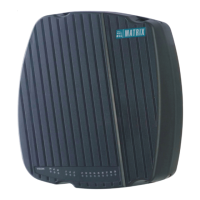
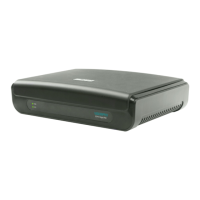
The Matrix VISIONPRO is an integrated digital SOHO (Small Office Home Office) PBX designed to meet the communication needs of small businesses. This Quick Start guide provides instructions for its installation and basic configuration. For more detailed information on configuring the product and its features, users should refer to the System Manual. Documentation can be accessed by scanning the QR Code on the Product Label/Packaging Label or by visiting the Matrix Telecom Solutions website. Product registration and warranty details are available on the Matrix Comsec website.
The VISIONPRO serves as a central hub for managing telephone communications within a small office environment. It connects to external CO (Central Office) trunk lines from the Public Switched Telephone Network (PSTN) and provides ports for connecting internal Single Line Telephone (SLT) phones and FAX machines. The system allows for internal calls between connected SLT stations and external calls through the CO lines. It supports various configurations for call routing, class of service, toll control, and hunting schemes, making it a versatile solution for small business communication.
The VISIONPRO series offers different variants based on the number of CO Trunk Ports (FXO Ports) and SLT Ports (FXS Ports):
The device is powered by an external 12V DC power adapter. It features an Earth connection for telecom earth. The connectors for CO and SLT ports are designed for standard twisted-pair telephone cables with 0.5 mm conductor diameter. A Reset button is available to restore the SE/SA Password to its default value.
The VISIONPRO is configured by dialing specific command strings from a station phone connected to the system. The Phone Wizard allows for programming basic parameters, while the System Manual provides details for advanced configurations.
1#98-SE Password (Default SE Password: 1234).27-Date-Month-Year-Day (Date: 01-31, Month: 01-12, Year: 00-99 (base year 2000), Day: 1-7 (1=Sunday)).28-Hour-Minute (Hour: 00-23, Minute: 00-59). Seconds are automatically set to '00'.291-New SE Password (4-digit number string, digits 0-9).292-New SA Password (4-digit number string, digits 0-9).31-Ext-Day CoS Group-Night CoS Group (Ext: 1-4 digits, CoS Group: 0-7).31-*-Day CoS Group-Night CoS Group.32-Ext-Day AL/DL List-Night AL/DL List (Ext: 1-4 digits, AL/DL List: 0-7).32-*-Day AL/DL List-Night AL/DL List.343-Ext.36-Ext-Flash Timer Count (Count: 1-9, 1=70-100ms, 6=101-600ms).36-*-Flash Timer Count.37-Software Port No-Flexible Number-#* (Software Port No: 00-07, Flexible Number: 1-4 digits, use #* if less than 4 digits).37-*-0.391-Ext (Ext: 1-4 digits).41-Trunk-Enable/Disable Flag-Dial Type Flag (Trunk: 0-2, Enable/Disable: 0=Disable, 1=Enable, Dial Type: 0=Pulse, 1=Tone).41-*-Enable/Disable Flag-Dial Type Flag.43-Trunk-Day Code-Night Code (Trunk: 0-2, Day/Night Code: 0=Disable, 1=Enable).45-Trunk-Day Code-Night Code (Trunk: 0-2, Day/Night Code: 0=Disable, 1=Enable).47-Trunk-Ext1-Ext2-Ext3-Ext4 (Trunk: 0-2, Ext1-Ext4: 1-4 digits, max four destinations).47-*-Ext1-Ext2-Ext3-Ext4.48-Trunk-Ext1-Ext2-Ext3-Ext4 (Trunk: 0-2, Ext1-Ext4: 1-4 digits, max four destinations).48-*-Ext1-Ext2-Ext3-Ext4.212-Timer (Timer: 01-99 seconds).46-Trunk-Day Hunting Scheme-Night Hunting Scheme (Trunk: 0-2, Scheme: 0=Off, 1=Round Robin, 2=Delayed Simultaneous, 3=Immediate Simultaneous).46-*-Day Hunting Scheme-Night Hunting Scheme.0.The standard sales package includes:

 To Next Page

 General