38
9.5 CONSOLE KEYPAD / OVERLAY REPLACEMENT
CHAPTER 9: PART REPLACEMENT GUIDE
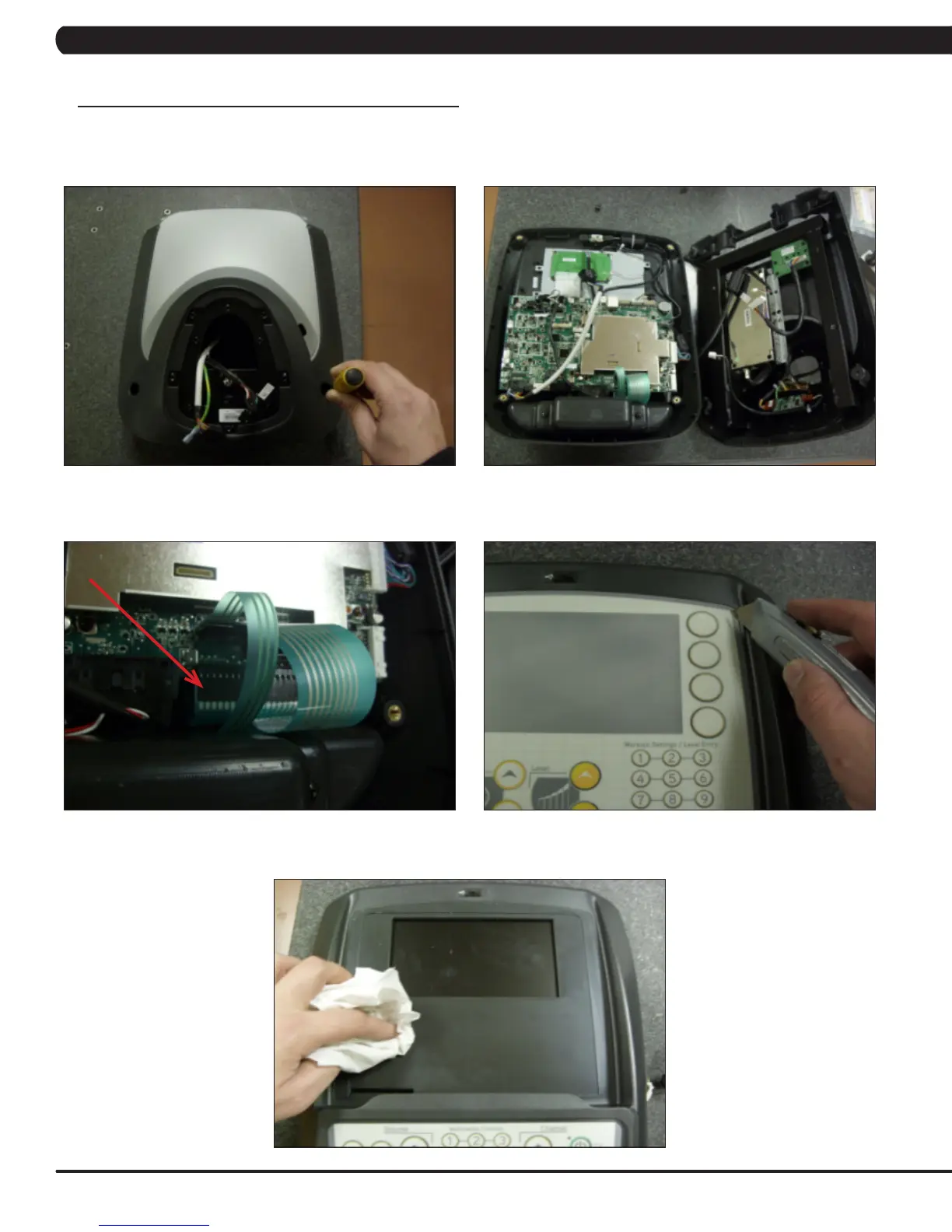
NOTE: The instructions below are for console overlays / keypads, but the procedure is the same regardless of where the overlay / keypad is.
1) Remove the console as outlined in Section 9.1.
2) Remove the 2 screws holding on the back cover of the console and remove it (Figure A).
3) Remove the 4 screws holding the front of the console to the back and split the 2 halves (Figure B).
3) Unplug the faulty keypad from the UCB (Figure C).
4) Use a razor to remove the faulty keypad / overlay from the console faceplate (Figure D).
5) Clean the console area with alcohol to remove any left over adhesive (Figure E).
FIGURE A
FIGURE B
FIGURE C FIGURE D
FIGURE E



 To Next Page